MCP server · Music
Discogs MCP server
by cswkim
Let your AI search Discogs and look after your record collection for you.

This is a small helper that connects your AI assistant to Discogs, the big online database and marketplace for music releases. Once it is set up, you can ask your AI in normal words to look up records, check your collection, or find things for sale. It is handy if you collect vinyl or CDs and want to save time clicking around the website.
What is an MCP server? The 30-second version
On its own, your AI can only chat with you using what it already knows. An MCP server is a small helper program that gives your AI a new skill or a connection to an app or service. This one connects your AI to Discogs, so it can look things up and make changes in your Discogs account when you ask. You do not need to understand how it works inside; you just add it once and then talk to your AI like usual.
What this MCP server does
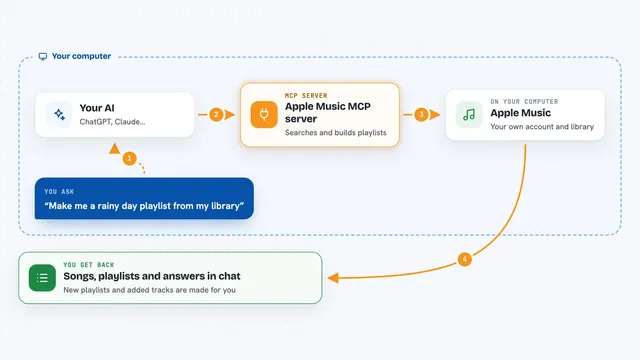
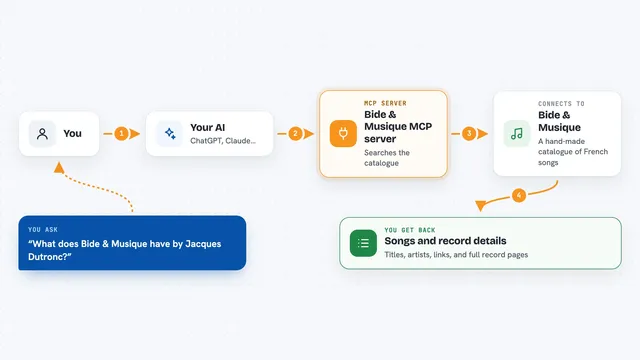
You ask your AI something about music or your collection in plain words. The AI passes your request to this helper program. The helper talks to Discogs on your behalf, using your personal access token to prove it is you. Discogs sends back the information, and the helper hands it to your AI. Your AI then shows you the answer in the chat, as a list, a summary, or a short reply.
 Click to zoom
What you can do with it
- Search Discogs for artists, releases, and labels
- Look up details about a specific record, like tracklist or year
- Browse and read your own Discogs collection
- Add items to your collection or change what is already there
- Check the marketplace for copies for sale and their prices
- Ask questions about your collection in plain words
Try asking your AI
- “Search Discogs for the 1979 album by The Clash and show me the tracklist”
- “What records by Miles Davis are in my Discogs collection?”
- “Add this release to my collection and mark it as vinyl”
- “Find the cheapest copy of Rumours by Fleetwood Mac for sale right now”
What it gives back to you
You get answers in the chat, like a list of matching releases, the details of one record, or a summary of what is in your collection. If you asked it to change something, it tells you what it changed. It can also show prices and seller info from the marketplace. Everything comes back as text you can read and copy.
Before you start
What you need
- A Discogs account (free to create)
- A Discogs personal access token, which you generate on your Discogs settings page (treat it like a password and do not share it)
- Node.js installed on your computer if you use the easy npx method
- The Claude desktop app or another AI app that supports MCP servers
Good to know
This server can change or add things in your Discogs collection, so check what your AI is about to do before you let it run.
Install it with your AI
Add Discogs MCP server to your AI, no technical skills needed
You don't install anything by hand. You copy one prompt, paste it into an AI that can work on your computer, and it checks, installs and connects the server for you, asking you when it needs something.
Sign in to get the install prompt
Members get a ready-made prompt that lets the Claude desktop app check Discogs MCP server, install it and connect it for them, step by step. You don't need any technical skills: you copy, paste and answer a few questions. Your connected AI can also find and install any of the 4,361 MCP servers here for you.
Who it's for
Record collectors, music fans, and anyone who spends time browsing or organising their Discogs collection.