MCP server · Analytics
TeslaMate MCP server
by cobanov
Ask your AI plain questions about your Tesla's drives, charging and battery using your own TeslaMate data.

This is a small helper that connects your AI assistant to your own TeslaMate database, the place where TeslaMate already stores everything your car does. Instead of clicking through Grafana dashboards or writing database queries, you just ask a question in normal words. It is handy for Tesla owners who already run TeslaMate and want quick answers about their car.
What is an MCP server? The 30-second version
On its own, your AI can only chat with you. An MCP server is a small helper program that gives your AI a new skill or a connection to a service. This one connects your AI to your TeslaMate database, so it can look up your drives, charging sessions and battery numbers when you ask. You stay in the chat, and the helper does the looking up behind the scenes.
What this MCP server does
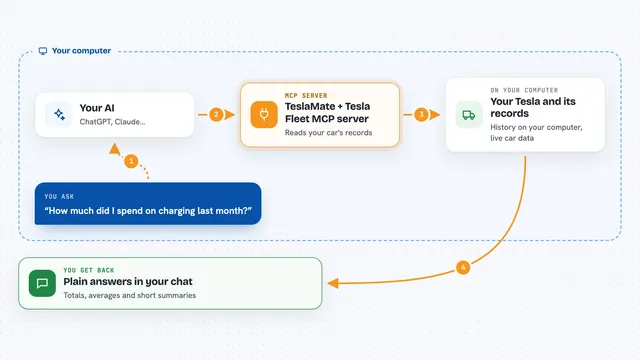
You type a question in your AI client, like asking about your battery or your charging costs. The AI sends that request to this helper program running on your computer. The helper turns your question into a database query, runs it against your TeslaMate PostgreSQL database, and gets the numbers back. Then the AI explains the result to you in plain language, sometimes with a chart. You never write any SQL yourself.
 Click to zoom
What you can do with it
- Check whether your battery capacity is really dropping over time
- Compare what charging cost at home versus on the road
- Find your least efficient drives and see why
- See how temperature affects your efficiency
- Look at your charging curve for a session
- Ask anything else by running a read-only database query
- View a drive route or battery degradation as a chart in the chat
Try asking your AI
- “Has my battery actually degraded this year?”
- “What did charging cost me at home versus on the road last month?”
- “Which drive was my least efficient one recently?”
- “Show me my charging curve for the last session”
What it gives back to you
You get answers in plain language in your chat, usually with the numbers behind them, like a list of months with usable capacity or a cost breakdown. Some questions come back as a table of rows, and on certain AI clients a few tools draw a simple chart right in the conversation. If you ask a custom question, you get whatever rows the database returned. Nothing is changed in your database unless you deliberately turn on the single write tool.
Before you start
What you need
- A running TeslaMate setup with its PostgreSQL database
- Python 3.11 or newer, or Docker
- The database connection details (the DATABASE_URL setting)
- An AI client that supports MCP, like Claude Desktop or Cursor
Good to know
This database is your full location history, so keep it on a private network and do not expose it to the open internet.
Install it with your AI
Add TeslaMate MCP server to your AI, no technical skills needed
You don't install anything by hand. You copy one prompt, paste it into an AI that can work on your computer, and it checks, installs and connects the server for you, asking you when it needs something.
Sign in to get the install prompt
Members get a ready-made prompt that lets the Claude desktop app check TeslaMate MCP server, install it and connect it for them, step by step. You don't need any technical skills: you copy, paste and answer a few questions. Your connected AI can also find and install any of the 4,609 MCP servers here for you.
Who it's for
Tesla owners who already run TeslaMate and want fast, plain-language answers about their car without touching dashboards or SQL.