MCP server · Analytics
Rideshare Comparison MCP server
Compare live Uber and Lyft prices for a route and find the cheaper ride.
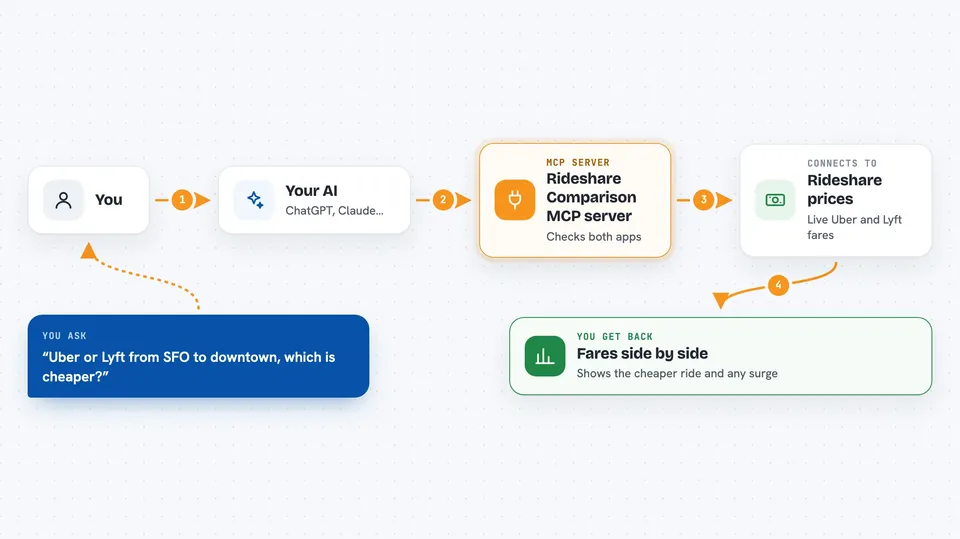
This is a small helper that lets your AI compare Uber and Lyft prices for a trip you are planning. You tell your AI where you are going, and it checks both apps and tells you which one is cheaper right now. It is handy if you take rideshares often and want to stop guessing which app to open first.
What is an MCP server? The 30-second version
On its own, your AI can only chat with you. It cannot open Uber or Lyft or see their prices. An MCP server is a small helper program that gives your AI a new skill, and this one connects it to rideshare pricing data. Once it is connected, your AI can look up fares for you when you ask.
What this MCP server does
You ask your AI something like how much an Uber and a Lyft would cost from the airport to downtown. Your AI passes that route to this helper. The helper talks to a rideshare pricing service and pulls back fare estimates for both apps, including any surge pricing. Then your AI shows you the numbers side by side and points out the cheaper one.
 Click to zoom
What you can do with it
- Compare Uber and Lyft prices for a route
- Spot surge pricing on either app
- Get a booking link to open the app directly
- See which cities have pricing data available
- Get distance and duration estimates for the trip
Try asking your AI
- “Compare Uber and Lyft prices from SFO airport to downtown San Francisco”
- “Which cities are supported for rideshare comparison?”
- “Get me a booking link for Uber from my location to the airport”
- “Is there surge pricing right now for a ride from my hotel to the stadium?”
What it gives back to you
You get back a comparison of the two fares, usually as a short list or table in the chat. It may also include surge pricing notes, distance, and estimated trip time. If you ask for a booking link, it gives you a link you can tap to open the Uber or Lyft app.
Before you start
What you need
- Python installed on your computer
- The rideshare-comparison-mcp package installed
- A rideshare API URL and API key (a kind of password for apps) from whoever runs the pricing service
- The Claude desktop app if you want to use it there
Good to know
Prices are estimates and can change quickly, so always check the app before you book.
Install it with your AI
Add Rideshare Comparison MCP server to your AI, no technical skills needed
You don't install anything by hand. You copy one prompt, paste it into an AI that can work on your computer, and it checks, installs and connects the server for you, asking you when it needs something.
Sign in to get the install prompt
Members get a ready-made prompt that lets the Claude desktop app check Rideshare Comparison MCP server, install it and connect it for them, step by step. You don't need any technical skills: you copy, paste and answer a few questions. Your connected AI can also find and install any of the 4,361 MCP servers here for you.
Who it's for
Anyone who takes Uber or Lyft often and wants a quick price check before booking, especially travelers and commuters.