MCP server · Analytics
TeslaMate + Tesla Fleet MCP server
by lodordev
Ask your AI about your Tesla's trips, charging and battery, and let it control climate, charging and locks.
This is a helper that connects your AI assistant to your Tesla. It reads the history your TeslaMate logger has saved and can also send simple commands to the car, like turning on the climate or starting a charge. It is handy if you already run TeslaMate at home and want to ask questions about your driving in plain words.
What is an MCP server? The 30-second version
On its own, your AI can only chat. An MCP server is a small helper program that gives your AI a new skill or a connection to an app or service. This one connects your AI to your Tesla data in TeslaMate and to Tesla's Fleet API for live data and commands. Once it is set up, you just ask a question in the chat and the AI uses this helper to look things up or do things for you.
What this MCP server does
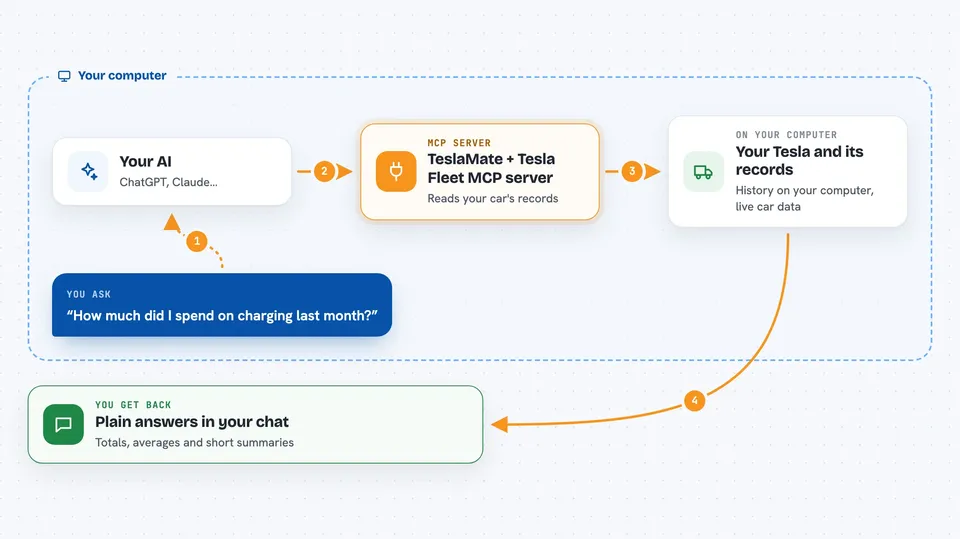
You ask your AI something about your car, like how much you spent on charging last month. The AI passes that request to this helper program. The helper then either reads your TeslaMate database for history and analytics, or talks to Tesla's Fleet API for live data and commands. The result comes back to the AI, which explains it to you in the chat. For commands, the helper sends the request to Tesla through a small proxy program on your computer.
 Click to zoom
What you can do with it
- Check your car's current status and where it is
- List your recent drives and charging sessions
- See battery health and how efficiency changes with temperature
- Compare your electricity cost with what gas would have cost
- Find your top destinations and longest trips
- Turn on climate, set temperature, start or stop charging
- Lock, unlock, honk, flash lights or open the trunk
Try asking your AI
- “How much did I spend on charging last month?”
- “Show me my last five drives with distance and efficiency.”
- “What is my battery health looking like?”
- “Turn on the climate and set it to 21 degrees.”
What it gives back to you
You get answers in the chat: lists of drives or charging sessions, totals and averages, cost estimates, and short summaries. For commands, you get a short confirmation that the action was sent. Everything is written in plain sentences, not tables of raw data.
Before you start
What you need
- A TeslaMate installation with its Postgres database details (host and password)
- A Tesla developer app with OAuth tokens saved in a tokens.json file
- The tesla-http-proxy program running locally if you want to send commands
- Python 3.10 or newer, or uvx if you use the quick start
Good to know
Some commands change your car, like unlocking it or opening the trunk, and these need an extra confirmation, so check before you agree.
Install it with your AI
Add TeslaMate + Tesla Fleet MCP server to your AI, no technical skills needed
You don't install anything by hand. You copy one prompt, paste it into an AI that can work on your computer, and it checks, installs and connects the server for you, asking you when it needs something.
Sign in to get the install prompt
Members get a ready-made prompt that lets the Claude desktop app check TeslaMate + Tesla Fleet MCP server, install it and connect it for them, step by step. You don't need any technical skills: you copy, paste and answer a few questions. Your connected AI can also find and install any of the 4,609 MCP servers here for you.
Who it's for
Tesla owners who already run TeslaMate and want to ask questions about their car or send simple commands without opening an app.