MCP server · Analytics
AirTreks MCP server
by SEKeener
Plan multi-stop and round-the-world trips, check which routings actually work, and get price ranges.
This is a helper for your AI that is built for complicated trips. Think round-the-world routes, open-jaw tickets, and trips with five or more stops across continents. If you plan travel for yourself, your family, or your company and normal flight search keeps giving up, this is for you.
What is an MCP server? The 30-second version
On its own, your AI can only chat with you. An MCP server is a small helper program you connect once, and it gives your AI a new skill or a connection to a service. This one connects your AI to AirTreks, a travel company that has built complex multi-stop trips since 1987. After you add it, you can just ask your AI to plan a route, and it will go check with AirTreks and come back with an answer.
What this MCP server does
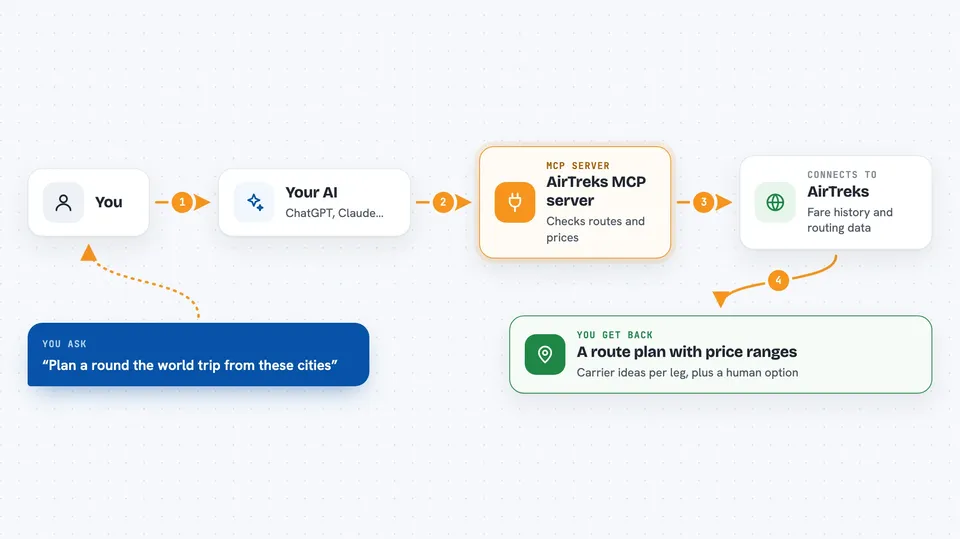
You ask your AI something like plan a round-the-world trip with these cities. Your AI sends that to this helper, which talks to the AirTreks service. AirTreks looks at its own fare history and routing data, checks which airlines and routings actually work, and spots legs that tend to fail at ticketing. Your AI then gives you back a suggested routing, carrier ideas for each leg, and a typical price range. If you want a real price and a real ticket, you can ask it to hand the whole thing to a human AirTreks consultant.
 Click to zoom
What you can do with it
- Plan a multi-stop or round-the-world route from a list of cities
- Check whether a routing works on Star Alliance or oneworld
- Spot dead legs and suggest a better connection between two airports
- Get a typical price range for a route before you decide anything
- Get live fares for one specific itinerary on specific dates
- Price a whole multi-stop trip several different ways
- Hand the trip to a human AirTreks consultant with the analysis attached
Try asking your AI
- “Plan a round-the-world trip: San Francisco, Tokyo, Bangkok, Singapore, Delhi, Istanbul, London, back to San Francisco.”
- “Is this routing valid on oneworld: LAX to NRT to BKK to LHR to LAX?”
- “What does a trip like this usually cost in economy, roughly?”
- “Price this itinerary for next March and show me the cheapest way to ticket it.”
What it gives back to you
You get back a written answer in the chat: a route summary, the direction, which regions it crosses, and whether it backtracks. For each leg you get carrier suggestions with a short reason, plus notes about any leg that is better done overland. You also get price ranges or, for a specific itinerary, live fares and a few ways to ticket the same trip. Everything is text you can read and copy, not a file to download.
Before you start
What you need
- An AI app that supports MCP connectors, like Claude Desktop, Claude Code, Cursor, or ChatGPT with Developer mode
- Nothing else. No account and no API key are needed for the free tier
Good to know
trip_idea_create sends real customer contact details to a human consultant, so only use it with the customer's knowledge and consent.
Install it with your AI
Add AirTreks MCP server to your AI, no technical skills needed
You don't install anything by hand. You copy one prompt, paste it into an AI that can work on your computer, and it checks, installs and connects the server for you, asking you when it needs something.
Sign in to get the install prompt
Members get a ready-made prompt that lets the Claude desktop app check AirTreks MCP server, install it and connect it for them, step by step. You don't need any technical skills: you copy, paste and answer a few questions. Your connected AI can also find and install any of the 4,361 MCP servers here for you.
Who it's for
Anyone planning a long multi-stop or round-the-world trip, and travel agents or assistants who build these itineraries for other people.