
MCP server · Finance and crypto · official
CoinPaprika MCP server
by coinpaprika · official
Lets your AI look up live crypto prices, market data, and coin details from CoinPaprika for you.
This is a small helper that connects your AI assistant to CoinPaprika, a website full of cryptocurrency market data. Once it is set up, you can just ask your AI things like the price of Bitcoin or which exchanges list a coin, and it will fetch the answer for you. It is handy for anyone who follows crypto prices at work without wanting to open ten browser tabs.
What is an MCP server? The 30-second version
On its own, your AI can only chat with you using what it already learned. An MCP server is a small helper program that gives your AI a new skill or a connection to an outside service. This one connects your AI to CoinPaprika, so it can look up real prices, coins, and exchanges when you ask. You do not need to understand how it works under the hood. You just ask a question, and the helper goes and gets the data.
What this MCP server does
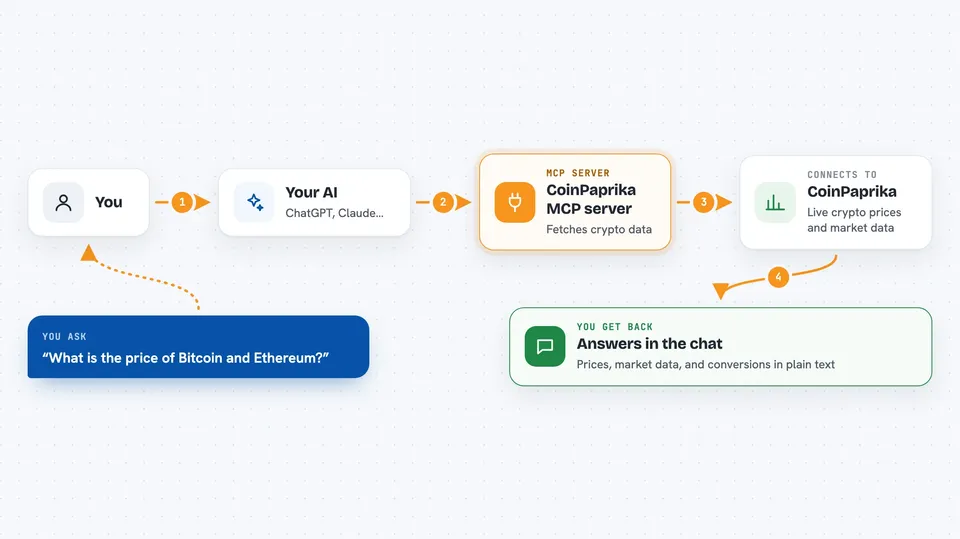
You ask your AI a question about crypto, like the price of Ethereum or the top exchanges. The AI passes that request to this helper program. The helper talks to CoinPaprika's data service over the internet and pulls back the numbers or details you asked for. Then the AI writes it up for you in the chat, in normal sentences. You never have to visit the CoinPaprika website yourself unless you want to.
 Click to zoom
What you can do with it
- Check the current price and 24 hour change of a coin
- See the overall crypto market size and Bitcoin's share of it
- Find which exchanges list a particular coin
- Convert an amount from one currency to another, like 0.5 BTC to USD
- Look up details about a coin's project, team, and upcoming events
- Search for a coin by name when you only remember part of it
- List the top coins by market cap
Try asking your AI
- “What is the current price of Bitcoin and Ethereum, with 24 hour change?”
- “Give me a quick overview of Cardano: price, team, and top exchanges.”
- “Convert 10 ETH to USD and tell me the rate you used.”
- “Which exchanges list Solana, and what trading pairs do they have?”
What it gives back to you
You get answers written out in the chat, like a short summary of a coin's price, market cap, and daily change. For lists, such as top coins or exchanges, you get a ranked table or bullet list. For conversions, you get the converted amount and the rate. Everything shows up as normal text you can read or copy.
Before you start
What you need
- The Claude desktop app or another AI app that supports MCP servers
- Node.js installed on your computer if you run it yourself (the free tier needs no API key)
- A CoinPaprika API key only if you want the paid features like historical data
Good to know
The free tier has a monthly limit of 20,000 calls, so heavy use can run out until the next month, and the paid features need a paid CoinPaprika plan.
Install it with your AI
Add CoinPaprika MCP server to your AI, no technical skills needed
You don't install anything by hand. You copy one prompt, paste it into an AI that can work on your computer, and it checks, installs and connects the server for you, asking you when it needs something.
Sign in to get the install prompt
Members get a ready-made prompt that lets the Claude desktop app check CoinPaprika MCP server, install it and connect it for them, step by step. You don't need any technical skills: you copy, paste and answer a few questions. Your connected AI can also find and install any of the 4,361 MCP servers here for you.
Who it's for
Anyone who tracks crypto prices at work, like analysts, finance teams, or curious office staff who want quick answers without opening a dozen tabs.




