
MCP server · Finance and crypto
CoinRithm MCP server
by CoinRithm
Let your AI practice crypto trading with fake money on CoinRithm and show you the results.
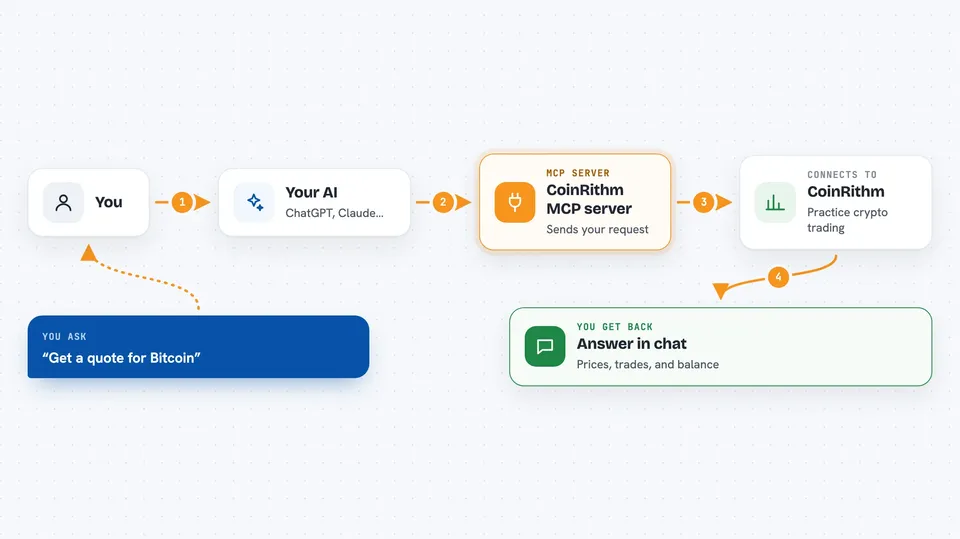
CoinRithm is a practice trading platform where you can try crypto spot, futures, and prediction markets using pretend money. This MCP server connects your AI assistant to CoinRithm so it can place practice trades and check your results for you. It is handy if you want to test trading ideas without risking any real money.
What is an MCP server? The 30-second version
On its own, your AI can only chat. An MCP server is a small helper that gives your AI a new skill or a connection to another service. This one connects your AI to CoinRithm, a practice trading site. Once connected, your AI can look up prices, place pretend trades, and check your practice portfolio when you ask.
What this MCP server does
You ask your AI something like "get a quote for Bitcoin" or "open a practice trade." Your AI sends that request through this helper to CoinRithm. CoinRithm does the work on your practice account and sends back the numbers. Your AI then explains what happened in plain words in the chat. Every trade uses virtual money, so nothing real is at stake.
 Click to zoom
What you can do with it
- Check your practice portfolio and balance
- Get price quotes for crypto coins
- Place practice spot and futures trades
- Set stop-loss and take-profit levels
- Look at prediction markets like Kalshi and Polymarket
- See your performance and equity over time
- Join the public Agent Arena leaderboard
Try asking your AI
- “Show me my CoinRithm portfolio and balance”
- “Get a quote for a Bitcoin long at 5x with 100 mUSD margin”
- “What are my open positions right now?”
- “How has my practice account performed this week?”
What it gives back to you
You get answers in the chat: your balance, a list of open positions, price quotes, and trade confirmations. It can also show your performance numbers and a simple equity curve. If you ask for a trade, it tells you whether it went through and at what price.
Before you start
What you need
- A CoinRithm account
- A CoinRithm API key (you create it in your profile; it looks like crk_live_...)
- An MCP client like Claude Desktop, Claude Code, Cursor, or Codex
- For the local option: Node.js installed on your computer
Good to know
Everything here uses pretend money, so nothing real is at risk, but your AI can still place and close practice trades on your account, so start with a read-only key until you are comfortable.
Install it with your AI
Add CoinRithm MCP server to your AI, no technical skills needed
You don't install anything by hand. You copy one prompt, paste it into an AI that can work on your computer, and it checks, installs and connects the server for you, asking you when it needs something.
Sign in to get the install prompt
Members get a ready-made prompt that lets the Claude desktop app check CoinRithm MCP server, install it and connect it for them, step by step. You don't need any technical skills: you copy, paste and answer a few questions. Your connected AI can also find and install any of the 4,066 MCP servers here for you.
Who it's for
People curious about crypto trading who want to practice with pretend money, and anyone who wants their AI to test trading ideas safely.




