MCP server · Developer tools
coldstart MCP server
by AkashGoenka
Your AI remembers how your codebase works and finds the right files fast, without re-reading everything.
coldstart is a helper for AI coding assistants. It gives your AI two things: a notebook of notes about how your project works, and a fast way to find which files matter for a task. It is handy if you use Claude Code, Codex, or Cursor on a real project and you are tired of the AI starting from scratch every session.
What is an MCP server? The 30-second version
On its own, your AI can only chat with you. An MCP server is a small helper program that gives your AI a new skill or a connection to something outside the chat. This one connects your AI to your own project folder, so it can look up files, symbols, and saved notes about your code. You ask a question, and the AI uses this helper to go find the answer in your project.
What this MCP server does
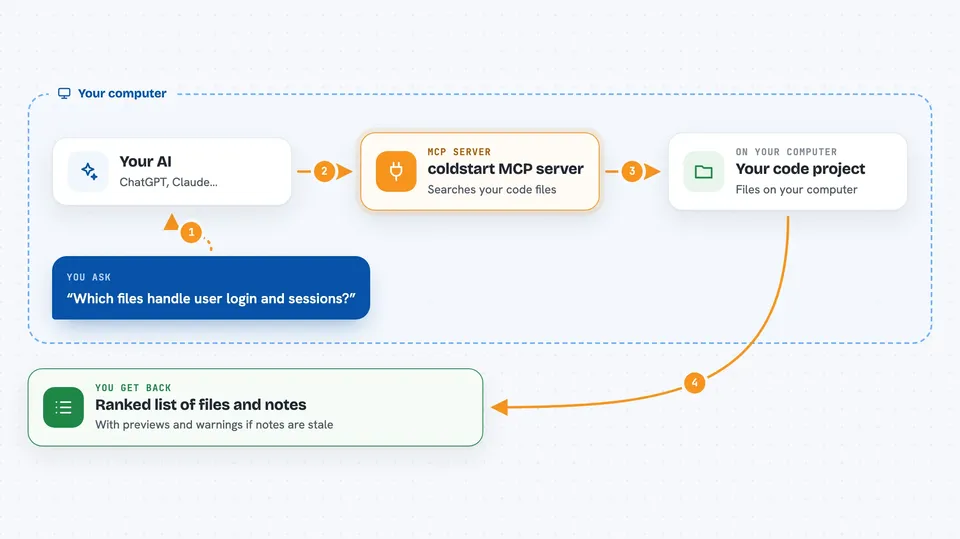
You ask your AI something like which files handle login. The AI uses coldstart to search your project by file names, symbol names, and imports, and gets back a ranked list of likely files. It can then ask coldstart about one file to see its main pieces and who uses them. coldstart also keeps a notebook of notes that past AI sessions wrote about your code, and it hands those notes back when they match your current task. If the code changed since a note was written, coldstart marks that note as possibly out of date instead of pretending it is still true.
 Click to zoom
What you can do with it
- Find which files in your project relate to a topic you name
- See the main symbols in a file and who imports or calls them
- Save notes about how your code works so later sessions can reuse them
- Search those saved notes by task words, symbols, or file names
- Look up everything known about one exact file or symbol
- Get a warning when a saved note no longer matches the code
- Open a simple browser page to read the notebook
Try asking your AI
- “Which files handle user login and sessions?”
- “Show me the shape of src/auth/service.ts and who calls into it”
- “What do we already know about the Tile model?”
- “Find files related to payment retries and webhooks”
What it gives back to you
You get back lists of file paths ranked by how well they match your words, with short previews of where your terms appear. For a single file you get its main symbols with line numbers and a list of who imports or calls them. Saved notes come back as a short title, a one-line gist, and the file path they refer to. If a note's evidence changed, you see a label saying so instead of a confident answer.
Before you start
What you need
- Node.js 18 or newer installed on your computer
- A project folder on your computer that you want the AI to work in
- One of these AI coding tools: Claude Code, Codex, or Cursor
Good to know
The notebook writes notes into your project folder and adds wiring files to your AI client's settings, so try it on a project you can undo changes in, and use coldstart unwire if you want to remove it cleanly.
Install it with your AI
Add coldstart MCP server to your AI, no technical skills needed
You don't install anything by hand. You copy one prompt, paste it into an AI that can work on your computer, and it checks, installs and connects the server for you, asking you when it needs something.
Sign in to get the install prompt
Members get a ready-made prompt that lets the Claude desktop app check coldstart MCP server, install it and connect it for them, step by step. You don't need any technical skills: you copy, paste and answer a few questions. Your connected AI can also find and install any of the 4,361 MCP servers here for you.
Who it's for
Developers and technical teams who use an AI coding assistant on a codebase and want it to stop re-learning the project every session.