MCP server · Developer tools
Empathy Framework MCP server
Lets your AI run code reviews, security checks, tests, and release prep on your project for you.
Empathy Framework is a helper that plugs into Claude Code and gives it a set of ready-made developer workflows. Instead of you figuring out how to run a security scan or write tests, you just ask in plain English and it does the work. It is handy for developers and anyone who works with code and wants a second pair of eyes.
What is an MCP server? The 30-second version
On its own, your AI can only chat with you. An MCP server is a small helper program that gives your AI a new skill or a connection to a tool. This one connects your AI to the Empathy Framework, a set of developer workflows that live on your own computer. Once it is connected, your AI can run those workflows for you when you ask.
What this MCP server does
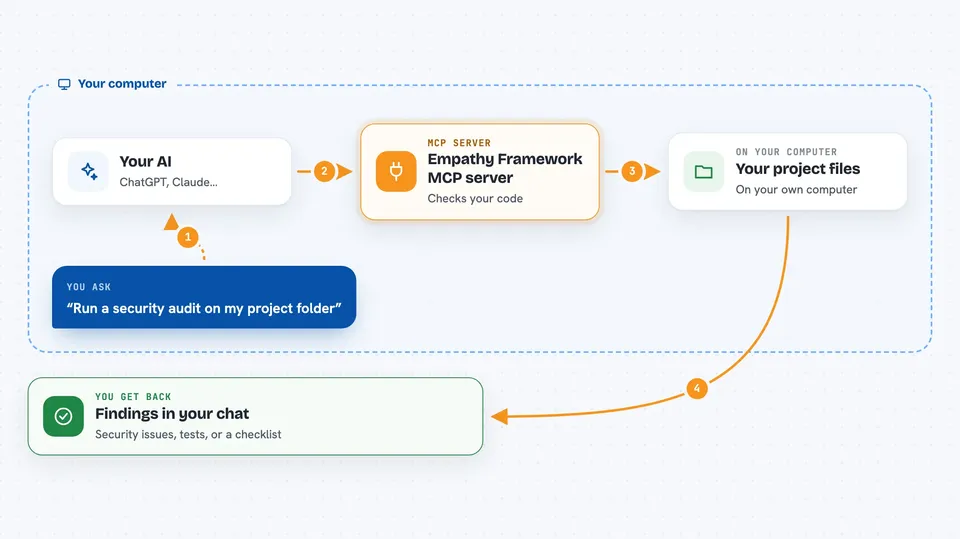
You type a request in plain English, like asking for a security check on a folder. Your AI recognizes what you want and passes it to this helper. The helper runs the matching workflow, which reads your code and looks for problems or gaps. When it finishes, the result comes back into your chat as a summary or a list of findings. You never have to remember workflow names or commands.
 Click to zoom
What you can do with it
- Run a security audit on a folder of code
- Predict likely bugs before you ship
- Review your code and suggest improvements
- Generate tests for a file
- Check performance bottlenecks
- Prepare a release checklist
- Check your authentication setup and get a recommendation
Try asking your AI
- “Run a security audit on src/”
- “Generate tests for config.py”
- “Check my auth configuration”
- “Analyze performance bottlenecks in this project”
What it gives back to you
You get answers right in the chat. Depending on what you asked, that could be a list of security issues, a set of suggested tests, a performance summary, or a release checklist. Some workflows also report how much they cost to run. You can then act on the findings or ask follow-up questions.
Before you start
What you need
- Python installed on your computer
- The Empathy Framework package installed (pip install empathy-framework[developer])
- Claude Code, with the MCP server enabled
- An Anthropic API key or a Claude subscription for the workflows that call the AI
Good to know
These workflows read your project files and can change files when generating tests or docs, so review the results before accepting them.
Install it with your AI
Add Empathy Framework MCP server to your AI, no technical skills needed
You don't install anything by hand. You copy one prompt, paste it into an AI that can work on your computer, and it checks, installs and connects the server for you, asking you when it needs something.
Sign in to get the install prompt
Members get a ready-made prompt that lets the Claude desktop app check Empathy Framework MCP server, install it and connect it for them, step by step. You don't need any technical skills: you copy, paste and answer a few questions. Your connected AI can also find and install any of the 4,361 MCP servers here for you.
Who it's for
Developers, testers, and technical leads who want an AI to help with code review, security checks, testing, and release work.