MCP server · Developer tools
CodeCortex MCP server
Lets your AI understand your codebase's structure, risks and hidden file links before it edits anything.
CodeCortex is a helper that studies your code project ahead of time and writes down what it finds: which files depend on which, which files are risky to touch, and which files secretly change together. It is handy if you use an AI coding assistant on a project with more than a handful of files, and you are tired of it opening the wrong files or breaking things. You install it once, and your AI gets this background knowledge from the very first question.
What is an MCP server? The 30-second version
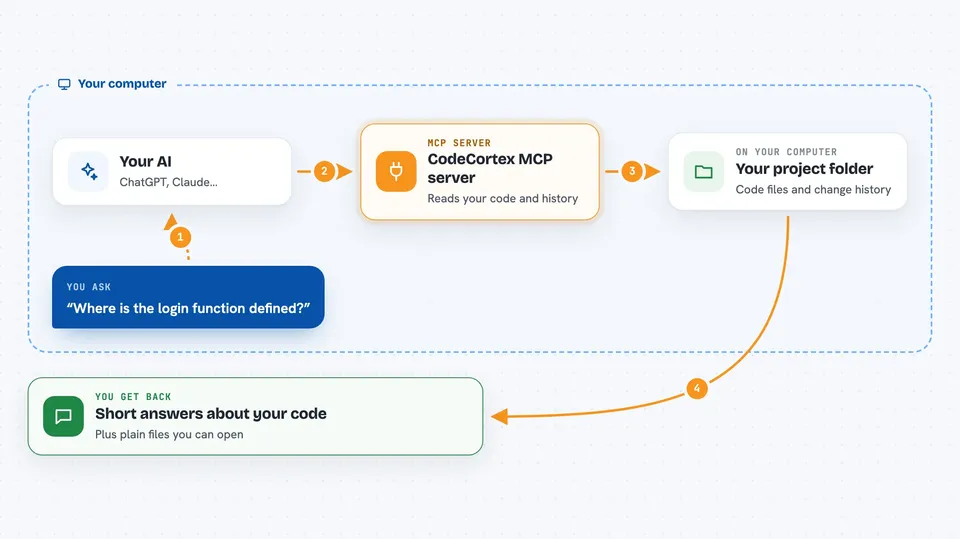
On its own, your AI can only chat with you. An MCP server is a small helper program that gives your AI a new skill or a connection to something outside the chat. This one connects your AI to a knowledge file about your own code project, built by CodeCortex. So when you ask about your code, the AI can look things up in that knowledge instead of guessing or reading files one by one.
What this MCP server does
You install CodeCortex and run one command in your project folder. It reads your code files and your project's history of changes, then writes a set of plain files describing your project's structure, dependencies and risky spots. From then on, when you ask your AI something about the code, the AI asks this helper, and the helper answers from those files. You get a short, focused answer instead of the AI wandering through your folders. It can also write a summary straight into your AI's config file, so the AI knows your project before you even ask.
 Click to zoom
What you can do with it
- Get a plain overview of your project's modules and entry points
- Look up where a specific function or class lives
- See which files import or call which other files
- Find files that always change together even with no imports between them
- Check the risk level of a file before editing it
- See how often a file has been bug-fixed in the past
- Refresh the knowledge after you make changes
Try asking your AI
- “Give me an overview of this project before I start working”
- “Where is the function that handles user login defined?”
- “I want to edit schema.labels.ts, what should I watch out for?”
- “Which files tend to change together with the billing module?”
What it gives back to you
You get short written answers in the chat: lists of files, short explanations of modules, and warnings about risky edits. For example, it might tell you that one file has been bug-fixed seven times and is linked to three others. It also writes knowledge files into a .codecortex folder in your project, which you can open and read yourself.
Before you start
What you need
- Node.js version 20 or 22 (version 24 is not supported yet)
- A code project on your computer, ideally tracked with git
- An AI coding assistant that supports MCP, like Claude Code or Cursor
Good to know
It reads your project files and your git history to build its knowledge, so keep that in mind if your repository contains anything private; it does not send your code to an outside service on its own.
Install it with your AI
Add CodeCortex MCP server to your AI, no technical skills needed
You don't install anything by hand. You copy one prompt, paste it into an AI that can work on your computer, and it checks, installs and connects the server for you, asking you when it needs something.
Sign in to get the install prompt
Members get a ready-made prompt that lets the Claude desktop app check CodeCortex MCP server, install it and connect it for them, step by step. You don't need any technical skills: you copy, paste and answer a few questions. Your connected AI can also find and install any of the 4,361 MCP servers here for you.
Who it's for
Developers and technical teams who use AI coding assistants on medium to large codebases and want fewer wrong turns and fewer broken edits.