MCP server · Notes
ContextStream MCP server
Give your AI a memory of your project's code and past decisions, so it can find files and recall choices across sessions.
ContextStream is a helper that gives your AI assistant a lasting memory of your project. It connects your code, notes and past conversations so the AI can find the right files and remember decisions you made before. It is handy for anyone who works with a coding assistant and is tired of explaining the same project over and over.
What is an MCP server? The 30-second version
On its own, your AI can only chat with you. It cannot see your project files or remember what you decided last week. An MCP server is a small helper program that gives your AI a new skill or a connection to a service. This one connects your AI to ContextStream, a hosted service that stores your project's code and decisions, so the AI can look things up and save things there when you ask.
What this MCP server does
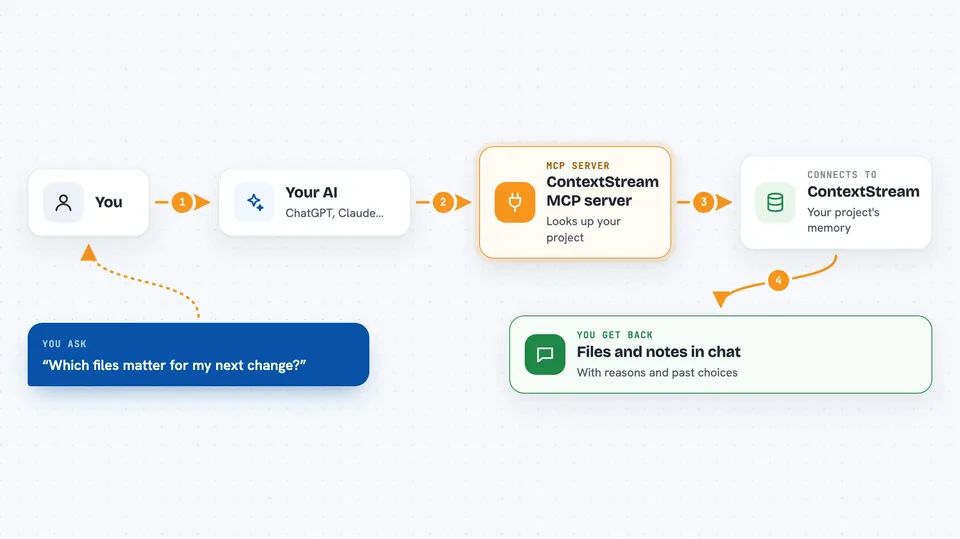
You ask your AI a question about your project, like which files matter for your next change. The AI passes that request to this helper. The helper talks to ContextStream, which has indexed your code and saved your earlier decisions. ContextStream sends back the relevant files and notes, and the AI shows you the answer in the chat. You can also ask the AI to save a new decision so it is there next time.
 Click to zoom
What you can do with it
- Find the files in your project that relate to a change you are about to make
- Recall decisions you saved in earlier sessions, with the reasons behind them
- Save a new decision and its reason so you do not have to repeat it
- Search your code by meaning, not just by exact words
- See how a change in one place might affect other parts of your project
- Keep useful context across different AI tools and sessions
Try asking your AI
- “Use ContextStream to find the files relevant to my next change and cite the sources.”
- “Retrieve any saved project decisions that should guide this work.”
- “Save this decision and the reason behind it for later.”
- “Search my project for where we handle user login.”
What it gives back to you
You get answers in the chat: lists of files with short notes on why they matter, summaries of past decisions, and search results pulled from your project. When you save something, the AI confirms it was stored. It looks like a normal reply from your assistant, but backed by your project's own history.
Before you start
What you need
- A ContextStream account (you can create one during setup, no credit card needed for the free plan)
- A supported AI coding tool, such as Claude Code, Cursor, Codex, GitHub Copilot, Gemini CLI, Zed, or another MCP client
- On macOS or Linux, a terminal to paste the install command; on Windows, PowerShell
Good to know
It sends your project's source code to ContextStream for indexing, and it saves conversation transcripts and local Git details by default, so check the data handling page before connecting private or sensitive projects.
Install it with your AI
Add ContextStream MCP server to your AI, no technical skills needed
You don't install anything by hand. You copy one prompt, paste it into an AI that can work on your computer, and it checks, installs and connects the server for you, asking you when it needs something.
Sign in to get the install prompt
Members get a ready-made prompt that lets the Claude desktop app check ContextStream MCP server, install it and connect it for them, step by step. You don't need any technical skills: you copy, paste and answer a few questions. Your connected AI can also find and install any of the 4,361 MCP servers here for you.
Who it's for
Developers and technical teams who use an AI coding assistant and want it to remember their project and past choices between sessions.