MCP server · Research
Peckish DoorDash MCP server
by CydVilla
Let your AI search DoorDash stores, compare real totals with fees, and build carts you approve before ordering.

Peckish is a helper that connects your AI assistant to DoorDash so it can look up restaurants and grocery stores, compare prices with fees included, and put together a cart for you. It is handy if you already use Claude Desktop or Claude Code and want to order food or groceries by just asking in plain words. You still approve every order yourself, so nothing gets bought without your say-so.
What is an MCP server? The 30-second version
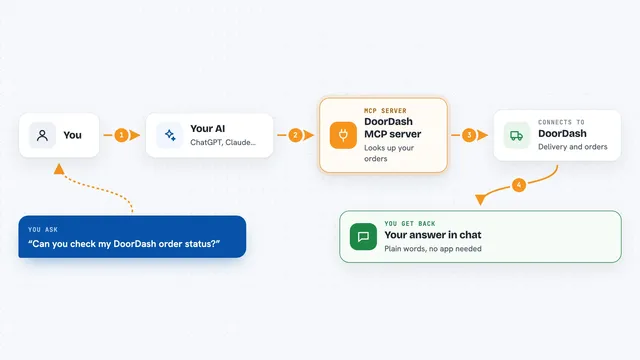
On its own, your AI can only chat with you. An MCP server is a small helper program that gives your AI a new skill or a connection to an app or service. This one connects your AI to DoorDash, so it can search stores, check menus, and build a cart when you ask. Your AI does the talking, and Peckish does the actual looking up and adding to cart behind the scenes.
What this MCP server does
You tell your AI what you want, like a high-protein dinner under $25 that arrives within 45 minutes. Your AI uses Peckish to search DoorDash stores, look at menus, and compare the real totals with fees and tip included. Peckish builds a cart with the items you picked. Before anything is ordered, it shows you an itemized quote and waits for you to approve it. If you say no, it backs off and nothing is charged.
 Click to zoom
What you can do with it
- Search DoorDash restaurants and grocery stores
- Compare real totals with fees and tip included
- Build a cart with the items you choose
- Check web reviews for a restaurant
- Reorder your usual from a favorite place
- Save food preferences like never mushrooms
- See what you spent on delivery last month
Try asking your AI
- “Find me a high-protein dinner under $25 that can arrive within 45 minutes. Avoid mushrooms and excessive fees.”
- “Compare the real totals at the top two places, fees included.”
- “Reorder my usual from Sharon Korean.”
- “Get me milk, eggs, and a pound of ground beef from Whole Foods.”
What it gives back to you
You get back a short answer in the chat, like the best-fitting restaurant, the dish, the price, and the total with fees. It can also show you a list of stores or a side-by-side comparison of totals. When it is ready to order, you see an itemized quote and a confirmation step. Nothing is placed until you approve it.
Before you start
What you need
- A Mac with Apple Silicon or a Linux x86_64 machine
- Node.js 20 or newer
- DoorDash CLI access (currently waitlist-gated by DoorDash)
- Claude Desktop or Claude Code if you want to use it without an API key
Good to know
It can place real orders on your DoorDash account, so always read the itemized quote and tip before you approve, and keep your DoorDash sign-in token private like a password.
Install it with your AI
Add Peckish DoorDash MCP server to your AI, no technical skills needed
You don't install anything by hand. You copy one prompt, paste it into an AI that can work on your computer, and it checks, installs and connects the server for you, asking you when it needs something.
Sign in to get the install prompt
Members get a ready-made prompt that lets the Claude desktop app check Peckish DoorDash MCP server, install it and connect it for them, step by step. You don't need any technical skills: you copy, paste and answer a few questions. Your connected AI can also find and install any of the 4,609 MCP servers here for you.
Who it's for
People who already use Claude Desktop or Claude Code and want to order food or groceries by chatting instead of clicking through the DoorDash app.