MCP server · Developer tools
Amendor MCP server
by deslay1
Let your AI pull website change requests from Amendor and turn them into pull requests.

Amendor is a tool that lets the people you build for ask for changes right on your live website. This connector brings those requests into your coding agent so it can build each one for you. It is handy if you run a site and get change requests from clients or teammates.
What is an MCP server? The 30-second version
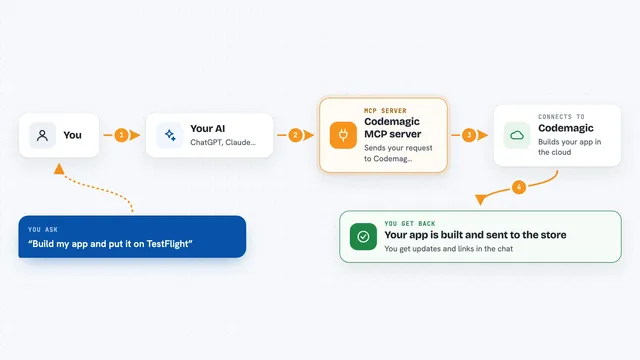
On its own, your AI can only chat. An MCP server is a small helper program that gives your AI a new skill or a connection to an app or service. This one connects your AI to Amendor, so it can look up the change requests people sent and start building them. You just ask in plain words, and the helper does the back and forth.
What this MCP server does
You ask your AI to show the change requests. The AI uses this helper to talk to Amendor and brings back the list. You pick one, and the AI builds it on a branch and opens a pull request. When a preview is ready, the helper can send that link back to Amendor so the person who asked can look at it. Once they approve, you merge.
 Click to zoom
What you can do with it
- See all the change requests waiting on your Amendor board
- Open one request to see which page and element it is about
- Start building a request on a branch
- Attach a preview link so the requester can check it
- Mark a request as done or shipped
- Publish a preview for review
Try asking your AI
- “Show me the change requests on Amendor”
- “Open the request about the homepage banner”
- “Build that one and open a pull request”
- “Send the preview link back to Amendor”
What it gives back to you
You get a list of change requests with their page and element, or the details of one request. When the AI starts building, it opens a pull request in your repo. You also get status updates you can send back to Amendor.
Before you start
What you need
- An Amendor account (sign in at amendor.site and create a project)
- The connector command from your Amendor Settings page, which already includes your token
- A coding agent that supports MCP, like Claude Code, Cursor, Cline or Codex
Good to know
It can open pull requests and change the status of requests in your Amendor account, so review what your AI does before merging.
Install it with your AI
Add Amendor MCP server to your AI, no technical skills needed
You don't install anything by hand. You copy one prompt, paste it into an AI that can work on your computer, and it checks, installs and connects the server for you, asking you when it needs something.
Sign in to get the install prompt
Members get a ready-made prompt that lets the Claude desktop app check Amendor MCP server, install it and connect it for them, step by step. You don't need any technical skills: you copy, paste and answer a few questions. Your connected AI can also find and install any of the 4,361 MCP servers here for you.
Who it's for
Developers and small teams who build websites for clients and want to turn client change requests into code quickly.