MCP server · Productivity
claw-tsaver MCP proxy
by Yang1Bai
Trims huge tool results down to a short preview so your AI uses fewer tokens and costs less.
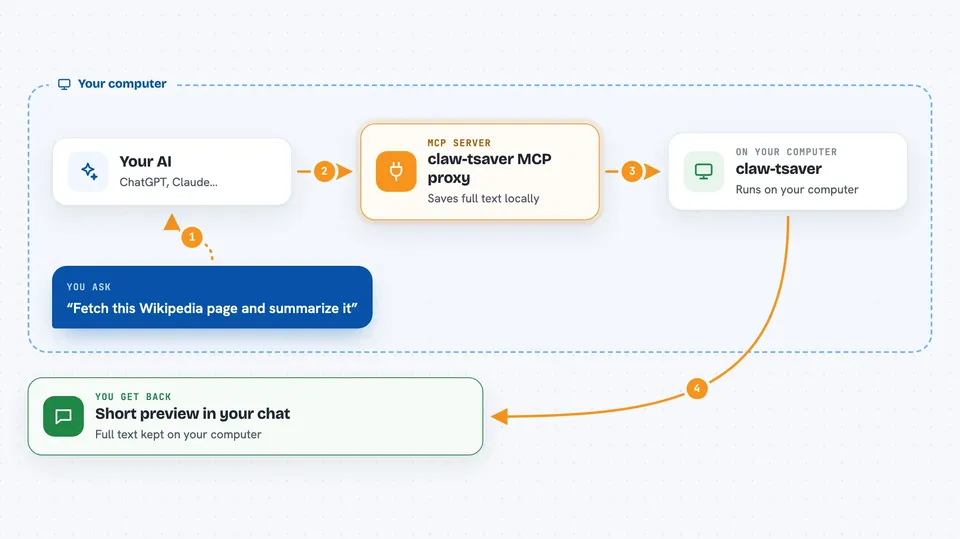
claw-tsaver is a small helper that sits between your AI and other tools it uses. When one of those tools sends back a giant pile of text, claw-tsaver swaps it for a short preview plus a way to get the full text later if needed. It is handy for people who use OpenClaw and notice their chats get slow or expensive when the AI reads big web pages or long data.
What is an MCP server? The 30-second version
On its own, your AI can only chat with you. An MCP server is a small helper program that gives your AI a new skill or a connection to another app or service. This one connects your AI to other MCP tools and acts as a middleman, so when a tool sends back too much text, your AI gets a short version first. That keeps the conversation lighter and cheaper.
What this MCP server does
You ask your AI to do something, like fetch a web page. The AI calls the tool through claw-tsaver instead of directly. claw-tsaver forwards the request, and when the answer comes back very large, it saves the full text in a small local database on your computer. It then hands your AI only a short preview plus a handle. If your AI decides it really needs the whole thing, it asks claw-tsaver again and gets the full text.
 Click to zoom
What you can do with it
- Shrink huge tool results to a short preview before they reach your AI
- Store the full text locally so nothing is lost
- Let your AI pull the full text back on demand
- Show you a local dashboard with token savings stats
- Work as a middleman for other MCP tools like fetch
- Cut token use by a large amount on big responses
Try asking your AI
- “Fetch this Wikipedia page and summarize the main points”
- “Get the full text of that page you previewed earlier”
- “Show me how many tokens claw-tsaver has saved today”
- “Fetch this long article and tell me if it mentions pricing”
What it gives back to you
Most of the time you get a short preview of the tool result, with the beginning and end of the text. If your AI needs more, it can pull the full content back and you see that in the chat. You can also open the local dashboard to see numbers like how many tokens were saved.
Before you start
What you need
- The OpenClaw app installed and running
- uv installed (a one-time setup tool; the README shows a single command)
- At least one other MCP server configured for it to sit in front of, like fetch
Good to know
It saves the full text of tool results in a local database on your computer, so anything sensitive that a tool returns may be stored there.
Install it with your AI
Add claw-tsaver MCP proxy to your AI, no technical skills needed
You don't install anything by hand. You copy one prompt, paste it into an AI that can work on your computer, and it checks, installs and connects the server for you, asking you when it needs something.
Sign in to get the install prompt
Members get a ready-made prompt that lets the Claude desktop app check claw-tsaver MCP proxy, install it and connect it for them, step by step. You don't need any technical skills: you copy, paste and answer a few questions. Your connected AI can also find and install any of the 4,361 MCP servers here for you.
Who it's for
OpenClaw users who work with big tool results and want to keep their chats cheaper and lighter.