MCP server · Privacy
DoorDash MCP server
by JordanDalton
Lets your AI look up DoorDash delivery info and help with orders through a helper program you run yourself.
This is a small helper program that connects your AI assistant to DoorDash, the food delivery service. It is an unofficial project, which means it is not made or supported by DoorDash itself. It is handy if you order food often and want your AI to help you with delivery details without switching apps.
What is an MCP server? The 30-second version
On its own, your AI can only chat with you. An MCP server is a small helper program that gives your AI a new skill or a connection to an app or service. This one connects your AI to DoorDash, so when you ask about a delivery or an order, the AI can pass that request along and bring the answer back to your chat. You run the helper on your own computer, and your AI talks to it.
What this MCP server does
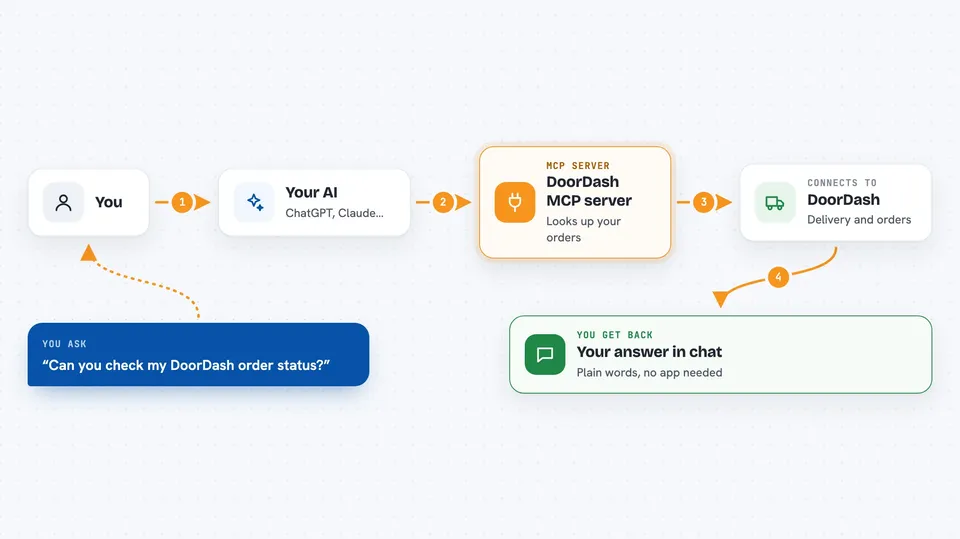
You ask your AI something about DoorDash, like a delivery or an order. The AI sends that request to this helper program running on your computer. The helper then talks to DoorDash using a key you provide, and DoorDash sends back the information. The helper passes that back to your AI, and your AI shows it to you in the chat in plain words. From your side, it feels like just asking a question and getting an answer.
 Click to zoom
What you can do with it
- Ask your AI about DoorDash delivery details
- Look up information about your DoorDash orders
- Check delivery status through your AI chat
- Get DoorDash answers without opening the app
- Keep your DoorDash questions in one conversation with your AI
Try asking your AI
- “Can you check the status of my DoorDash order?”
- “What DoorDash deliveries do I have coming today?”
- “Look up my last DoorDash order for me”
- “Is there any update on my food delivery?”
What it gives back to you
You get answers back in your chat, in plain words. Depending on what you ask, that could be a status update, a list of orders, or details about a delivery. The AI writes it out for you like a normal reply, so you do not have to read any technical output.
Before you start
What you need
- Node.js installed on your computer (a free program that runs small tools like this one)
- A DoorDash API key (a kind of password for apps; you need to get one to connect)
- An AI app that supports MCP servers, like Claude Desktop, Windsurf, or Cursor
- A few minutes to build the helper program once, following the project's steps
Good to know
This is an unofficial project, so it is not supported by DoorDash, and you should keep your API key private and only run code you trust.
Install it with your AI
Add DoorDash MCP server to your AI, no technical skills needed
You don't install anything by hand. You copy one prompt, paste it into an AI that can work on your computer, and it checks, installs and connects the server for you, asking you when it needs something.
Sign in to get the install prompt
Members get a ready-made prompt that lets the Claude desktop app check DoorDash MCP server, install it and connect it for them, step by step. You don't need any technical skills: you copy, paste and answer a few questions. Your connected AI can also find and install any of the 4,361 MCP servers here for you.
Who it's for
People who order food on DoorDash often and want their AI assistant to help with delivery questions in one place.