
MCP server · Gaming
Disney Lorcana MCP server
Lets your AI look up Lorcana cards, check deck rules, and read or write deck lists for you.
This is a helper for the Disney Lorcana trading card game. It lets your AI assistant look up cards, check whether a deck is legal, and work with deck lists from Dreamborn or Pixelborn. It is handy if you play Lorcana and want quick answers without opening a card site.
What is an MCP server? The 30-second version
On its own, your AI can only chat with you. An MCP server is a small helper program that gives your AI a new skill or a connection to an app or service. This one connects your AI to a Lorcana card collection of about 2,500 cards. Once it is connected, your AI can search those cards and answer your Lorcana questions for you.
What this MCP server does
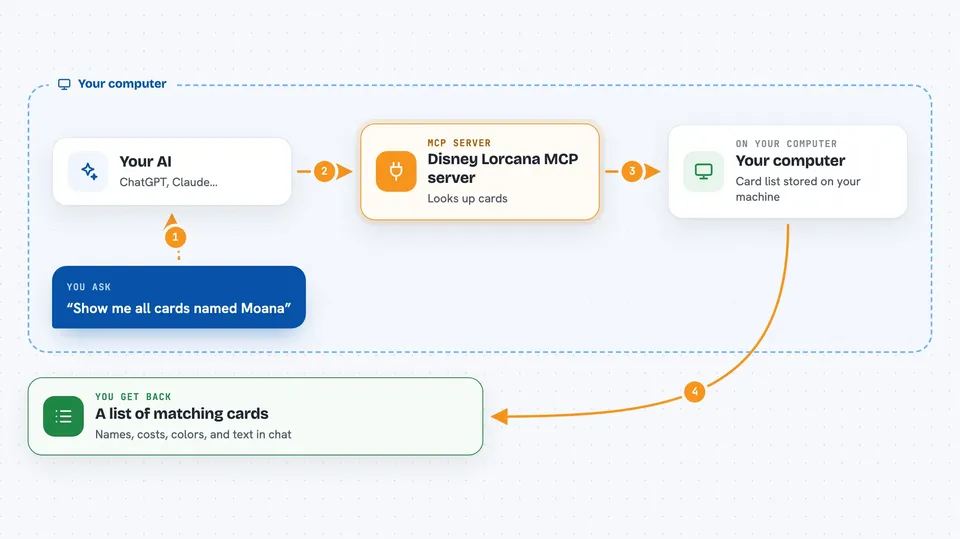
You ask your AI a question in normal words, like which amber cards cost 2 or less. Your AI sends that request to this helper program running on your computer. The helper looks through its stored card list and finds the matches. It sends the results back, and your AI writes them out for you in the chat. It can also check a deck against the format rules and turn a deck list into cards or back into text.
 Click to zoom
What you can do with it
- Search cards by name, color, cost, rarity, type, keyword, or stats
- Count how many cards match a filter without listing them all
- Group cards by cost, rarity, color, set, or type to see patterns
- Check a deck against Lorcana format rules and list any problems
- Show deck stats like ink curve, color split, and keyword counts
- Import a Dreamborn or Pixelborn deck list and match the lines to real cards
- Export a deck back out as a Dreamborn or Pixelborn compatible text list
Try asking your AI
- “Show me all cards named Moana”
- “Find all legendary amber cards”
- “How many Evasive characters are there in the first set”
- “Check this deck list and tell me if it is legal”
What it gives back to you
You get answers in plain text in your chat. For searches, that is a list of cards with their names, costs, colors, and text. For deck checks, you get a simple legal or not legal answer plus a list of any rule problems. For stats, you get numbers and short breakdowns, like how many cards sit at each cost.
Before you start
What you need
- A computer that can run a small helper program (the setup guide shows the exact command)
- An AI app that supports MCP servers, like the Claude desktop app
Good to know
This is an unofficial fan project, not connected to Disney or Ravensburger, so treat the card data as helpful but not official.
Install it with your AI
Add Disney Lorcana MCP server to your AI, no technical skills needed
You don't install anything by hand. You copy one prompt, paste it into an AI that can work on your computer, and it checks, installs and connects the server for you, asking you when it needs something.
Sign in to get the install prompt
Members get a ready-made prompt that lets the Claude desktop app check Disney Lorcana MCP server, install it and connect it for them, step by step. You don't need any technical skills: you copy, paste and answer a few questions. Your connected AI can also find and install any of the 4,361 MCP servers here for you.
Who it's for
Lorcana players and deck builders who want fast card lookups and deck checks without leaving their chat.





