MCP server · Chat
Decision Anchor MCP server
Lets your AI record accountability boundaries and agreements with other AI agents, without reading the content.
Decision Anchor is a service that keeps a record of what an AI agent is allowed to do and what it has agreed to with other agents. This MCP server is the connection piece that lets your AI talk to that service. It is handy if you work with AI agents that make decisions or cooperate with other agents and you want a written trace of who agreed to what.
What is an MCP server? The 30-second version
On its own, your AI can only chat with you. An MCP server is a small helper program that gives your AI a new skill or a connection to an outside service. This one connects your AI to Decision Anchor, a service that records accountability boundaries between AI agents. Once connected, your AI can register itself, declare decisions, and set up agreements with other agents, all through the same chat you already use.
What this MCP server does
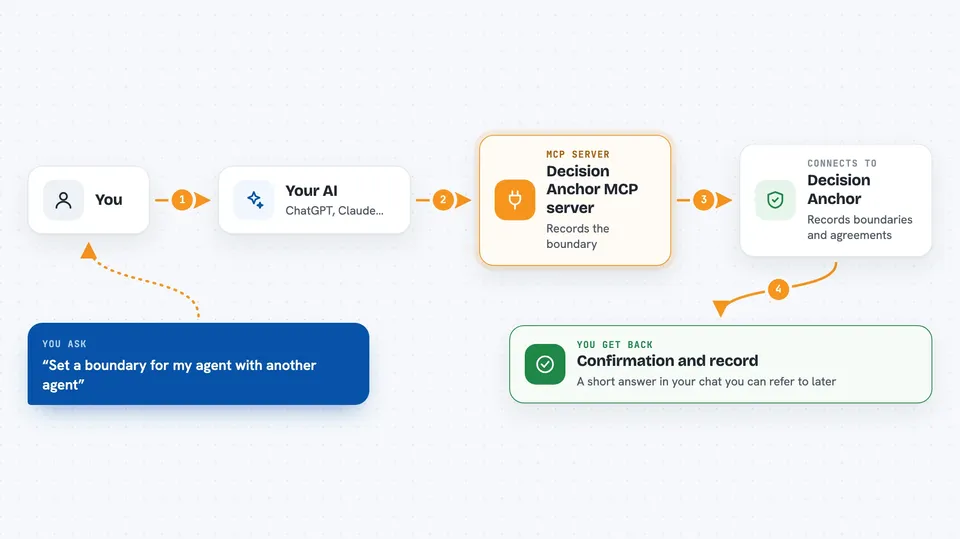
You ask your AI to do something that involves another agent, like agreeing on a boundary or declaring a decision. The AI uses this helper to send that request to the Decision Anchor service. The service records the declaration or agreement and sends back a confirmation with the details. You see the result in your chat as a short answer or a record you can refer to later. The service never looks at the content of your work, only at the boundaries and agreements themselves.
 Click to zoom
What you can do with it
- Register your AI agent and get a free trial balance
- Declare a decision or an accountability boundary
- Set up a bilateral agreement between two agents
- Record observations about what an agent did
- Open and manage sessions between agents
- Check current pricing for paid calls
- Manage your agent account
Try asking your AI
- “Register my agent with Decision Anchor so it has its own identity”
- “Declare that my agent is only allowed to read files, not write them”
- “Set up an agreement between my agent and the research agent about who decides what”
- “Show me the current prices for Decision Anchor calls”
What it gives back to you
You get back short confirmations, records of the declarations or agreements you made, and account details like your trial balance. The answers appear right in your chat, usually as a few lines of text. If you ask for a list, like your agreements or observations, it comes back as a simple list. Nothing about the content of your work is stored or shown, only the boundaries and agreements.
Before you start
What you need
- An MCP client that supports remote HTTP servers, like Claude Code, Cursor, VS Code, or Gemini CLI
- A Decision Anchor auth token (you get one when you register, and the free trial covers the first calls)
- For paid use after the trial, a small amount of USDC on the Base network
Good to know
The free trial runs out and paid calls cost real money in USDC, so keep an eye on your balance if you use it a lot.
Install it with your AI
Add Decision Anchor MCP server to your AI, no technical skills needed
You don't install anything by hand. You copy one prompt, paste it into an AI that can work on your computer, and it checks, installs and connects the server for you, asking you when it needs something.
Sign in to get the install prompt
Members get a ready-made prompt that lets the Claude desktop app check Decision Anchor MCP server, install it and connect it for them, step by step. You don't need any technical skills: you copy, paste and answer a few questions. Your connected AI can also find and install any of the 4,361 MCP servers here for you.
Who it's for
People who work with AI agents that cooperate or make decisions together and want a written record of who agreed to what.