MCP server · Productivity · official
Elicitly MCP server
by elicitly · official
Lets your AI pause and ask you a question with a simple yes/no box or a short form before it continues.
Elicitly is a small helper that lets your AI stop and ask you something in the middle of a task. Instead of guessing, it shows you a confirmation box or a short form, waits for your answer, and then carries on. It is handy if you use an AI assistant for work and want to approve things before they happen.
What is an MCP server? The 30-second version
On its own, your AI can only chat with you. An MCP server is a small helper program that gives your AI a new skill or a connection to something else. This one gives your AI the ability to ask you a question and get a real answer back, using the built-in question feature of your AI app. So when the AI needs your input, it can pop up a box or a form right there in your chat window.
What this MCP server does
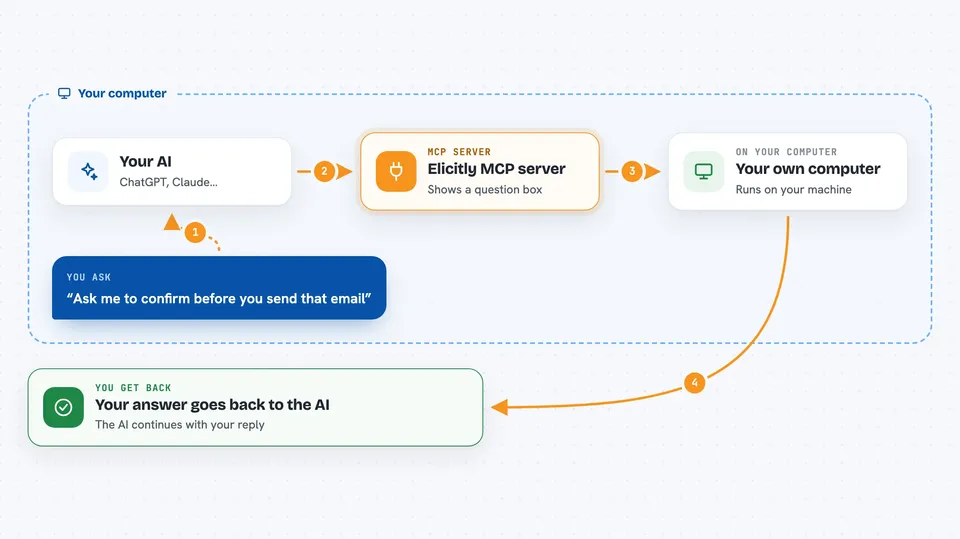
You ask your AI to do something, like prepare a message or check a plan. When the AI needs your approval or a piece of information, it uses Elicitly to show you a confirmation dialog or a short form. You fill it in or click yes or no. Elicitly passes your answer back to the AI, and the AI continues with your reply in hand. There is also a check tool that tells you whether your AI app supports these question boxes at all.
 Click to zoom
What you can do with it
- Approve or reject an action with a simple yes or no box
- Fill in a short form the AI builds for you on the spot
- Give the AI a piece of information it is missing before it continues
- Check whether your AI app supports these question dialogs
- Use it inside Claude Desktop with a one-click install file
- Add it to your own AI tool if you build one
Try asking your AI
- “Ask me to confirm before you send that email”
- “Show me a form so I can fill in the project name and deadline”
- “Check if this app supports confirmation dialogs”
- “Before you finish, ask me whether the summary looks right”
What it gives back to you
You get a small pop-up in your chat: a yes or no question, or a short form with fields to fill in. After you answer, the AI replies in the chat using what you typed. The check tool gives you a plain answer about whether your app supports these dialogs.
Before you start
What you need
- An AI app that supports MCP, like Claude Desktop or Claude Code
- Node.js installed if you run it with the npx command
- Or the elicitly.mcpb file from the releases page for a one-click install in Claude Desktop
Good to know
The AI is asking for your input, so read the question or form carefully before you answer.
Install it with your AI
Add Elicitly MCP server to your AI, no technical skills needed
You don't install anything by hand. You copy one prompt, paste it into an AI that can work on your computer, and it checks, installs and connects the server for you, asking you when it needs something.
Sign in to get the install prompt
Members get a ready-made prompt that lets the Claude desktop app check Elicitly MCP server, install it and connect it for them, step by step. You don't need any technical skills: you copy, paste and answer a few questions. Your connected AI can also find and install any of the 4,361 MCP servers here for you.
Who it's for
Anyone who uses an AI assistant for everyday work and wants to approve or answer questions before the AI acts.