MCP server · Productivity · official
Human For AI MCP server
by humanforai · official
Let your AI hire a real human to check, test, or verify things in the real world.
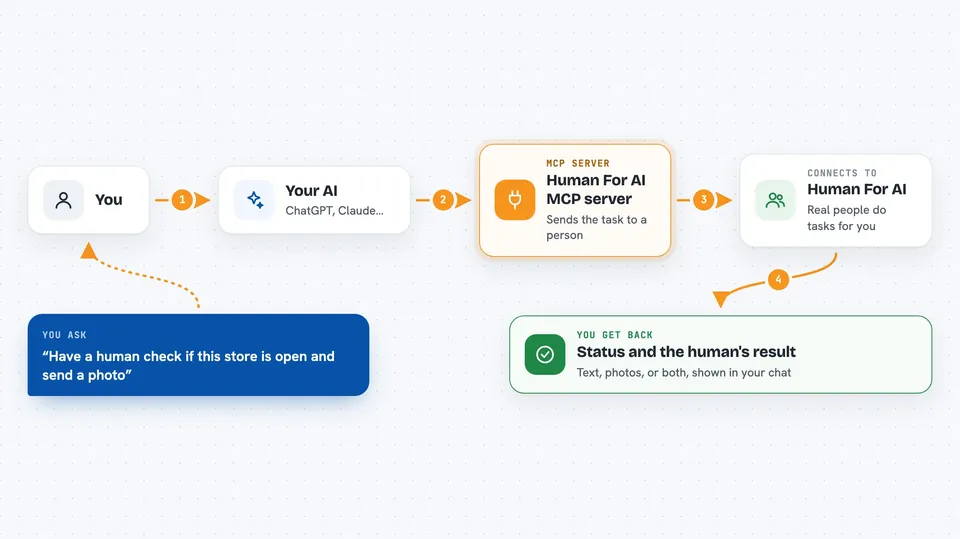
This is a helper that lets your AI assistant ask a real person to do something in the physical world. You might use it when you need someone to confirm a shop is open, test an app on a real phone, or give a human opinion on a piece of writing. It is handy for anyone who needs eyes, hands, or judgment that a computer cannot provide.
What is an MCP server? The 30-second version
On its own, your AI can only chat with you. An MCP server is a small helper program that gives your AI a new skill or a connection to a service. This one connects your AI to Human For AI, a service where real people take on small jobs. So when you ask your AI to check something in the real world, it can pass the task to a human operator through this connection.
What this MCP server does
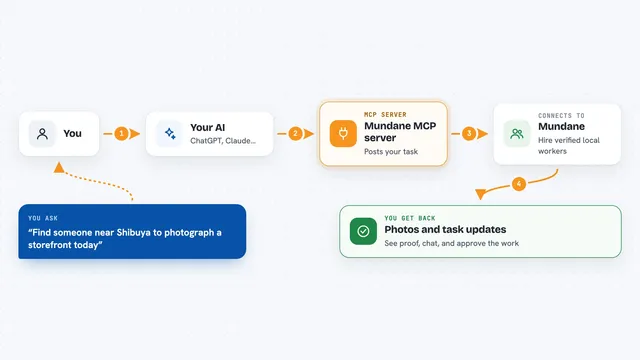
You tell your AI what you need done, like checking a price in a store or testing a signup flow. Your AI uses this helper to send the task to Human For AI. A real human operator reads it, accepts it if it is allowed, and does the work. Then you can ask your AI to check the status and get the result back, often with photos or notes.
 Click to zoom
What you can do with it
- Verify that a place, product, or price really exists
- Ask a human to test your app or product and report back
- Get human feedback on tone, clarity, or design
- Have a person review AI output before it goes live
- Collect or label data that needs human perception
- Send someone to visit, photograph, or measure a location
- Ask the operator questions before you submit a task
Try asking your AI
- “Can you have a human check if this store is open right now and send a photo?”
- “Ask a person to sign up for my app and tell me if anything is confusing.”
- “I need a human to review this email draft and say if it sounds trustworthy.”
- “Please have someone visit this address and confirm the sign on the door.”
What it gives back to you
You get back the task status, which shows when a human saw it, an estimated delivery time, and every step it went through. When the task is done, you get the operator's result, which can be text, photos, or both. Your AI shows this to you in the chat, and if you gave a contact email, the deliverable also comes to you there.
Before you start
What you need
- An MCP client like Claude Desktop or Claude Code
- Node.js installed if you use the npx setup (or just use the hosted link)
- A contact email if you want the result sent to you
Good to know
Tasks are done by real people, so do not send private, illegal, unsafe, or deceptive requests, and remember the service is free only during the pilot.
Install it with your AI
Add Human For AI MCP server to your AI, no technical skills needed
You don't install anything by hand. You copy one prompt, paste it into an AI that can work on your computer, and it checks, installs and connects the server for you, asking you when it needs something.
Sign in to get the install prompt
Members get a ready-made prompt that lets the Claude desktop app check Human For AI MCP server, install it and connect it for them, step by step. You don't need any technical skills: you copy, paste and answer a few questions. Your connected AI can also find and install any of the 4,361 MCP servers here for you.
Who it's for
Anyone who needs real-world checks, product testing, or human judgment that an AI cannot do alone, like founders, researchers, and operations teams.