
MCP server · Finance and crypto
CalcNook MCP server
by Declan142
Lets your AI run personal finance calculators like loans, taxes, Zakat and retirement in seconds.
CalcNook is a small helper that plugs into your AI and gives it a set of ready-made finance calculators. Instead of you hunting for a loan EMI calculator or a tax table online, you just ask your AI in plain words and it does the math for you. It is handy for anyone who deals with money questions at work or at home, from HR and admin staff to freelancers and small business owners.
What is an MCP server? The 30-second version
On its own, your AI can only chat. An MCP server is a small helper program that gives your AI a new skill or a connection to a service. This one connects your AI to CalcNook, a personal finance calculation engine. Once it is set up, your AI can look up numbers and run calculations for you whenever you ask, without you opening a spreadsheet.
What this MCP server does
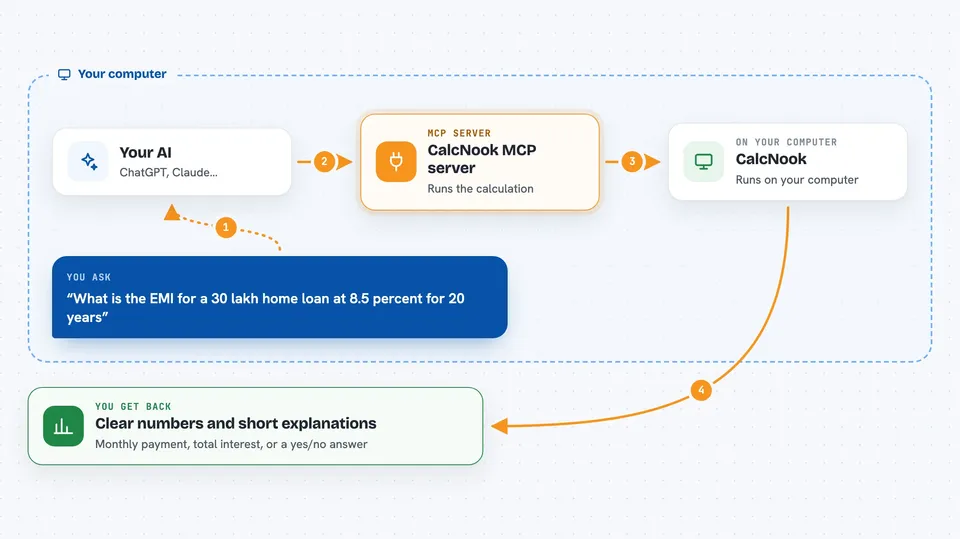
You ask your AI a money question in normal words, like how much a loan will cost each month. Your AI passes the details to this helper, which runs the calculation using the CalcNook engine. The helper sends the answer back, and your AI shows it to you in the chat, often with a breakdown. It covers things like compound interest, savings plans, loans, retirement, income tax for several countries, VAT, Islamic finance and even electricity bills in India.
 Click to zoom
What you can do with it
- Work out monthly loan or mortgage payments
- Estimate how much a monthly savings plan will grow
- Check income tax for the US, UK, Canada, Australia or India
- Calculate Zakat, Murabaha or Ijarah amounts
- Screen a stock for Sharia compliance
- Figure out retirement savings needed
- Estimate VAT, gratuity or an Indian electricity bill
Try asking your AI
- “What is the EMI for a 30 lakh home loan at 8.5 percent for 20 years”
- “How much will 5000 a month grow to in 15 years at 12 percent”
- “Zakat on 25000 dollars savings and 5000 dollars stocks”
- “UAE VAT on a 1000 dirham product”
What it gives back to you
You get back clear numbers and short explanations, like a monthly payment, a total interest figure, or a yes/no on a tax question. Some answers come as a breakdown, for example the split between principal and interest, or the tax per bracket. It all appears as normal text in your chat, so you can copy it into a document or email.
Before you start
What you need
- An AI app that supports MCP servers, like Claude Desktop, Claude Code, Cursor, Goose or Continue
- Python installed on your computer (the installer usually includes it)
- A tool called uv or uvx, which the setup instructions use to run the server
Good to know
The answers are estimates based on the numbers you give and the rules built into the tool, so double-check anything important with a qualified professional before you act on it.
Install it with your AI
Add CalcNook MCP server to your AI, no technical skills needed
You don't install anything by hand. You copy one prompt, paste it into an AI that can work on your computer, and it checks, installs and connects the server for you, asking you when it needs something.
Sign in to get the install prompt
Members get a ready-made prompt that lets the Claude desktop app check CalcNook MCP server, install it and connect it for them, step by step. You don't need any technical skills: you copy, paste and answer a few questions. Your connected AI can also find and install any of the 4,609 MCP servers here for you.
Who it's for
Anyone who answers money questions at work or home, like HR and admin staff, freelancers, small business owners, and people planning loans, savings or taxes.



