
MCP server · Finance and crypto
Polymarket MCP server
by demwick
Lets your AI browse, analyze, and trade Polymarket prediction markets, and copy other traders, right from chat.
This is a helper that connects your AI assistant to Polymarket, a website where people buy and sell bets on future events. Once it is set up, you can ask your AI in plain words to look up markets, check prices, follow other traders, or place small trades. It is handy if you already use Polymarket and want to do things faster without clicking around the site.
What is an MCP server? The 30-second version
On its own, your AI can only chat with you. An MCP server is a small helper program that gives your AI a new skill or a connection to an app. This one connects your AI to Polymarket, so it can look up markets, read prices, and place orders there when you ask. You talk to your AI like normal, and the helper does the work behind the scenes.
What this MCP server does
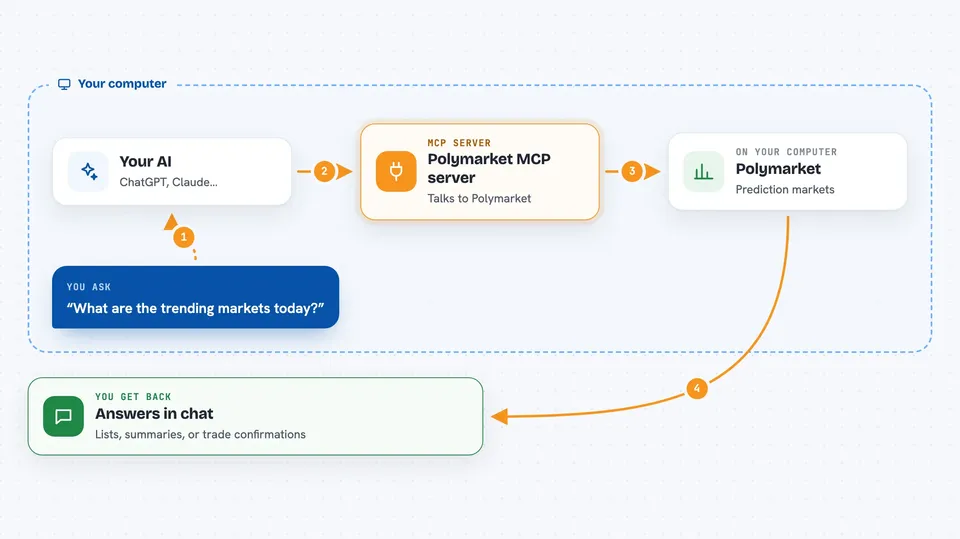
You ask your AI something like what is trending on Polymarket today. Your AI passes that request to this helper program running on your computer. The helper talks to Polymarket's public data and trading services, gathers the answer, and hands it back. Your AI then shows you the result in the chat as a list, a summary, or a confirmation. If you turn on live mode, it can also place real buy and sell orders for you.
 Click to zoom
What you can do with it
- Search Polymarket for markets about a topic like bitcoin or elections
- See which markets are trending by trading volume
- Check live prices, spreads, and price history for a market
- Look up top traders and score how good they are
- Copy a trader's past trades in a simulation to see how it would have gone
- Set stop-loss and take-profit rules on your positions
- Scan for arbitrage gaps where YES and NO prices do not add up
Try asking your AI
- “What are the trending markets today?”
- “Search for bitcoin prediction markets”
- “Score this trader, should I copy them?”
- “Show smart money flow, what are the top traders buying?”
- “Set stop-loss at 0.30 on my BTC position”
What it gives back to you
You get answers in the chat: lists of markets with prices, trader profiles with win rates and profit numbers, side-by-side comparisons, or a quick summary of what your portfolio looks like. When you place an order, it tells you whether the order went through and at what price. In preview mode, trades are simulated, so nothing real happens to your money.
Before you start
What you need
- Node.js 18 or newer installed on your computer (or Docker if you prefer)
- A Polymarket account, if you want to trade for real
- A wallet signing key and Polymarket API credentials, only if you turn on live trading
- The Claude desktop app or another AI tool that supports MCP servers
Good to know
If you switch it to live mode, it can place real orders and spend real money from your Polymarket wallet, so keep preview mode on until you are sure, and never expose the HTTP version publicly.
Install it with your AI
Add Polymarket MCP server to your AI, no technical skills needed
You don't install anything by hand. You copy one prompt, paste it into an AI that can work on your computer, and it checks, installs and connects the server for you, asking you when it needs something.
Sign in to get the install prompt
Members get a ready-made prompt that lets the Claude desktop app check Polymarket MCP server, install it and connect it for them, step by step. You don't need any technical skills: you copy, paste and answer a few questions. Your connected AI can also find and install any of the 4,609 MCP servers here for you.
Who it's for
People who already use Polymarket and want to research markets, follow traders, or place small trades faster through their AI assistant.



