
MCP server · Gaming
RPG Maker MV Ultimate MCP server
Lets your AI build maps, edit your RPG Maker MV database and events, and spot broken references in your game.
This is a helper for people making games in RPG Maker MV. It connects your AI assistant to the actual project folder on your computer, so the AI can look at your maps, database and events, and make changes for you. It is handy if you already use RPG Maker MV and want a hand with the boring or fiddly parts.
What is an MCP server? The 30-second version
On its own, your AI can only chat. An MCP server is a small helper program that gives your AI a new skill or a connection to an app, and here it connects your AI to your RPG Maker MV project on disk. Once it is set up, you can ask your AI to make a map or fix an event, and the helper does the actual work in your project files. You stay in charge; the AI just gets hands.
What this MCP server does
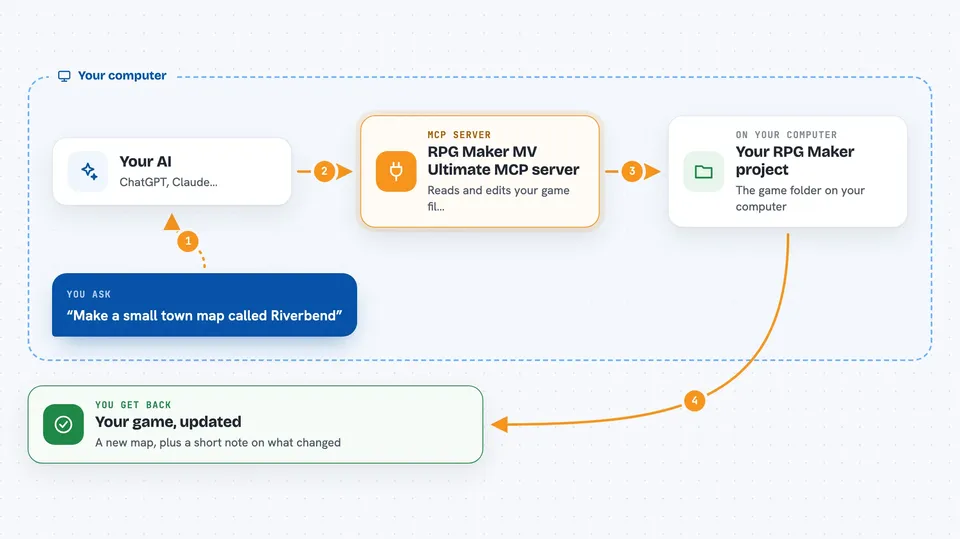
You point the helper at the folder that holds your RPG Maker MV project. When you ask your AI something like make me a small town map, the AI sends that request to this helper. The helper reads your project files, creates or edits the right map, database entry or event, and writes it back to disk. Then it tells your AI what it did, and your AI explains the result to you in the chat. There are also tools to check your project for broken links and to run the game and report back what happens.
 Click to zoom
What you can do with it
- Generate a new map for a town, dungeon, forest or other theme
- Create or edit database entries like skills, items, enemies and troops
- Add or change events on a map, including doors, chests and transfers
- Validate your project and find broken transfers or missing references
- Search your project by meaning across names, dialogue and descriptions
- Run the game and get back errors, player position or screenshots
- Measure a map for dead space, reachability and variety
Try asking your AI
- “Make a small town map called Riverbend with a few houses and a shop”
- “Add a healing skill called Mend Wounds that costs 8 MP”
- “Check my project for broken transfers and unused switches”
- “Why does the door on Map003 never open?”
What it gives back to you
You get answers in the chat: lists of maps or database entries, health summaries, warnings about broken references, or a short explanation of what was changed. For maps, it can show you a simple character grid so you can see the layout. When it runs the game, it can send back error messages, the player's position, or a screenshot saved as a file.
Before you start
What you need
- An RPG Maker MV project on your computer
- Node.js installed (the helper runs with npx)
- An MCP client like Claude Desktop or Claude Code
- The full path to your project folder (the one with data, js and index.html)
Good to know
This helper can change and delete things in your project files, so keep a backup or use version control before letting it make big edits.
Install it with your AI
Add RPG Maker MV Ultimate MCP server to your AI, no technical skills needed
You don't install anything by hand. You copy one prompt, paste it into an AI that can work on your computer, and it checks, installs and connects the server for you, asking you when it needs something.
Sign in to get the install prompt
Members get a ready-made prompt that lets the Claude desktop app check RPG Maker MV Ultimate MCP server, install it and connect it for them, step by step. You don't need any technical skills: you copy, paste and answer a few questions. Your connected AI can also find and install any of the 4,361 MCP servers here for you.
Who it's for
RPG Maker MV hobbyists and small game makers who want help building maps, fixing events and keeping their project tidy.





