
MCP server · Gaming
Specter MCP server
Lets your AI set up and check your Specter game backend: currencies, quests, leaderboards and more.
This is a helper for people building games with Specter, a service that handles player accounts, in-game money, quests and leaderboards for you. Once it is connected, you can describe what you want in plain English and your AI will write the game code and set up the backend for you. It is handy if you are making a game and do not want to click around a dashboard all day.
What is an MCP server? The 30-second version
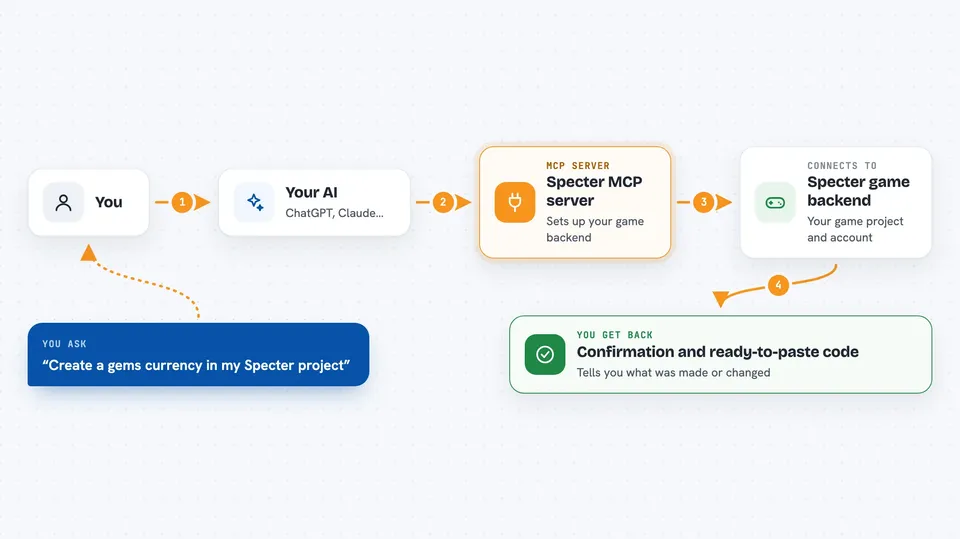
On its own, your AI can only chat. An MCP server is a small helper program that gives your AI a new skill or a connection to an app or service. This one connects your AI to Specter, your game backend. So when you ask for a gems currency or a daily quest, the AI can actually go and create it in your Specter project for you.
What this MCP server does
You ask your AI for something, like a coins wallet or a daily quest. The AI uses this helper, which talks to your Specter project through your account. The helper checks what is already there, creates or changes things, and reports back. You get an answer in the chat, plus code you can paste into your game if you asked for it. For example, you can ask it to create a gems currency and it will do that in your backend and tell you it is done.
 Click to zoom
What you can do with it
- Create currencies, items, bundles and stores in your Specter project
- Set up daily quests, achievements, battle passes and level systems
- Add leaderboards and tournaments with prize rules
- Check whether your project is set up correctly
- Test an achievement end to end with a sandbox test player
- Generate ready-to-paste game code in JavaScript or Unity C#
- Grant items or currency to a player
Try asking your AI
- “Create a gems currency and a daily login quest that rewards 100 coins in my Specter project”
- “Is my Specter project set up correctly?”
- “Add a weekly leaderboard with top-10 prize distribution”
- “Give me the client code for silent device login and a coins wallet”
What it gives back to you
You get answers in the chat: lists of what is in your project, confirmation that something was created or changed, and short reports like whether a test achievement progressed. If you ask for code, it gives you a block you can copy into your game. For checks, it tells you what passed and what still needs attention.
Before you start
What you need
- Node.js 18 or newer
- A Specter project and API key from console.specterapp.xyz
- A Claude app that supports MCP, like Claude Desktop or Claude Code
- A browser sign-in to Specter the first time you want it to create something
Good to know
The tools that create or change things edit your live game setup, so point them at a staging project first and check each change before approving it.
Install it with your AI
Add Specter MCP server to your AI, no technical skills needed
You don't install anything by hand. You copy one prompt, paste it into an AI that can work on your computer, and it checks, installs and connects the server for you, asking you when it needs something.
Sign in to get the install prompt
Members get a ready-made prompt that lets the Claude desktop app check Specter MCP server, install it and connect it for them, step by step. You don't need any technical skills: you copy, paste and answer a few questions. Your connected AI can also find and install any of the 4,361 MCP servers here for you.
Who it's for
Game developers and small game teams who use Specter and want to set up their backend and write integration code by chatting instead of clicking through a dashboard.





