
MCP server · Finance and crypto
Asset Management MCP server
by disin7c9
Ask your AI about your own stock and ETF portfolio and get drawdown-focused numbers it cannot make up.
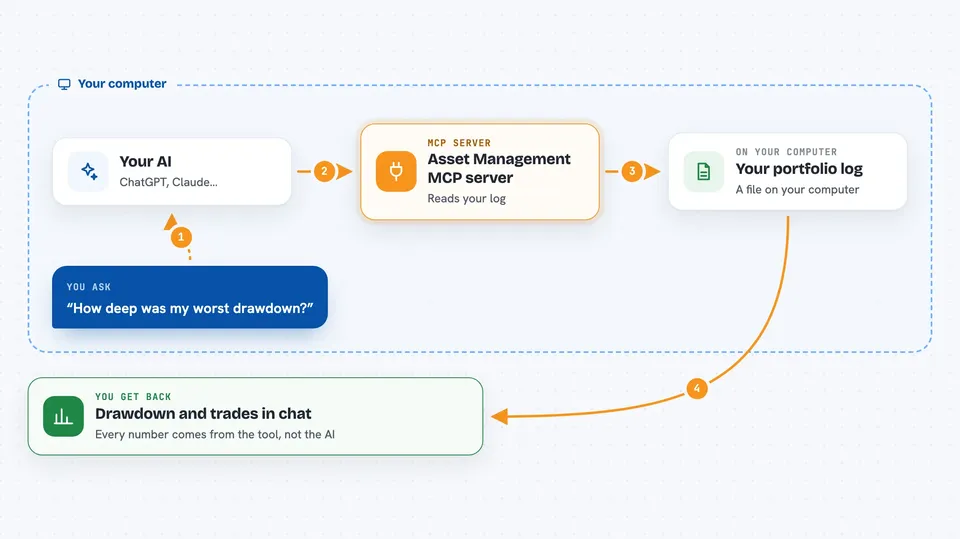
This is a small helper that lets your AI chat about your personal stock and ETF portfolio. You keep a simple log of your buys and sells, and the tool turns it into a plain-language brief about how far you fell from your peak and how long you stayed down. It is handy if you track your own investments and want honest numbers instead of a chatbot guessing.
What is an MCP server? The 30-second version
On its own, your AI can only chat. It has no idea what is in your portfolio. An MCP server is a small helper program that gives your AI a new skill or a connection to an app or service. This one connects your AI to your own transaction log, so it can look up your holdings and answer questions about them when you ask.
What this MCP server does
You keep a transaction log, which is just a list of rows: date, ticker, buy or sell, how many, at what price, and any fee. You ask your AI a question about your portfolio. The AI uses this helper, and the helper reads your log and works out your holdings and risk numbers on your own computer. The AI then explains the result in plain words. The important part is that the AI never does the math itself. Every figure it shows you comes from the tool, and if the AI tries to type a number on its own, the whole summary is thrown away.
 Click to zoom
What you can do with it
- See how far your portfolio fell from its peak and how long it stayed down
- Get buy and sell suggestions toward a target mix you choose, each tied to a named rule
- Check whether a fund you are considering actually fits your portfolio
- Compare your portfolio against a simple reference mix over the same period
- Read a plain-language summary of your numbers, written by your AI but with figures filled in by the tool
- Preview an import before you trust it, so you can see skipped rows and why
Try asking your AI
- “How deep was my worst drawdown and how long was I underwater?”
- “What does my current allocation look like compared to my target?”
- “Should I rebalance this week, and if so, what would I buy or sell?”
- “Is QQQM a good fit for my portfolio, or does it overlap with what I already hold?”
What it gives back to you
You get answers in the chat: your holdings, your drawdown figures with a confidence range, and any suggested trades with the rule behind each one. Some numbers come back as n/a when there is not enough history to compute them honestly, rather than a made-up value. If you ask for a written summary, you get a short paragraph where every number was filled in by the tool, not the AI.
Before you start
What you need
- A transaction log of your own buys and sells, in the CSV format the tool describes
- Python 3.12 and the uv tool installed on your computer
- The Claude desktop app if you want to chat with your portfolio through the addon
- Optionally, a free Tiingo API key (a kind of password for apps; the site gives you one for free) as a backup price source
Good to know
It is read-only and never places trades, but it does read your personal transaction log, and the suggestions it gives are not financial advice.
Install it with your AI
Add Asset Management MCP server to your AI, no technical skills needed
You don't install anything by hand. You copy one prompt, paste it into an AI that can work on your computer, and it checks, installs and connects the server for you, asking you when it needs something.
Sign in to get the install prompt
Members get a ready-made prompt that lets the Claude desktop app check Asset Management MCP server, install it and connect it for them, step by step. You don't need any technical skills: you copy, paste and answer a few questions. Your connected AI can also find and install any of the 4,609 MCP servers here for you.
Who it's for
People who track their own stock and ETF portfolio and want to ask an AI about it without trusting the AI to do the math.



