
MCP server · Finance and crypto · official
Polystrike Tweet Count MCP server
by dizpers · official
Let your AI check live Elon Musk and Ted Cruz tweet counters for Polymarket markets.
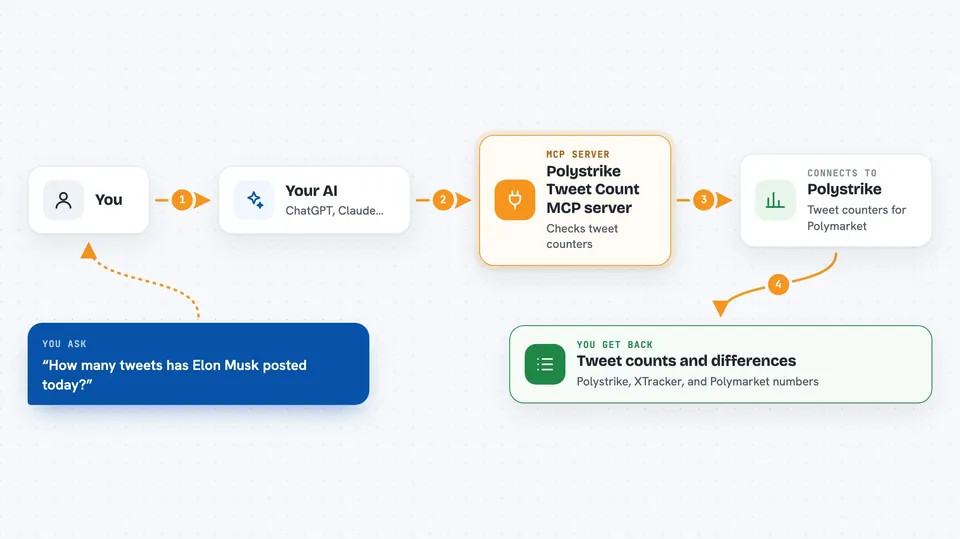
This is a small helper that connects your AI to Polystrike, a service that counts tweets for Polymarket's Elon Musk and Ted Cruz tweet-count markets. Once it is connected, you can just ask your AI for the current numbers instead of opening a website yourself. It is handy for anyone who follows these prediction markets and wants a quick read on where the counts stand.
What is an MCP server? The 30-second version
On its own, your AI can only chat with you. An MCP server is a small helper program that gives your AI a new skill or a connection to an app or service. This one connects your AI to Polystrike, so it can look up tweet counters and recent tweets for you. You ask in plain words, and the AI uses this helper behind the scenes to fetch the answer.
What this MCP server does
You ask your AI something like how many tweets Elon Musk has posted in the current market window. The AI sends that request to this MCP server, which talks to the Polystrike API. Polystrike returns three counters per active market: its own independent count, the official XTracker settlement count, and the count shown on Polymarket's UI, plus the differences between them. Your AI then shows you those numbers in the chat. On the free tier, the counters are delayed by 30 minutes, and every response tells you how fresh the data is.
 Click to zoom
What you can do with it
- Check the current tweet counters for Elon Musk markets
- Check the current tweet counters for Ted Cruz markets
- Compare the Polystrike count, the XTracker count, and the Polymarket UI count
- See the difference between the settlement count and the displayed count
- Read the most recent tweets counted for an account
- Ask your AI to summarize where the counters stand right now
Try asking your AI
- “What are the current Elon Musk tweet counters on Polymarket?”
- “Compare the XTracker count and the Polystrike count for the Cruz market.”
- “Show me the latest tweets counted for Elon Musk.”
- “Is there a gap between the settlement count and what Polymarket shows?”
What it gives back to you
You get back numbers in the chat: the Polystrike count, the XTracker settlement count, the Polymarket UI count, and the deltas between them. You can also get a short list of recent tweets for an account. Each response includes a note about how delayed the data is. It reads like a small table or a few lines of text, not a file you have to open.
Before you start
What you need
- The Claude desktop app or another AI tool that supports MCP servers
- Node.js 20 or newer if you want to run the local MCP server
- A Polystrike Data key only if you want live counters instead of the free delayed ones (paid, $29/month)
Good to know
The free counters are delayed by 30 minutes, and these are measurement tools, not a promise of profit.
Install it with your AI
Add Polystrike Tweet Count MCP server to your AI, no technical skills needed
You don't install anything by hand. You copy one prompt, paste it into an AI that can work on your computer, and it checks, installs and connects the server for you, asking you when it needs something.
Sign in to get the install prompt
Members get a ready-made prompt that lets the Claude desktop app check Polystrike Tweet Count MCP server, install it and connect it for them, step by step. You don't need any technical skills: you copy, paste and answer a few questions. Your connected AI can also find and install any of the 4,361 MCP servers here for you.
Who it's for
People who follow Polymarket tweet-count markets and want a quick way to check the numbers through their AI.





