
MCP server · Gaming
PINE MCP server for PCSX2 and RPCS3
by dmang-dev
Let your AI peek at and change memory inside a running PS2 or PS3 emulator, and save or load states.
This is a small helper that connects your AI assistant to a PlayStation 2 or PlayStation 3 emulator running on your own computer. Once it is set up, you can ask your AI to look at what is happening inside the game's memory, or to save and load save states for you. It is handy if you enjoy tinkering with old games, hunting for cheat values, or poking around how a game stores its data.
What is an MCP server? The 30-second version
On its own, your AI can only chat with you. An MCP server is a small helper program that gives your AI one new skill, like a plug that connects it to another app. This particular helper plugs your AI into an emulator that speaks a language called PINE, which is how PCSX2 and RPCS3 let outside programs peek at what is going on inside them. So when you ask your AI to check a memory value or save a state, it quietly asks this helper, and the helper talks to the emulator for you.
What this MCP server does
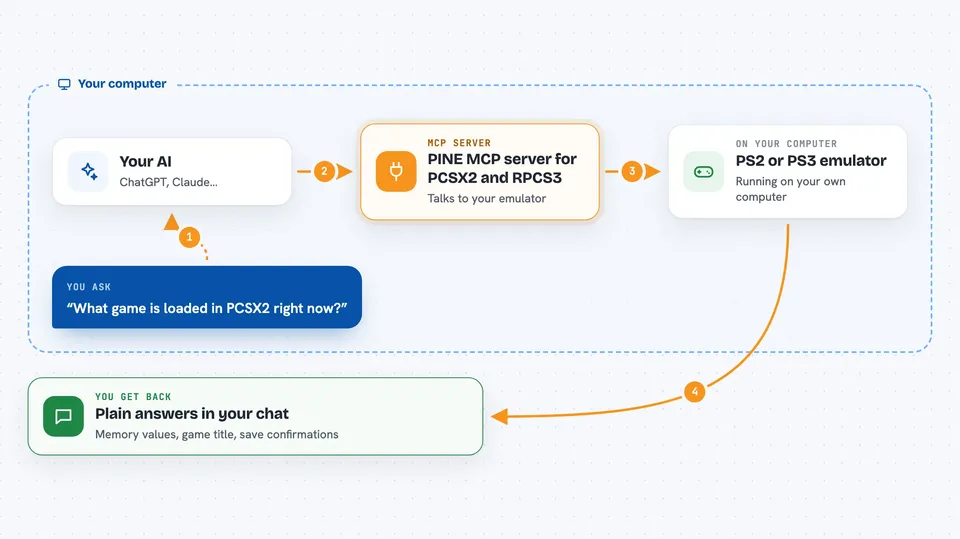
You ask your AI something about the game running in your emulator, like what the current value at a certain memory address is. Your AI passes that request to this helper program running on your computer. The helper opens a small local connection to the emulator's PINE server and asks it for the answer. The emulator replies, the helper passes it back, and your AI shows you the result in the chat. It can also do the reverse: write a value into memory, or tell the emulator to save or load a state slot.
 Click to zoom
What you can do with it
- Read memory values from a running PCSX2 or RPCS3 game
- Write new values into the emulator's memory
- Save the current game state into a numbered slot
- Load a saved state from a numbered slot
- Ask for the game's title, serial number, disc CRC and version
- Check whether the emulator is running, paused or shut down
- Read a chunk of memory up to 4096 bytes at once
Try asking your AI
- “What game is loaded in PCSX2 right now?”
- “Read 4 bytes at address 0x00100000 and tell me the value.”
- “Save the current state to slot 3.”
- “Load state from slot 3 and tell me if it worked.”
- “Is the emulator paused or running?”
What it gives back to you
You get plain answers in the chat: numbers for memory reads, the game's title and serial number, and a short confirmation when a save or load state request went through. If you ask for a range of memory, you get the bytes back, usually shown as a list of values. If something went wrong, like the emulator not running, you get a short error message explaining what to check.
Before you start
What you need
- Node.js version 22 or newer installed on your computer
- PCSX2 version 1.7 or newer (or RPCS3) with its PINE or IPC server turned on in settings
- A game loaded in the emulator
- An MCP-compatible AI app like Claude Desktop or Claude Code
Good to know
It can change values in the running game's memory and overwrite save state slots, so anything you have not saved elsewhere could be lost, and PCSX2's PINE server can get stuck if too many requests are sent at once, which usually needs a full emulator restart to fix.
Install it with your AI
Add PINE MCP server for PCSX2 and RPCS3 to your AI, no technical skills needed
You don't install anything by hand. You copy one prompt, paste it into an AI that can work on your computer, and it checks, installs and connects the server for you, asking you when it needs something.
Sign in to get the install prompt
Members get a ready-made prompt that lets the Claude desktop app check PINE MCP server for PCSX2 and RPCS3, install it and connect it for them, step by step. You don't need any technical skills: you copy, paste and answer a few questions. Your connected AI can also find and install any of the 4,361 MCP servers here for you.
Who it's for
People who enjoy retro game tinkering, cheat and RAM hunting, save state automation, or reverse engineering on PS2 and PS3 emulators.





