
MCP server · Gaming
PPSSPP MCP server
by dmang-dev
Let your AI peek inside a PSP game running in PPSSPP: read memory, press buttons, take screenshots.
This is a small helper that connects your AI assistant to PPSSPP, the PlayStation Portable emulator. Once it is set up, you can ask your AI things like what game is loaded, what is happening in the game's memory, or to press a button for you. It is handy if you tinker with PSP games, look for cheat values, or just want to poke around inside a game you are playing.
What is an MCP server? The 30-second version
On its own, your AI can only chat. An MCP server is a small helper program that gives your AI a new skill or a connection to an app. This one connects your AI to PPSSPP, the PSP emulator, through a debugger that PPSSPP already has built in. So when you ask your AI something about the running game, it can actually go look inside PPSSPP and answer you.
What this MCP server does
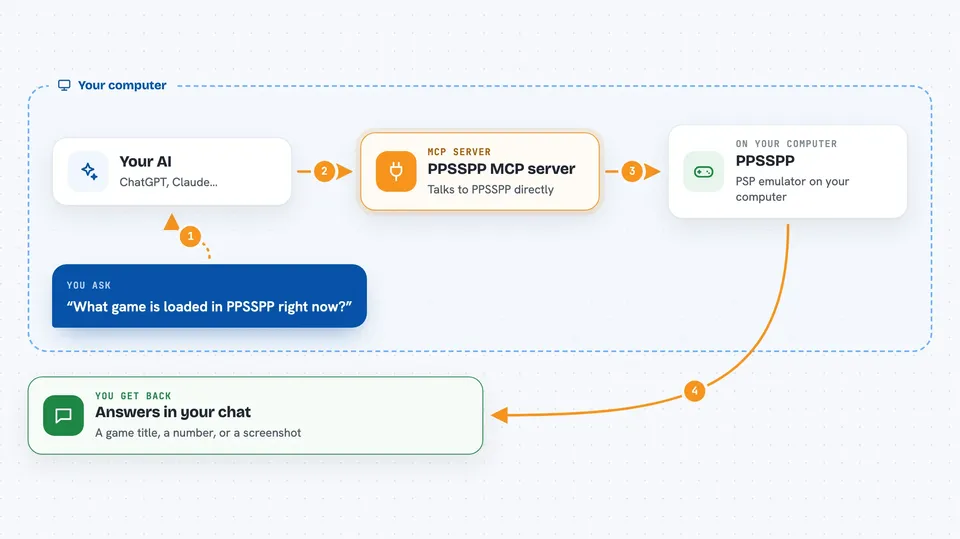
You ask your AI a question about the PSP game you have open in PPSSPP. The AI sends that request to this helper program running on your computer. The helper talks to PPSSPP's built-in debugger over a local connection. PPSSPP answers with the memory value, the screenshot, or the button press you asked for. The AI then tells you the result in plain words in the chat.
 Click to zoom
What you can do with it
- Check which game is loaded and whether it is running or paused
- Read numbers from the game's memory at a specific address
- Write new values into memory, for example to change a stat
- Press PSP buttons like cross, start, or the shoulder triggers
- Move the analog stick to a position
- Pause, resume, or step one instruction at a time
- Take a screenshot of what is on screen right now
Try asking your AI
- “What game is loaded in PPSSPP right now?”
- “Read the 32-bit value at address 0x08800000 and tell me what it is.”
- “Press the cross button for 30 frames, then take a screenshot.”
- “Pause the emulator and show me all the CPU registers.”
What it gives back to you
You get answers in the chat: a game title, a number, a list of registers, or a short confirmation that a button was pressed or memory was changed. Screenshots come back as an image you can see right in the conversation. If something fails, you get a short error message explaining why.
Before you start
What you need
- PPSSPP version 1.7 or newer installed on the same computer
- Node.js 22 or newer
- Allow remote debugger turned on in PPSSPP's Developer Tools settings
- The port number PPSSPP shows in that dialog
Good to know
Writing to memory or pressing buttons can change your game, and changes are not saved anywhere, so a wrong value can crash or freeze the game.
Install it with your AI
Add PPSSPP MCP server to your AI, no technical skills needed
You don't install anything by hand. You copy one prompt, paste it into an AI that can work on your computer, and it checks, installs and connects the server for you, asking you when it needs something.
Sign in to get the install prompt
Members get a ready-made prompt that lets the Claude desktop app check PPSSPP MCP server, install it and connect it for them, step by step. You don't need any technical skills: you copy, paste and answer a few questions. Your connected AI can also find and install any of the 4,361 MCP servers here for you.
Who it's for
People who play or tinker with PSP games in PPSSPP and want an AI to help them inspect memory, hunt for cheat values, or automate button presses.





