
MCP server · Finance and crypto
DEX Data MCP server
by donnywin85
Ask your AI for live crypto prices, pool liquidity and company or SEC records, all in plain chat.
This is a small helper you add to your AI so it can pull live crypto market data and some public company records for you. It covers token prices and pool liquidity on Base, Polygon and Avalanche, plus things like US Treasury yields and SEC filings. It is handy if you follow crypto markets or check company paperwork, and you would rather ask in plain words than dig through websites.
What is an MCP server? The 30-second version
On its own, your AI can only chat with you using what it already knows. An MCP server is a little helper program you connect to it that gives it one new skill. This helper connects your AI to a paid data service that reads live crypto pools and public records. So when you ask a question, your AI can go and look up the real numbers instead of guessing.
What this MCP server does
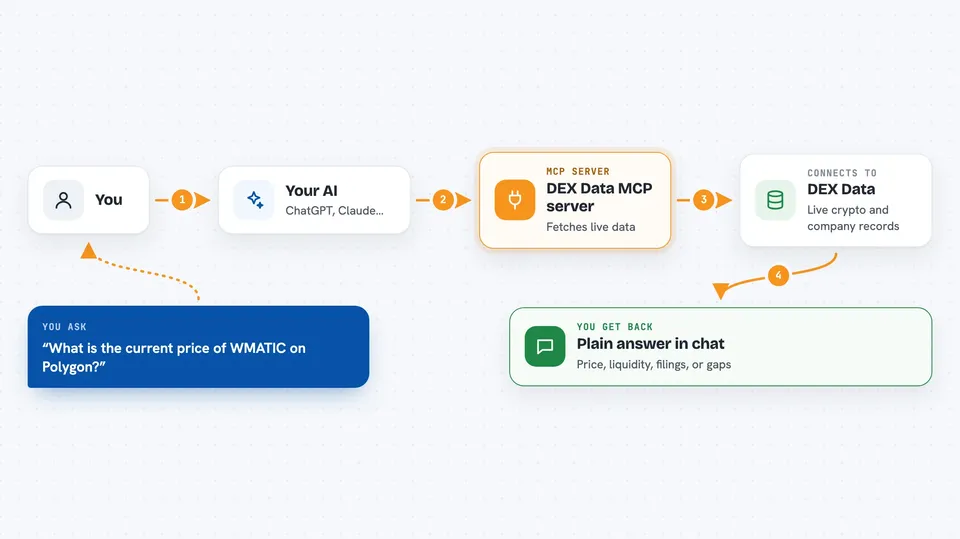
You ask your AI something like the price of a token on Polygon. Your AI passes that question to this helper program running on your computer. The helper sends the request to a data service, which reads the live pools and records and sends back an answer. Your AI then shows you that answer in the chat, in normal words. The first 25 questions each day are free, and after that the helper tells you the price instead of spending anything unless you have set up a wallet.
 Click to zoom
What you can do with it
- Check the live USD price of a token on Polygon
- See how much liquidity sits in a trading pair on Base
- Look up raw pool reserves and fees for an Avalanche pair
- Scan Polygon or Avalanche for price gaps between venues
- Look up a company's legal record by name
- Pull recent SEC filings, events or insider changes for a ticker
- Check the US Treasury yield curve from 1 month to 30 years
Try asking your AI
- “What is the current price of WMATIC on Polygon?”
- “How much liquidity is in the WETH/USDC pool on Base?”
- “Show me any price gaps above 25 basis points on Avalanche right now”
- “What has Apple filed with the SEC since the start of last month?”
What it gives back to you
You get back plain answers in the chat: a price, a list of pools with their liquidity, a ranked list of price gaps, or a set of filings and events. Some tools also return confidence ratings, block heights or flags like whether a record has lapsed. For the SEC tools you get only what has landed since the date you last checked, and the answer tells you if the list was cut off.
Before you start
What you need
- Node.js 18 or newer on your computer
- An MCP host that can run local servers, such as the Claude desktop app
- Nothing else for the free tier: no account, no signup, no key
Good to know
If you set up a wallet for paid calls, it can spend real USDC on Base, so use a wallet you funded only for this and keep the spending caps low.
Install it with your AI
Add DEX Data MCP server to your AI, no technical skills needed
You don't install anything by hand. You copy one prompt, paste it into an AI that can work on your computer, and it checks, installs and connects the server for you, asking you when it needs something.
Sign in to get the install prompt
Members get a ready-made prompt that lets the Claude desktop app check DEX Data MCP server, install it and connect it for them, step by step. You don't need any technical skills: you copy, paste and answer a few questions. Your connected AI can also find and install any of the 4,609 MCP servers here for you.
Who it's for
People who follow crypto markets or company paperwork and want quick answers in chat without opening a dozen websites.



