MCP server · Gaming
L2 Calendar MCP server
by Dreiev
Ask your AI which Lineage 2 private servers are opening soon, by chronicle, rate, or name.
This is a small helper that connects your AI assistant to L2 Calendar, a public calendar of Lineage 2 private server openings. Once it is set up, you can just ask your AI things like which Interlude servers are launching soon, and it will look it up for you. It is handy if you follow private servers and want a quick answer without browsing the site yourself.
What is an MCP server? The 30-second version
On its own, your AI can only chat with you. An MCP server is a small helper program that gives your AI a new skill or a connection to an app or service. This one connects your AI to L2 Calendar, so it can look up server openings and details there when you ask. You do not need to understand how it works inside. You just add it once, and then you talk to your AI like usual.
What this MCP server does
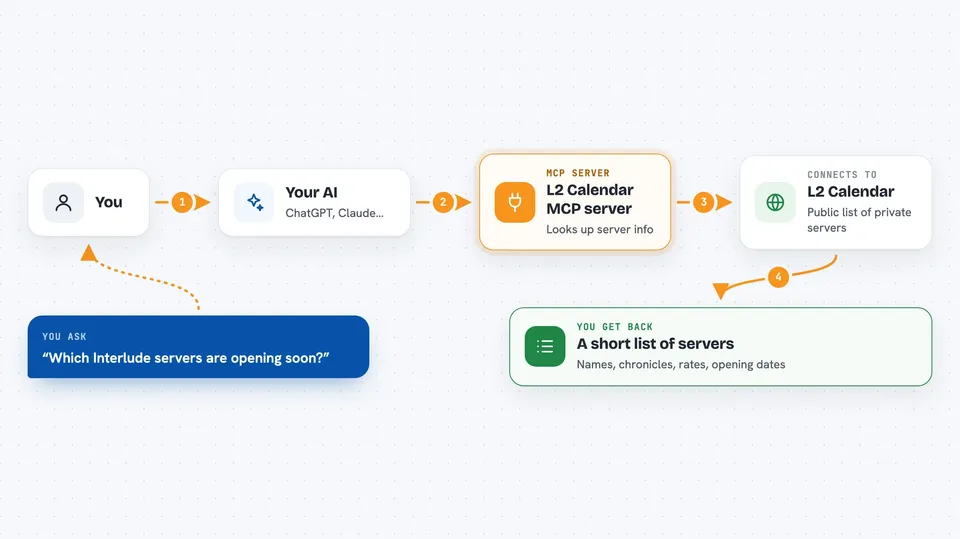
You ask your AI a question about Lineage 2 private servers. The AI sends that question to this helper. The helper talks to the public L2 Calendar website and pulls back the matching server information. The AI then reads that information and answers you in plain words. Everything is read-only, so it only looks things up and never changes anything.
 Click to zoom
What you can do with it
- List Lineage 2 private servers that are opening soon
- Filter servers by chronicle, like Interlude or Classic
- Search servers by name, rate, or description
- Show only newly added servers
- Look up the full details of one server by its exact name
- List all chronicles that L2 Calendar tracks
- See the labels used on servers, like PTS or Low rate
Try asking your AI
- “List the Interlude servers opening soon.”
- “Which Classic servers are new this week?”
- “Search for High Five servers with rate x1000.”
- “Get the details of the server named L2Hispano.”
What it gives back to you
You get a clear answer in the chat, usually a short list of servers with their names, chronicles, rates, and opening dates. If you ask about one server, you get its full public record, including its website, description, and labels. The AI may also summarize or compare the results for you. Everything stays in the conversation, so you can ask follow-up questions right away.
Before you start
What you need
- An MCP client like Claude Desktop, Cursor, VS Code, Windsurf, or Cline
- Node.js installed if you run it locally with npx
Good to know
The public API only returns one page of up to 50 servers at a time, so filters and searches only cover that page unless you narrow things down with a chronicle filter.
Install it with your AI
Add L2 Calendar MCP server to your AI, no technical skills needed
You don't install anything by hand. You copy one prompt, paste it into an AI that can work on your computer, and it checks, installs and connects the server for you, asking you when it needs something.
Sign in to get the install prompt
Members get a ready-made prompt that lets the Claude desktop app check L2 Calendar MCP server, install it and connect it for them, step by step. You don't need any technical skills: you copy, paste and answer a few questions. Your connected AI can also find and install any of the 4,361 MCP servers here for you.
Who it's for
Lineage 2 players and private server fans who want quick answers about upcoming openings without browsing the calendar site.