MCP server · Gaming
Steam Reviews MCP server
by jhomen368
Let your AI look up Steam games, read player reviews, and check patch notes for you.
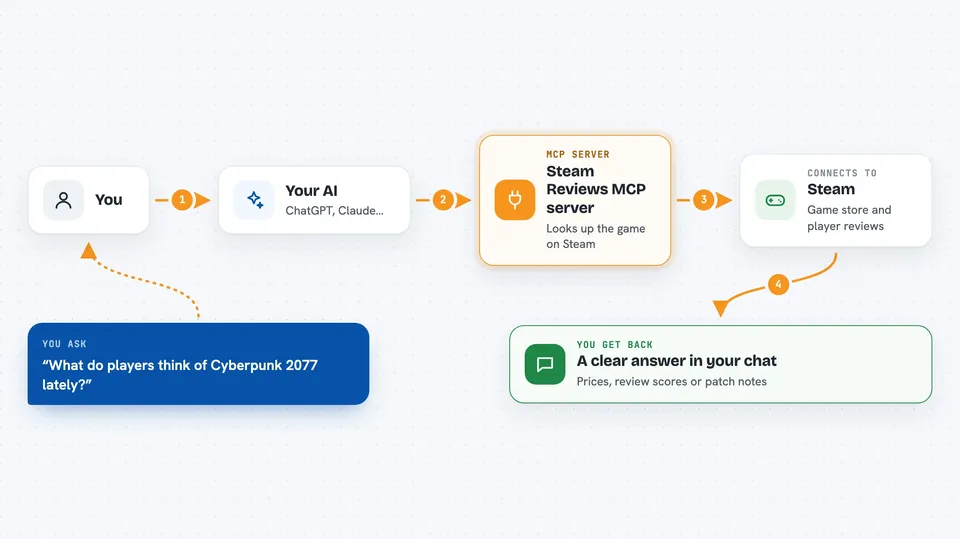
This is a small helper that connects your AI assistant to public Steam information. Once it is set up, you can ask your AI about games, prices, reviews, and patch notes, and it will go and fetch the answers for you. It is handy if you play games on Steam and like to check what other players think before you buy or update something.
What is an MCP server? The 30-second version
On its own, your AI can only chat with you using what it already knows. An MCP server is a small helper program that gives your AI a new skill or a connection to an app or service. This one connects your AI to Steam, so it can look up games, reviews, and announcements for you. You just ask in normal words, and the AI uses this helper behind the scenes to get the information.
What this MCP server does
You ask your AI a question about a Steam game, like what players think or how much it costs. The AI sends that request to this helper program. The helper talks to Steam's public pages and pulls back the details, reviews, or patch notes. Then the AI reads that information and gives you a clear answer in the chat. You do not need a Steam login or any kind of password for it to work.
 Click to zoom
What you can do with it
- Search for a game by name on Steam
- Check prices, review scores, and Steam Deck ratings for a game
- Read player reviews filtered by date, language, or whether they recommend it
- Summarize what players are saying and pick out common themes
- Read official patch notes and announcements for a game
- Search a game's community discussions and read threads
Try asking your AI
- “What are players saying about Cyberpunk 2077's performance in the last month?”
- “Compare Elden Ring and Baldur's Gate 3 for Steam Deck, with prices in Germany.”
- “What changed in the latest Baldur's Gate 3 patch?”
- “Search Portal 2 discussions for co-op connection problems and read a few threads.”
What it gives back to you
You get answers written in plain language in your chat. Depending on what you asked, that could be a list of games, a price, a review score, a short summary of what players think, or the text of a patch note. If you ask about discussions, it can show you a thread and its replies. The AI pulls the details together so you do not have to open Steam yourself.
Before you start
What you need
- The Claude desktop app or another app that supports MCP servers
- Node.js version 24 or newer (the free program that runs the helper)
- An internet connection
Good to know
Community posts and reviews are what players say, not official facts, and the discussion tools plus the Steam Deck review filter are marked experimental, so they may not always return results.
Install it with your AI
Add Steam Reviews MCP server to your AI, no technical skills needed
You don't install anything by hand. You copy one prompt, paste it into an AI that can work on your computer, and it checks, installs and connects the server for you, asking you when it needs something.
Sign in to get the install prompt
Members get a ready-made prompt that lets the Claude desktop app check Steam Reviews MCP server, install it and connect it for them, step by step. You don't need any technical skills: you copy, paste and answer a few questions. Your connected AI can also find and install any of the 4,361 MCP servers here for you.
Who it's for
Anyone who plays games on Steam and wants quick answers about reviews, prices, and updates without browsing Steam by hand.