MCP server · Privacy
Immich Photo Manager MCP server
by drolosoft
Let your AI search, organize, and clean up your self-hosted Immich photo library by talking to it.
This is a helper for people who run their own Immich photo server and whose library has grown too big to sort by hand. Once it is connected, you can ask your AI assistant to find photos, build albums, and clean things up in plain conversation. It is handy if you already have Immich running and want less clicking.
What is an MCP server? The 30-second version
On its own, your AI can only chat with you. An MCP server is a small helper program that gives your AI a new skill, in this case a connection to your Immich photo library. The helper runs on your own computer and talks only to your Immich server. So when you ask a question about your photos, the AI can actually look things up there and do things for you.
What this MCP server does
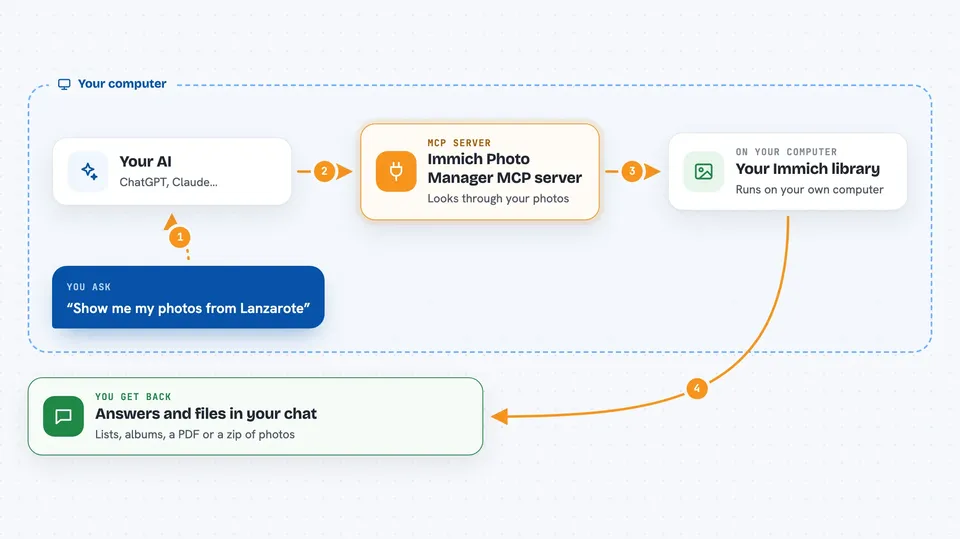
You ask your AI something about your photos, like finding beach sunsets or making trip albums. The AI passes your request to this helper program running on your machine. The helper talks to your Immich server, searches or changes things there, and sends the result back. Your AI then explains what it found or what it did in the chat. Your original photo files stay on your server.
 Click to zoom
What you can do with it
- Search your library in plain words, like sunset at the beach or birthday cake
- Create albums for your trips using location and time
- Find duplicate and near-duplicate photos across imports
- Fix wrong dates and missing location information
- List and organize recognized people and faces
- Build a PDF report or an HTML gallery from an album
- Download an album or selection as a zip file
Try asking your AI
- “Create albums for all my trips”
- “Find duplicate photos in my library”
- “Show me my photos from Lanzarote”
- “Make an HTML gallery of my best sunset shots”
What it gives back to you
You get answers in the chat: lists of albums, counts of photos, names of people, or a summary of what changed. For bigger jobs it can write files on your computer, like a PDF report, an HTML gallery, or a zip of an album. It can also tell you your library numbers, such as how many assets you have and how much space they take.
Before you start
What you need
- A running Immich server (self-hosted, version 1.90 or newer)
- An Immich API key (a kind of password for apps; Immich shows you how to make one)
- Python 3.10 or newer with pip, if you install it yourself
- The Claude desktop app or another AI app that supports MCP
Good to know
It can change or delete things in your Immich library, so check before letting it remove or overwrite anything, and remember that thumbnails may be sent to your AI provider unless you use a local model.
Install it with your AI
Add Immich Photo Manager MCP server to your AI, no technical skills needed
You don't install anything by hand. You copy one prompt, paste it into an AI that can work on your computer, and it checks, installs and connects the server for you, asking you when it needs something.
Sign in to get the install prompt
Members get a ready-made prompt that lets the Claude desktop app check Immich Photo Manager MCP server, install it and connect it for them, step by step. You don't need any technical skills: you copy, paste and answer a few questions. Your connected AI can also find and install any of the 4,361 MCP servers here for you.
Who it's for
People who run their own Immich photo server and want to manage a large library without clicking through every screen.