
MCP server · Generative video · official
ClipKit MCP server
by clipkit-video · official
Describe a video in plain words and your AI can build it, check it, and render an MP4 for you.
ClipKit is a tool that turns a written description of a video into an actual video file. You describe what you want (scenes, text, captions, timing) and it renders the result as an MP4. It is handy for people who need short promo clips, captioned videos, or motion graphics but do not want to learn a video editor.
What is an MCP server? The 30-second version
On its own, your AI can only chat with you. An MCP server is a small helper program that gives your AI a new skill or a connection to another service. This one connects your AI to ClipKit, so it can write the video description, check it for mistakes, and ask ClipKit to render the final file. You just say what you want the video to look like, and the AI does the fiddly parts.
What this MCP server does
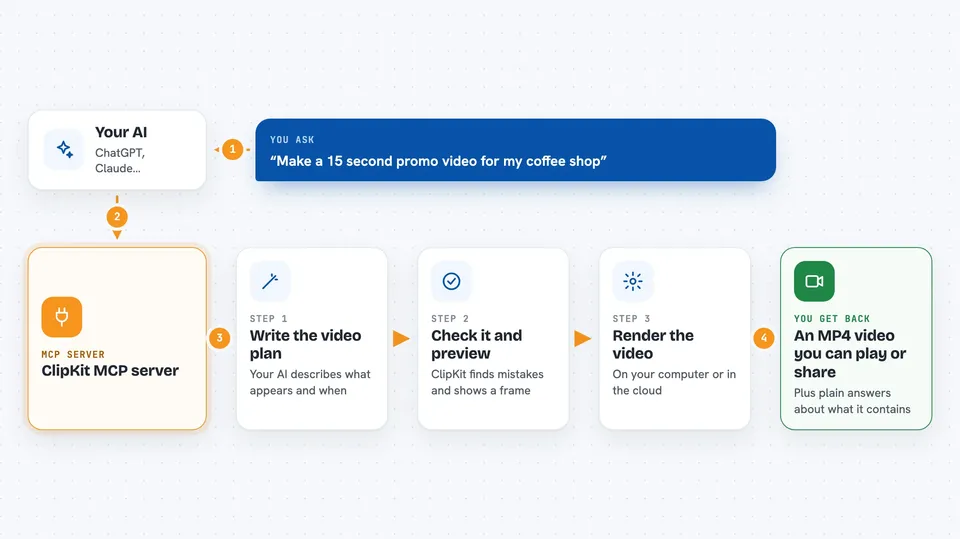
You tell your AI what kind of video you want, in normal words. The AI writes a ClipKit document, which is just a structured description of the video: what appears, when, and for how long. It sends that document to ClipKit, which checks it and can show you a preview frame. When you are happy, ClipKit renders the whole thing into an MP4, either on your own computer or on ClipKit's cloud service. You get the finished video file back.
 Click to zoom
What you can do with it
- Create a new video description from a short prompt
- Check a video description for errors before rendering
- Preview a single frame to see how it looks
- Add captions from a transcript
- Use ready-made promo templates
- Render the final video as an MP4
- Render on the cloud when you need GPU speed or pro formats
Try asking your AI
- “Make a 15 second promo video for my coffee shop, with the name, a tagline, and a warm background”
- “Turn this transcript into a captioned video with the text appearing at the bottom”
- “Check my video description for mistakes and tell me what is wrong in plain words”
- “Render this as an MP4 and save it to my Downloads folder”
What it gives back to you
You get back plain answers in the chat: a summary of what the video contains, a list of any problems found, or a preview image of one frame. When you render, you get an MP4 file you can play or share. If something is wrong in the description, the AI explains it in everyday language so you can fix it.
Before you start
What you need
- Node.js 18 or newer installed on your computer
- Google Chrome installed (used for local rendering)
- A ClipKit account if you want to render on their cloud service
Good to know
Rendering on ClipKit's cloud service may use your account credits or cost money, so check before you render large or repeated videos.
Install it with your AI
Add ClipKit MCP server to your AI, no technical skills needed
You don't install anything by hand. You copy one prompt, paste it into an AI that can work on your computer, and it checks, installs and connects the server for you, asking you when it needs something.
Sign in to get the install prompt
Members get a ready-made prompt that lets the Claude desktop app check ClipKit MCP server, install it and connect it for them, step by step. You don't need any technical skills: you copy, paste and answer a few questions. Your connected AI can also find and install any of the 4,361 MCP servers here for you.
Who it's for
Anyone who needs short videos, captions, or motion graphics but does not want to learn a full video editor, such as marketers, social media managers, teachers, and small business owners.



