MCP server · Privacy
ImageSorcery MCP server
by sunriseapps
Lets your AI edit, crop, blur, and read text in your images, all on your own computer.
ImageSorcery is a helper that gives your AI assistant hands-on image skills. It can crop, resize, rotate, blur, draw on, and read text from pictures you already have on your computer. It is handy for anyone who deals with photos, screenshots, or scanned documents and does not want to learn an image editor.
What is an MCP server? The 30-second version
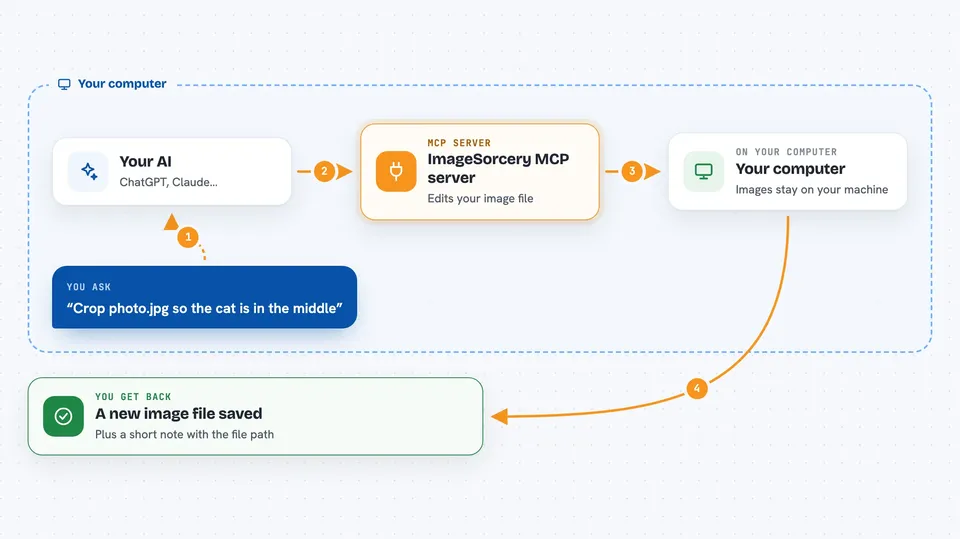
On its own, your AI can only chat and write text. An MCP server is a small helper program that gives your AI a new skill or a connection to something useful. This one connects your AI to image tools like cropping, blurring, and text reading, and it runs on your own machine. So when you ask for something like cropping a photo, the AI can actually do it instead of just explaining how.
What this MCP server does
You tell your AI what you want done with an image, in normal words. The AI picks the right tool from ImageSorcery, like crop, blur, or ocr. ImageSorcery then works on the file on your computer and saves the result where you asked. You get back a short answer, often with the path to the new image file. Nothing is sent to a server, so your pictures stay on your machine.
 Click to zoom
What you can do with it
- Crop, resize, and rotate images
- Blur or fill parts of an image, including removing the background
- Draw text, lines, arrows, circles, and rectangles on a picture
- Add a logo or watermark on top of another image
- Detect objects in a photo, like people, cars, or pets
- Find objects using a plain text description, like all dogs
- Read text from a scanned document or screenshot
Try asking your AI
- “Crop photo.jpg so the cat is in the middle, half width and half height”
- “Blur the area from 150,100 to 250,200 in screenshot.png and save it as output.png”
- “Extract the text from receipt.jpg using OCR in English”
- “Resize team_photo.jpg to 800 by 600 and save it as small.jpg”
What it gives back to you
You get short answers in the chat, usually naming the new file it saved and where it is. For text reading, you get the words it found in the image. For object detection, you get a list of what it found and where. For edits, you get a new image file on your computer.
Before you start
What you need
- Python 3.10 or newer
- pipx (a small tool that installs Python programs cleanly)
- Some system libraries for image handling (ffmpeg, libsm6, libxext6, libgl1-mesa-glx)
- An MCP client like Claude desktop app or Cline
Good to know
It can change or overwrite your image files, so keep a copy of anything important before asking it to edit.
Install it with your AI
Add ImageSorcery MCP server to your AI, no technical skills needed
You don't install anything by hand. You copy one prompt, paste it into an AI that can work on your computer, and it checks, installs and connects the server for you, asking you when it needs something.
Sign in to get the install prompt
Members get a ready-made prompt that lets the Claude desktop app check ImageSorcery MCP server, install it and connect it for them, step by step. You don't need any technical skills: you copy, paste and answer a few questions. Your connected AI can also find and install any of the 4,361 MCP servers here for you.
Who it's for
Office workers who handle photos, screenshots, or scanned documents and want quick edits without opening an image editor.