
MCP server · Developer tools · official
Cleanor MCP server
by cleanor-app · official
Shrink and convert images, make QR codes, and run small tech calculations your AI often gets wrong.
Cleanor MCP is a free helper you connect to your AI so it can do a set of small, exact jobs for you. It can make an image file smaller, turn a link into a QR code, and handle fiddly number and text tasks like hashes, time zones and color codes. It is handy if you work with images, web pages or spreadsheets and want your AI to give you the right answer instead of a guess.
What is an MCP server? The 30-second version
On its own, your AI can only chat with you. An MCP server is a small helper program that gives your AI a new skill or a connection to another service. This one is a helper for Cleanor, a set of free image and research tools. Once it is connected, your AI can ask Cleanor to shrink an image or run a calculation, and then tell you the result right in the chat.
What this MCP server does
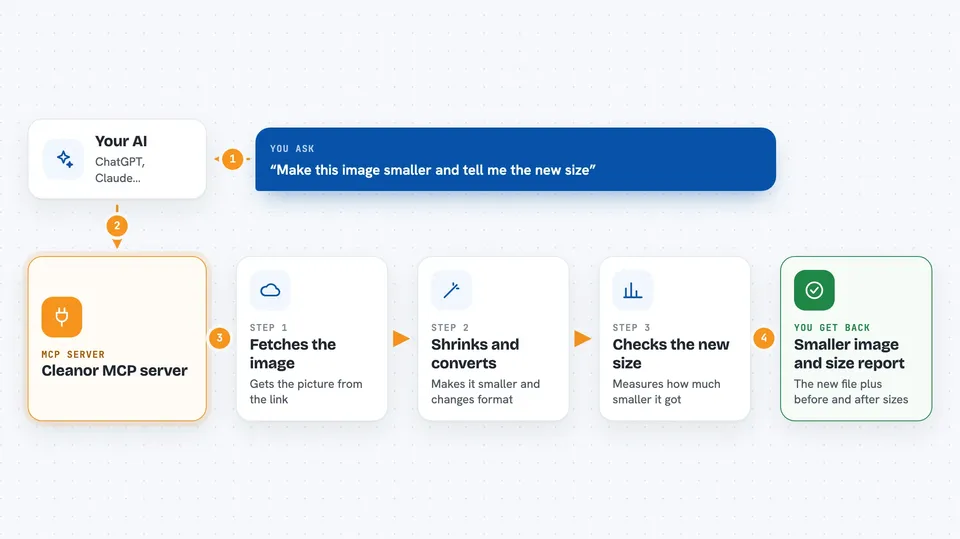
You ask your AI something like "make this image smaller" or "what is the hash of this text". Your AI passes the request to the Cleanor helper. The helper does the work: it fetches the image and re-saves it in a smaller format, or it runs the exact calculation on its own computer. Then it hands the result back, and your AI shows it to you in plain words. You do not install anything or sign up for anything.
 Click to zoom
What you can do with it
- Shrink an image from a web link and get a smaller file back
- Convert an image to WebP, AVIF or JPEG
- Turn any text or link into a QR code you can paste anywhere
- Make a plain placeholder image with your own size, colors and label
- Check how many photos or how many hours of video fit on a drive
- Compare how much smaller WebP, AVIF or JPEG XL are than JPEG
- Run exact tech tasks like hashes, UUIDs, base64, JWT decoding, cron explanations, unit conversions, color codes and text diffs
Try asking your AI
- “Optimize this image link and tell me how much smaller it got”
- “Make a QR code for https://cleanor.app at size 512”
- “How many photos fit on a 512 GB drive”
- “What is the SHA-256 hash of this text”
- “Explain this cron expression: 0 9 * * 1-5”
What it gives back to you
You get an answer in the chat, plus a small structured result your AI can read. For images, that means the optimized file itself and the before and after sizes in bytes. For the other tools, it is a short block of text: the hash, the UUID, the decoded token, the list of matches, the converted number, the color in three formats, or the next five run times. Some tools also link to the Cleanor research page the numbers came from.
Before you start
Good to know
The image tool fetches whatever web link you give it, so only point it at links you are fine with it downloading, and remember the free hosted version is rate-limited.
Install it with your AI
Add Cleanor MCP server to your AI, no technical skills needed
You don't install anything by hand. You copy one prompt, paste it into an AI that can work on your computer, and it checks, installs and connects the server for you, asking you when it needs something.
Sign in to get the install prompt
Members get a ready-made prompt that lets the Claude desktop app check Cleanor MCP server, install it and connect it for them, step by step. You don't need any technical skills: you copy, paste and answer a few questions. Your connected AI can also find and install any of the 4,361 MCP servers here for you.
Who it's for
Anyone who works with images, web pages, spreadsheets or small tech tasks and wants their AI to give exact answers instead of guesses.




