MCP server · Developer tools
Distil MCP server
by dshakes
Your AI can shrink huge tool outputs to save tokens, then pull the exact original text back whenever it needs it.
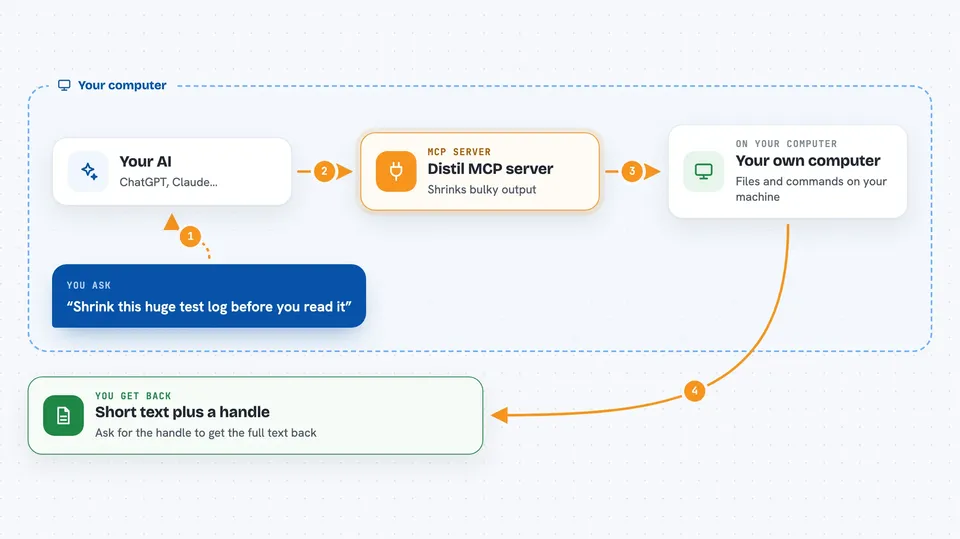
Distil is a small helper that sits between your AI coding assistant and the model, and makes the long, repetitive text your tools produce much shorter. It keeps the full original text in a local store, so nothing is lost. It is handy for people who use coding agents like Claude Code and notice their usage or bill climbing.
What is an MCP server? The 30-second version
On its own, your AI can only chat with what is in front of it. An MCP server is a small helper program that gives your AI a new skill or a connection to something else. This one connects your AI to Distil, a local tool that compresses big tool outputs and keeps the originals. So when your AI reads a huge log or a long file listing, Distil can shrink it and hand the exact original back later if the AI asks.
What this MCP server does
You work with your coding agent as usual, and the agent runs commands and reads files. Those results can be enormous, and the agent re-sends them every turn, which costs tokens. Distil compresses that bulky, repetitive output into a short marker and stores the full original on your computer. Your AI gets a tool called distil_expand, so mid-task it can ask for the exact original text back. Over time, Distil also counts how much it saved you, based on your own usage.
 Click to zoom
What you can do with it
- Shrink large tool outputs and logs before they reach the model
- Get the exact original text back on demand with distil_expand
- Track how many tokens and how much money you saved
- Keep certain text untouched with a distil:keep marker
- See what was compressed with a live status line and per-request details
- Compress code files into readable skeletons for several languages
Try asking your AI
- “Expand handle 4f2a9c so I can see the full test output again”
- “How much has Distil saved me so far this month?”
- “Show me the compressed version of that last log file”
- “Keep this section exactly as is and compress the rest”
What it gives back to you
You get shorter text in the chat instead of walls of repeated output, plus a short handle you can expand later. When you ask for savings, you get numbers: tokens saved and an estimate of money saved, based on your own traffic. When the AI expands a handle, the exact original text appears in the chat, byte for byte. You can also see a live status line and per-request details if you want to check what happened.
Before you start
What you need
- Python and the uv tool installer (the install command sets this up)
- A coding agent such as Claude Code, or any tool that talks to an AI model
- Nothing else for basic use; some features need an API key or a paid plan
Good to know
It reads and stores the tool output and files your agent sees in a local store, so keep that in mind if your work involves private or sensitive data.
Install it with your AI
Add Distil MCP server to your AI, no technical skills needed
You don't install anything by hand. You copy one prompt, paste it into an AI that can work on your computer, and it checks, installs and connects the server for you, asking you when it needs something.
Sign in to get the install prompt
Members get a ready-made prompt that lets the Claude desktop app check Distil MCP server, install it and connect it for them, step by step. You don't need any technical skills: you copy, paste and answer a few questions. Your connected AI can also find and install any of the 4,609 MCP servers here for you.
Who it's for
Developers and anyone using coding agents like Claude Code who want to cut token use and see real savings numbers.