
MCP server · Chat
Mood Booster MCP server
by edge-claw
Lets your AI send you a warm, uplifting message when you ask, and shows you how to tip the agent in USDC.
This is a small helper that gives your AI one cheerful job: cheering you up. You ask for a boost, and it replies with an encouraging note, a compliment, a bit of wisdom, or a joke. It is handy if you use an AI assistant all day and want a friendly pick-me-up without leaving the chat.
What is an MCP server? The 30-second version
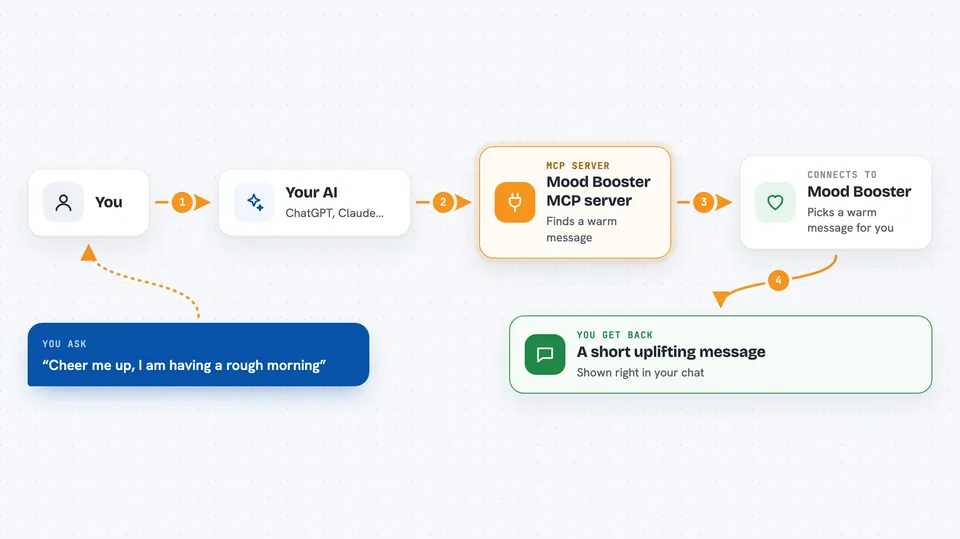
On its own, your AI can only chat with you using what it already knows. An MCP server is a small helper program that gives your AI a new skill or a connection to a service. This one connects your AI to the Mood Booster Agent, a service that hands out uplifting messages. Once it is connected, your AI can ask that service for a message and bring it back to you.
What this MCP server does
You ask your AI for a boost, like "cheer me up" or "tell me a joke". Your AI passes that request to this helper, which talks to the Mood Booster service. The service picks a message from its library of 32 messages across four categories: encouragement, compliment, wisdom, and joke. The message comes back and your AI shows it to you in the chat. If you want, it can also walk you through tipping the agent in USDC and reporting feedback.
 Click to zoom
What you can do with it
- Get a warm, uplifting message on demand
- Ask for a specific kind, like a joke or a compliment
- See the tipping details for the agent in a clear format
- Confirm a tip you already sent in USDC
- Report feedback about the agent on-chain
- Read a full tipping guide with examples
- Check the service statistics
Try asking your AI
- “Cheer me up, I am having a rough morning”
- “Tell me a programming joke”
- “Give me a compliment”
- “How do I tip this agent?”
What it gives back to you
You get a short uplifting message written out in the chat, in plain text. If you ask about tipping, you get the details and steps instead. If you confirm a tip or report feedback, you get a note that it was recorded, along with the on-chain details.
Before you start
What you need
- An AI app that supports MCP servers, like Claude Code or another MCP client
- The MCP endpoint address from the README (already provided, nothing to install)
- A crypto wallet with USDC only if you want to tip the agent
Good to know
Tipping sends real USDC from your wallet, so only tip what you are comfortable giving, and never share your wallet private key with anyone.
Install it with your AI
Add Mood Booster MCP server to your AI, no technical skills needed
You don't install anything by hand. You copy one prompt, paste it into an AI that can work on your computer, and it checks, installs and connects the server for you, asking you when it needs something.
Sign in to get the install prompt
Members get a ready-made prompt that lets the Claude desktop app check Mood Booster MCP server, install it and connect it for them, step by step. You don't need any technical skills: you copy, paste and answer a few questions. Your connected AI can also find and install any of the 4,609 MCP servers here for you.
Who it's for
Anyone who uses an AI assistant daily and wants a quick, friendly mood boost, and crypto-curious users who want to try tipping an AI agent.



