
MCP server · Finance and crypto
Crypto Market Data MCP server
by eliasfire617
Lets your AI look up live crypto prices, funding rates, order books and candles across major exchanges.
This is a helper that gives your AI assistant live cryptocurrency market data. It pulls prices, funding rates, open interest and order books from exchanges like Bybit, Binance, OKX, Hyperliquid, Gate and KuCoin. It is handy for anyone who follows crypto markets and wants quick answers without opening a dozen tabs.
What is an MCP server? The 30-second version
On its own, your AI can only chat with you using what it already knows. An MCP server is a small helper program that gives your AI a new skill or a connection to an outside service. This one connects your AI to public crypto exchange data, so when you ask about a coin, the AI can actually go and look it up instead of guessing. You do not need any accounts or passwords for it.
What this MCP server does
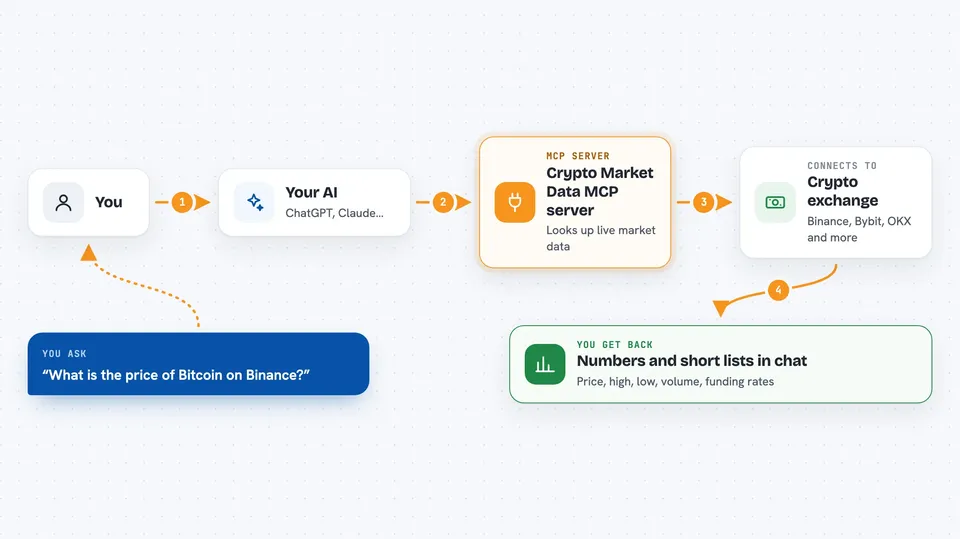
You ask your AI something like the current price of Bitcoin or the funding rate on Ethereum perpetuals. The AI sends that request to this helper. The helper then talks to the exchange you asked about, using public data anyone can see. It brings the numbers back and the AI explains them to you in the chat. You can also ask it to compare funding rates across several exchanges at once to spot differences.
 Click to zoom
What you can do with it
- Check the latest price and 24-hour stats for any coin
- Look up current and historical funding rates on perpetual futures
- Compare funding rates across several exchanges to spot arbitrage spreads
- See the top bids and asks in an order book
- Pull recent price candles for charting or analysis
- Check open interest and long/short ratios
- Find the correct symbol format for a coin on a given exchange
Try asking your AI
- “What is the current price of Bitcoin on Binance?”
- “Compare the funding rate for ETH perpetuals across Bybit, OKX and Hyperliquid”
- “Show me the last 24 hourly candles for SOL/USDT on Bybit”
- “What is the open interest on BTC perpetuals right now?”
What it gives back to you
You get back plain numbers and short lists in the chat. For example, a price tool returns the last price plus 24-hour high, low and volume. The funding comparison returns a table of rates per exchange with an annualized percentage so you can see which venue pays the most. Everything is read-only, so nothing on the exchanges is changed.
Before you start
Good to know
It only reads public data, so it cannot place trades or change anything, but the numbers come from exchanges and can be delayed or briefly wrong during busy times.
Install it with your AI
Add Crypto Market Data MCP server to your AI, no technical skills needed
You don't install anything by hand. You copy one prompt, paste it into an AI that can work on your computer, and it checks, installs and connects the server for you, asking you when it needs something.
Sign in to get the install prompt
Members get a ready-made prompt that lets the Claude desktop app check Crypto Market Data MCP server, install it and connect it for them, step by step. You don't need any technical skills: you copy, paste and answer a few questions. Your connected AI can also find and install any of the 4,609 MCP servers here for you.
Who it's for
Crypto traders, analysts and anyone curious about market data who wants quick answers from their AI without juggling exchange websites.



