
MCP server · Finance and crypto · official
EmblemAI crypto MCP server
by EmblemCompany · official
Lets your AI look up crypto markets, track wallets, and run swaps across seven blockchains for you.
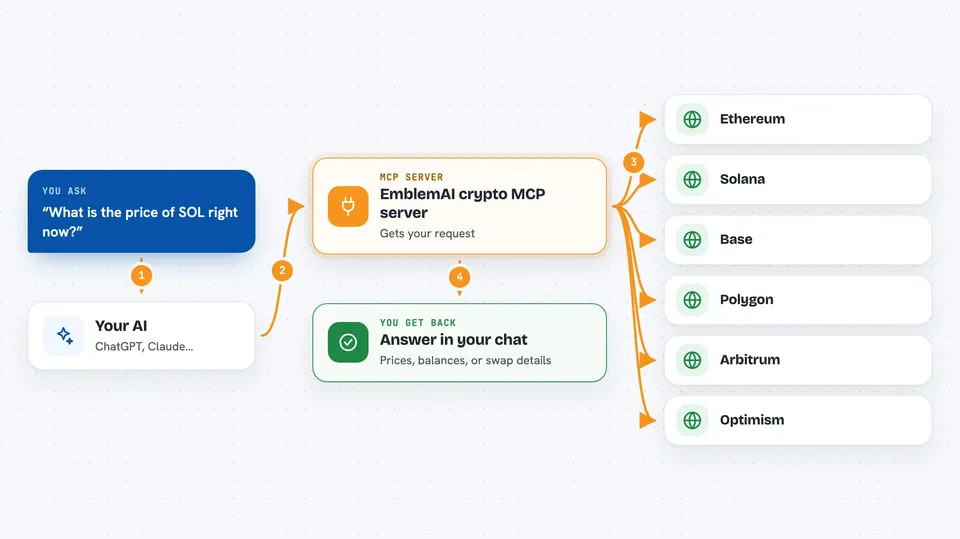
EmblemAI is a set of crypto tools made by Emblem Company. Once you connect it, your AI helper can check prices, look at your wallet, and even do trades and swaps on several blockchains when you ask. It is handy if you already follow crypto and want your AI to do the clicking and checking for you.
What is an MCP server? The 30-second version
On its own, your AI can only chat. It cannot see your crypto wallet or reach any blockchain. An MCP server is a small helper program that gives your AI a new skill, and here that skill is a connection to EmblemAI's crypto tools. So when you ask about a token or a trade, your AI passes the request to EmblemAI, which talks to the blockchains and hands the answer back to you.
What this MCP server does
You type a request in plain words, like asking for the price of a token or the value of a wallet. Your AI sends that request to the EmblemAI helper, which reaches out to the blockchains it supports. EmblemAI does the actual work, such as looking up market data, checking a wallet, or preparing a swap. Then it sends the result back, and your AI shows it to you in the chat. Anything that changes a wallet needs your explicit approval first.
 Click to zoom
What you can do with it
- Check prices and market data for tokens across seven blockchains
- Track a wallet's holdings and profit and loss across chains
- Swap one token for another with route and slippage settings
- Find DeFi yield and staking options
- Look up NFTs and cross-chain bridge routes
- Set conditional orders that trigger on a price you choose
- Spot trending tokens and check for rug-pull warning signs
Try asking your AI
- “What is the price of SOL right now?”
- “Show me the tokens in this wallet and what they are worth”
- “Find the best yield for USDC on Base”
- “Swap 0.5 ETH for USDC on Ethereum”
What it gives back to you
You get answers in the chat: prices, lists of tokens, wallet balances, and short summaries. For trades or swaps, it shows you the details and asks for your approval before anything happens. Market research comes back as short write-ups with the numbers behind them. Nothing changes in your wallet unless you say yes.
Before you start
What you need
- An MCP-compatible AI client, such as Claude Code or GitHub Copilot
- An EmblemAI account, or an API key from EmblemAI if you are not using the browser sign-in
Good to know
It can move real crypto and spend real money, so read every trade or swap it proposes before you approve it.
Install it with your AI
Add EmblemAI crypto MCP server to your AI, no technical skills needed
You don't install anything by hand. You copy one prompt, paste it into an AI that can work on your computer, and it checks, installs and connects the server for you, asking you when it needs something.
Sign in to get the install prompt
Members get a ready-made prompt that lets the Claude desktop app check EmblemAI crypto MCP server, install it and connect it for them, step by step. You don't need any technical skills: you copy, paste and answer a few questions. Your connected AI can also find and install any of the 4,609 MCP servers here for you.
Who it's for
People who already use crypto and want their AI to handle the checking, tracking, and trading steps for them.



