MCP server · Developer tools
MCP Log Proxy
by emicklei
Watch every message your AI sends to and receives from an MCP server, in a simple web page.
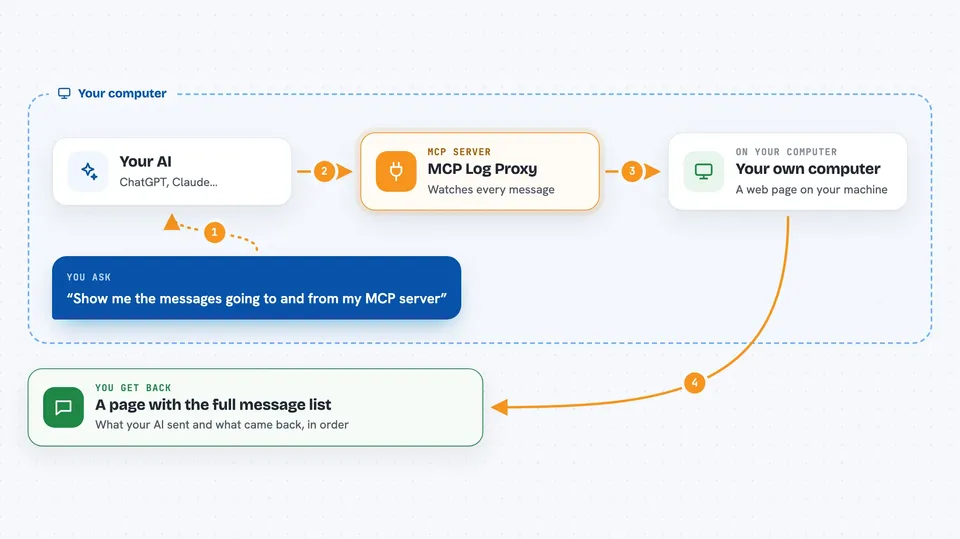
MCP Log Proxy is a small helper program that sits between your AI and another MCP server, and shows you all the messages going back and forth. It is handy when something is not working as expected and you want to see what your AI actually asked for and what came back. If you like to peek under the hood, this is for you.
What is an MCP server? The 30-second version
On its own, your AI can only chat. An MCP server is a small helper program that gives your AI a new skill, like talking to another app or service. This tool is a helper for helpers: it stands in the middle between your AI and another MCP server, and shows you the traffic. So instead of guessing what happened, you can open a web page and read every message.
What this MCP server does
You start MCP Log Proxy and tell it the command that launches the MCP server you want to watch. Your AI then talks to the proxy instead of talking to the server directly. The proxy passes every message along and also shows it on a web page at http://localhost:5656. You open that page in your browser and see the full flow of messages, in order. If you run several proxies at once, the page lets you switch between them.
 Click to zoom
What you can do with it
- See every message your AI sends to an MCP server
- See every reply the MCP server sends back
- Open the log in your browser at a local web address
- Switch between several running proxies on one page
- Change the page title and port to keep things tidy
- Save proxy errors to a log file you choose
Try asking your AI
- “Show me the messages going to and from my melrose MCP server”
- “Open the proxy page so I can see what my AI just asked for”
- “Switch to my other running proxy instance and show its messages”
- “What did the MCP server reply the last time I asked something”
What it gives back to you
It gives you a web page with the full list of messages, in the order they happened. You see what your AI sent and what the server sent back, side by side in time. It does not change anything by itself; it just shows you the flow. If you set a log file, errors from the proxy itself go there.
Before you start
What you need
- The MCP Log Proxy program installed on your computer
- The MCP server you want to watch, already working on your machine
- A web browser to open the local page
Good to know
It only supports the STDIO kind of MCP server, and if you set the host flag to 0.0.0.0 the log page becomes reachable from other machines on your network.
Install it with your AI
Add MCP Log Proxy to your AI, no technical skills needed
You don't install anything by hand. You copy one prompt, paste it into an AI that can work on your computer, and it checks, installs and connects the server for you, asking you when it needs something.
Sign in to get the install prompt
Members get a ready-made prompt that lets the Claude desktop app check MCP Log Proxy, install it and connect it for them, step by step. You don't need any technical skills: you copy, paste and answer a few questions. Your connected AI can also find and install any of the 4,361 MCP servers here for you.
Who it's for
People who set up MCP servers and want to see what is really happening, especially when debugging a connection.