MCP server · Developer tools · official
ESP RainMaker MCP server
by espressif · official
Let your AI check and control your ESP RainMaker smart home devices for you.
This is a helper that connects your AI assistant to ESP RainMaker, the smart home system from Espressif. Once it is set up, you can ask your AI in plain words to check your devices, turn things on or off, or set schedules. It is handy if you already have ESP RainMaker devices at home and want to control them by chatting instead of tapping around an app.
What is an MCP server? The 30-second version
On its own, your AI can only chat. It cannot see or touch anything outside the conversation. An MCP server is a small helper program that gives your AI a new skill or a connection to another service, and here that service is ESP RainMaker. With this helper running, your AI can look up your devices and send commands to them when you ask.
What this MCP server does
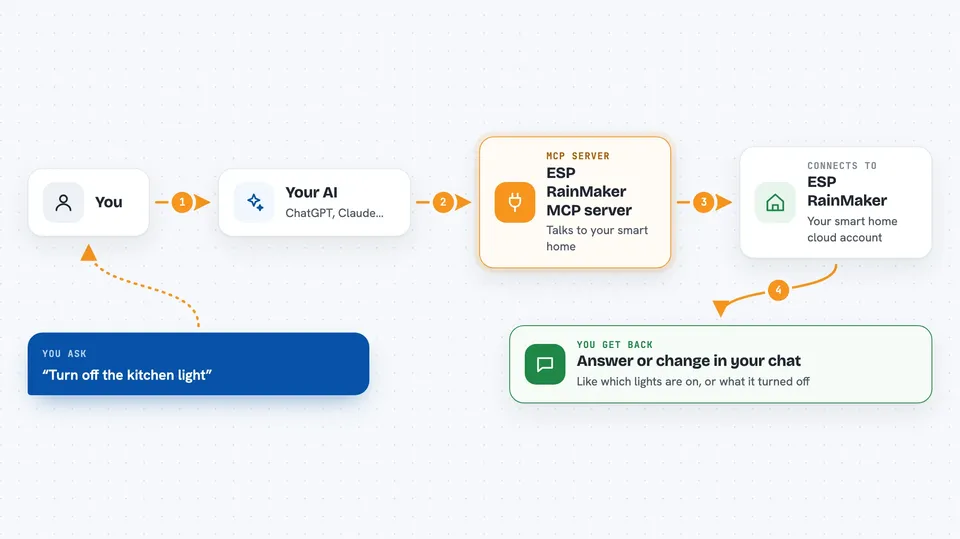
You ask your AI something about your smart home, like which lights are on. Your AI passes that request to this helper program. The helper talks to the ESP RainMaker cloud using your saved login, and the cloud talks to your devices. The answer, or the change you asked for, comes back to your AI and shows up in the chat.
 Click to zoom
What you can do with it
- List all your ESP RainMaker devices
- Check whether a device is online or offline
- Read the current settings of a device, like brightness or power state
- Turn devices on or off and change their settings
- Set up, edit, or remove schedules for a device
- Create homes and rooms and put devices in them
- Look up details about a home or room group
Try asking your AI
- “Which of my ESP RainMaker devices are online right now?”
- “Turn off the kitchen light.”
- “Show me the current settings of my bedroom lamp.”
- “Set a schedule so the living room light turns on every day at 8 in the morning.”
What it gives back to you
You get answers in the chat, like a list of your devices, whether each one is online, or the current values of a device's settings. When you ask it to change something, it tells you what it changed. If something goes wrong, you get a short error message instead.
Before you start
What you need
- Python 3.10 or newer
- The uv package manager installed on your computer
- An ESP RainMaker account with at least one device already added
- You must log in once using the esp-rainmaker-cli login command in your terminal before this works
Good to know
This helper can change your real devices and their schedules, so double check before you tell your AI to turn things off or change settings.
Install it with your AI
Add ESP RainMaker MCP server to your AI, no technical skills needed
You don't install anything by hand. You copy one prompt, paste it into an AI that can work on your computer, and it checks, installs and connects the server for you, asking you when it needs something.
Sign in to get the install prompt
Members get a ready-made prompt that lets the Claude desktop app check ESP RainMaker MCP server, install it and connect it for them, step by step. You don't need any technical skills: you copy, paste and answer a few questions. Your connected AI can also find and install any of the 4,066 MCP servers here for you.
Who it's for
People who already own ESP RainMaker smart home devices and want to control them by chatting with an AI instead of using an app.