
MCP server · Finance and crypto
VibeTrader MCP server
by etbars
Create and manage AI trading bots and check your portfolio through your AI assistant.
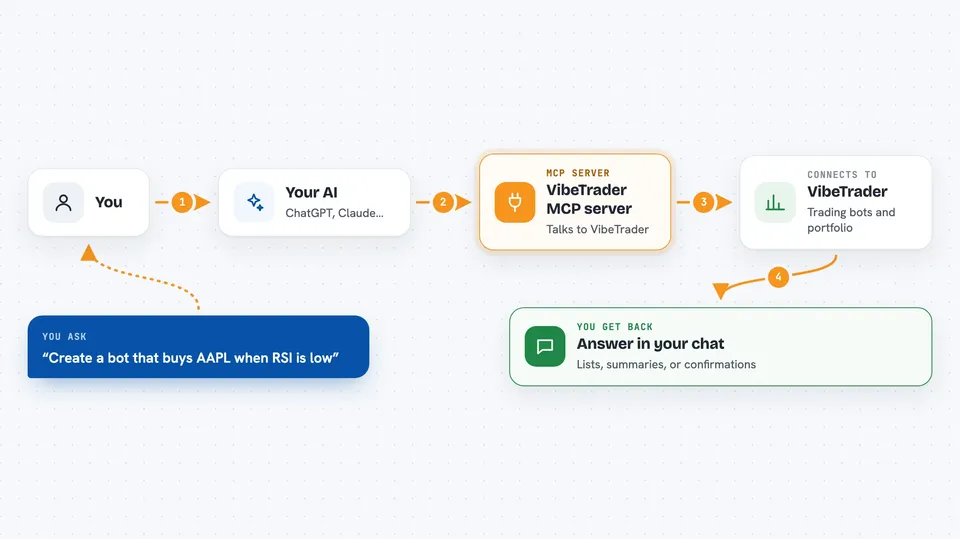
VibeTrader is a trading bot platform that connects to the Alpaca brokerage. This MCP server lets your AI assistant create trading bots, start or pause them, and look at your portfolio for you. It is handy if you already trade or want to try trading with a bot but do not want to click through a website for every small thing.
What is an MCP server? The 30-second version
On its own, your AI can only chat. An MCP server is a small helper program that gives your AI a new skill or a connection to an app or service. This one connects your AI to VibeTrader, so the AI can create bots, check your positions, and place orders when you ask. You stay in charge of what you ask for, and the helper does the talking to VibeTrader behind the scenes.
What this MCP server does
You type a request in plain words, like asking for a bot that buys a stock when a signal appears. Your AI sends that request to this helper, and the helper talks to VibeTrader and to the Alpaca brokerage behind it. VibeTrader builds or changes the bot, or fetches the data you asked for. Then the answer comes back into your chat as a list, a summary, or a confirmation that something changed.
 Click to zoom
What you can do with it
- Create a trading bot from a plain English description
- List, search, start, pause, or delete your bots
- See your portfolio positions and account balance
- Check current quotes for a stock
- Run a backtest on a bot's strategy using past data
- Look at recent trade history across your bots
- Place a buy or sell order and close a position
Try asking your AI
- “Create a trading bot that buys AAPL when RSI goes below 30 and sells when it goes above 70”
- “Show me all my trading bots and how they are doing”
- “Backtest a moving average crossover strategy on SPY for the last 6 months”
- “What are my current positions and unrealized profit or loss”
What it gives back to you
You get answers right in the chat. That can be a list of your bots, a summary of your balance and buying power, current quotes, or the results of a backtest with numbers. When you ask for a change, like starting a bot or placing an order, it tells you whether it worked.
Before you start
What you need
- A VibeTrader account and an API token from vibetrader.markets/settings
- An Alpaca brokerage account linked to VibeTrader
- The Claude desktop app or another AI app that supports MCP servers
Good to know
This server can place real trades and delete bots, so check what your AI is about to do before you confirm, and keep paper trading mode on until you are comfortable.
Install it with your AI
Add VibeTrader MCP server to your AI, no technical skills needed
You don't install anything by hand. You copy one prompt, paste it into an AI that can work on your computer, and it checks, installs and connects the server for you, asking you when it needs something.
Sign in to get the install prompt
Members get a ready-made prompt that lets the Claude desktop app check VibeTrader MCP server, install it and connect it for them, step by step. You don't need any technical skills: you copy, paste and answer a few questions. Your connected AI can also find and install any of the 4,609 MCP servers here for you.
Who it's for
People who trade or want to try trading with bots and would rather describe what they want in plain words than click through a website.



