MCP server · Finance and crypto
FLOX MCP server
Lets your AI look up FLOX trading docs, indicators, and errors, and run backtests for you.
This is a small helper that connects your AI assistant to FLOX, a framework for building and testing trading strategies. It runs quietly on your own computer and gives your AI a real reference book for FLOX instead of letting it guess. It is handy if you write or review FLOX strategies and want fewer made-up function names and fewer wrong answers.
What is an MCP server? The 30-second version
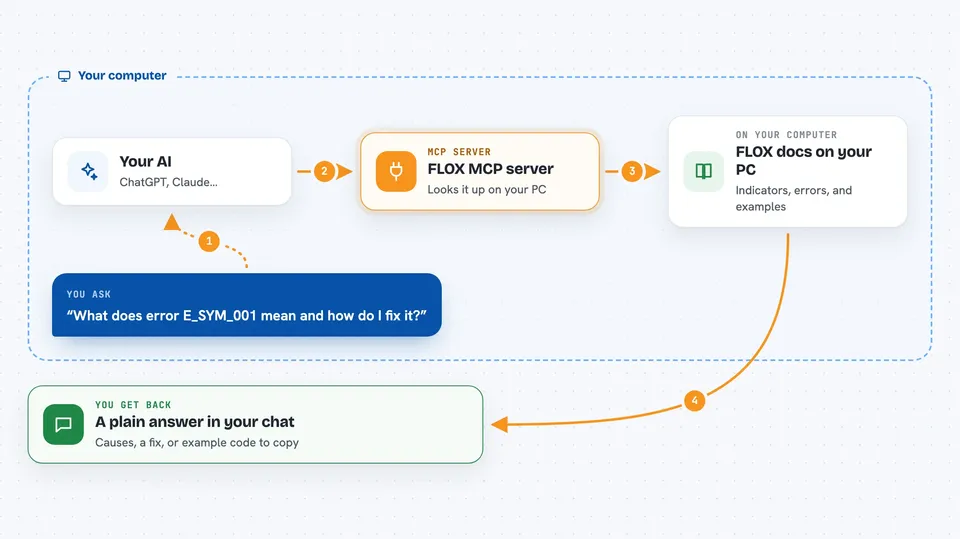
On its own, your AI can only chat with you. An MCP server is a small helper program that gives your AI a new skill or a connection to another tool. This one connects your AI to FLOX, so it can look up indicators, error codes, and example code, and even run a backtest. You ask in normal words, and the AI uses this helper behind the scenes to get real answers from FLOX.
What this MCP server does
You ask your AI something like which FLOX indicator fits a trend filter, or what error E_SYM_001 means. The AI passes your question to this helper, which looks it up in the FLOX docs, error catalog, and indicator library bundled with it. The helper sends the real answer back, and the AI explains it to you in the chat. It can also run a strategy against a CSV file of price data and hand you the results. Everything happens on your machine, so nothing is sent to an outside service.
 Click to zoom
What you can do with it
- Look up any FLOX indicator with its signature and shape
- Decode a FLOX error code into causes and a fix recipe
- Search the FLOX C-API for a function and its parameter types
- Check a Python strategy for missing hooks or risky calls
- Get starter code for a strategy, connector, or event handler
- Run a backtest on a CSV dataset and see the outcome
- Find which indicator matches a plain-English description
Try asking your AI
- “What does error E_SYM_001 mean and how do I fix it?”
- “Show me a bar-driven Python strategy scaffold I can start from”
- “Which FLOX indicator is best for a momentum oscillator?”
- “Run a backtest of my strategy file against the sample CSV”
What it gives back to you
You get back plain answers in the chat: lists of indicators, a Markdown page for an error code, function signatures, or example code you can copy. When you run a backtest, you get the results of that run, like summary numbers or output from the strategy. For validation, you get a short report saying whether the code passed or what is wrong. Nothing is changed on your computer unless you save the code yourself.
Before you start
What you need
- Python installed on your computer
- The flox-mcp package installed with pip
- An AI client that supports MCP, like Claude Code, Cursor, or Cline
- For live order tools: a running paper engine URL and token
Good to know
The backtest tool runs your Python code in a limited sandbox that caps CPU, memory, and output but does not block file or network access, so only run code you trust or wrap it in a stronger sandbox.
Install it with your AI
Add FLOX MCP server to your AI, no technical skills needed
You don't install anything by hand. You copy one prompt, paste it into an AI that can work on your computer, and it checks, installs and connects the server for you, asking you when it needs something.
Sign in to get the install prompt
Members get a ready-made prompt that lets the Claude desktop app check FLOX MCP server, install it and connect it for them, step by step. You don't need any technical skills: you copy, paste and answer a few questions. Your connected AI can also find and install any of the 4,609 MCP servers here for you.
Who it's for
Developers and analysts who build or review FLOX trading strategies and want their AI to use the real FLOX docs instead of guessing.