MCP server · Finance and crypto · official
Klever MCP server
by klever-io · official
Lets your AI look up Klever blockchain code patterns, examples, and best practices while you build.
This is a helper from Klever, the company behind the Klever blockchain. It gives your AI assistant a built-in library of Klever smart contract knowledge: code examples, common mistakes, and recommended ways to do things. It is handy if you write or review Klever contracts and want your AI to stop guessing and start using real Klever patterns.
What is an MCP server? The 30-second version
On its own, your AI can only chat with you using what it already learned. An MCP server is a small helper program that gives your AI a new skill or a connection to a service. This one connects your AI to Klever's knowledge base for smart contract development. So when you ask a Klever question, your AI can look things up in that library instead of making things up.
What this MCP server does
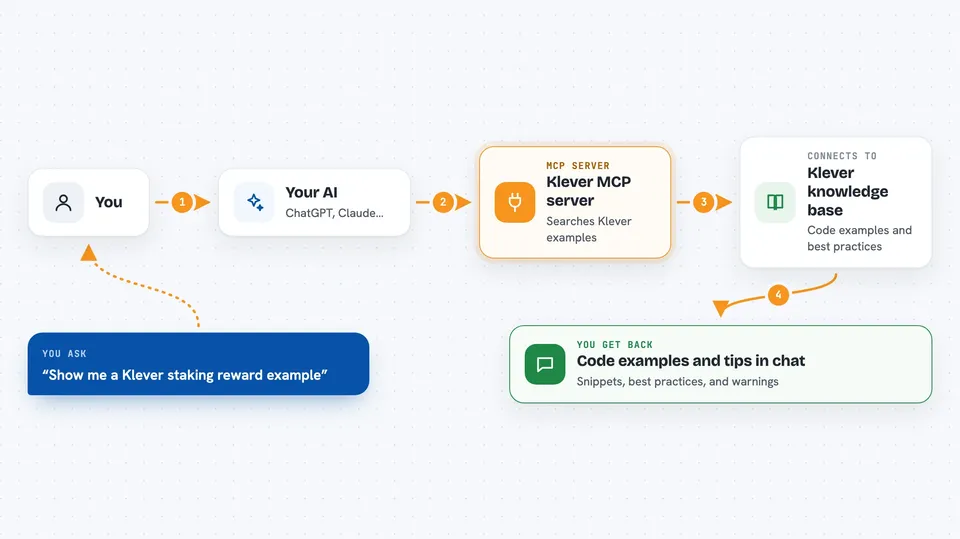
You ask your AI something about Klever smart contracts, like how to handle payments or emit events. Your AI sends that question to this helper. The helper searches Klever's knowledge base of code examples, best practices, and common errors, then sends back the most relevant entries. Your AI uses those to write or explain the answer for you. It can also check a contract you paste in and point out likely issues.
 Click to zoom
What you can do with it
- Search Klever's knowledge base for code examples and patterns
- Look up best practices for storage, events, and tokens
- Find common errors and how to fix them
- Retrieve a specific knowledge entry by its ID
- Find entries similar to one you already have
- Check a Klever contract for common mistakes and anti-patterns
- Set up a new Klever smart contract project with helper scripts (when running it yourself)
Try asking your AI
- “Show me a Klever smart contract example for a staking reward.”
- “What is the right way to emit events in a Klever contract?”
- “Find common mistakes when handling token decimals in Klever.”
- “Look at this contract code and tell me what might go wrong.”
What it gives back to you
You get answers in plain chat: code snippets, short explanations, lists of best practices, or warnings about likely issues. When it finds knowledge entries, it shows the relevant text and examples. If you ask it to check a contract, it lists the problems it spotted with suggestions. Nothing is changed on the blockchain by this helper.
Before you start
What you need
- An AI app that supports MCP, like Claude Desktop, Claude Code, Cursor, or VS Code with Copilot
- Nothing else if you use the hosted server at mcp.klever.org
- Node.js if you want to run it on your own computer with npx
Good to know
The hosted public server is read-only, but if you run it yourself some tools can add entries to the knowledge base and create project files on your computer.
Install it with your AI
Add Klever MCP server to your AI, no technical skills needed
You don't install anything by hand. You copy one prompt, paste it into an AI that can work on your computer, and it checks, installs and connects the server for you, asking you when it needs something.
Sign in to get the install prompt
Members get a ready-made prompt that lets the Claude desktop app check Klever MCP server, install it and connect it for them, step by step. You don't need any technical skills: you copy, paste and answer a few questions. Your connected AI can also find and install any of the 4,609 MCP servers here for you.
Who it's for
Klever blockchain developers and anyone writing, reviewing, or learning Klever smart contracts.