MCP server · Research
Disruption Intelligence MCP server
Lets your AI look up layoff notices, company risk and local disruption signals from the Forgemesh service.
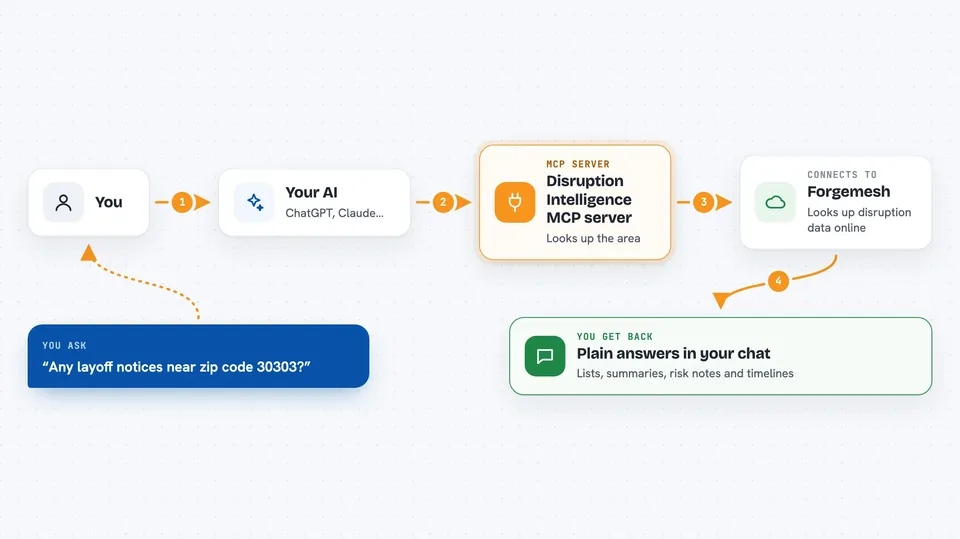
This is a helper that connects your AI assistant to a service called Forgemesh, which gathers commercial disruption data such as layoff notices and company risk signals. It is handy if you work in real estate, commercial leasing, sales or research and you want quick answers about what is happening to businesses in a certain area or industry. You ask your AI a question, and it goes and fetches the information for you.
What is an MCP server? The 30-second version
On its own, your AI can only chat with you using what it already knows. An MCP server is a small helper program that gives your AI a new skill or a connection to an outside service. This one connects your AI to the Forgemesh disruption service, so it can look up layoff notices, company context and local disruption signals when you ask. You do not need to understand how it works inside; you just install it once and your AI can use it.
What this MCP server does
You ask your AI something like which companies near a certain zip code have had layoff notices lately. Your AI passes that question to this helper, which talks to the Forgemesh service over the internet. The service looks up the data and sends back an answer. Your AI then shows you the result in the chat, in plain words. Some lookups are free, and some cost a small amount, so the helper will sometimes come back and tell you a payment is needed before it can finish.
 Click to zoom
What you can do with it
- Check whether the Forgemesh service is up and running
- Look up layoff notices and disruption signals for a zip code
- Search for background information about a company
- Get a risk summary for a specific company
- See the severity and timeline of a disruption event
- Get a short report on disruption signals for a topic or area
- See which spending categories are affected downstream of a signal
Try asking your AI
- “What disruption signals are showing up around zip code 30303?”
- “Search for company context on a business called Acme Logistics”
- “Give me a risk summary for company ID 4821”
- “Show me the timeline for event ID 992”
What it gives back to you
You get back plain answers in the chat: lists of signals, short summaries, risk notes, severity levels, timelines and small reports. Free lookups return counts and pricing hints, while paid ones return the fuller picture such as signal summaries and affected spending categories. When a payment is needed, you get clear instructions instead of an error. Everything shows up as text you can read and copy.
Before you start
What you need
- The Claude desktop app or another app that supports MCP servers
- Node.js installed on your computer (the free software that runs this helper)
- An internet connection to reach the Forgemesh service
Good to know
Some lookups cost money (from $0.01 up to $0.25 each), and this helper does not pay for them itself, so you will need a separate wallet or payment tool to settle those charges.
Install it with your AI
Add Disruption Intelligence MCP server to your AI, no technical skills needed
You don't install anything by hand. You copy one prompt, paste it into an AI that can work on your computer, and it checks, installs and connects the server for you, asking you when it needs something.
Sign in to get the install prompt
Members get a ready-made prompt that lets the Claude desktop app check Disruption Intelligence MCP server, install it and connect it for them, step by step. You don't need any technical skills: you copy, paste and answer a few questions. Your connected AI can also find and install any of the 4,361 MCP servers here for you.
Who it's for
Real estate agents, commercial leasing teams, sales researchers and analysts who want quick disruption and layoff context for a company or area.