
MCP server · Research
Travel Assistant MCP server
Lets your AI look up airports, compare routes, explain travel timing, and build booking links for you.
This is a small helper that gives your AI travel skills. It can look up airports, compare different routes, explain when to book and when to arrive, and build links to booking sites. It is handy if you plan trips and want quick answers without opening five browser tabs.
What is an MCP server? The 30-second version
On its own, your AI can only chat. An MCP server is a small helper program that gives your AI a new skill or a connection to a service. This one connects your AI to travel search information, so it can look up airports and compare routes for you. You just ask in normal words, and the helper does the looking up.
What this MCP server does
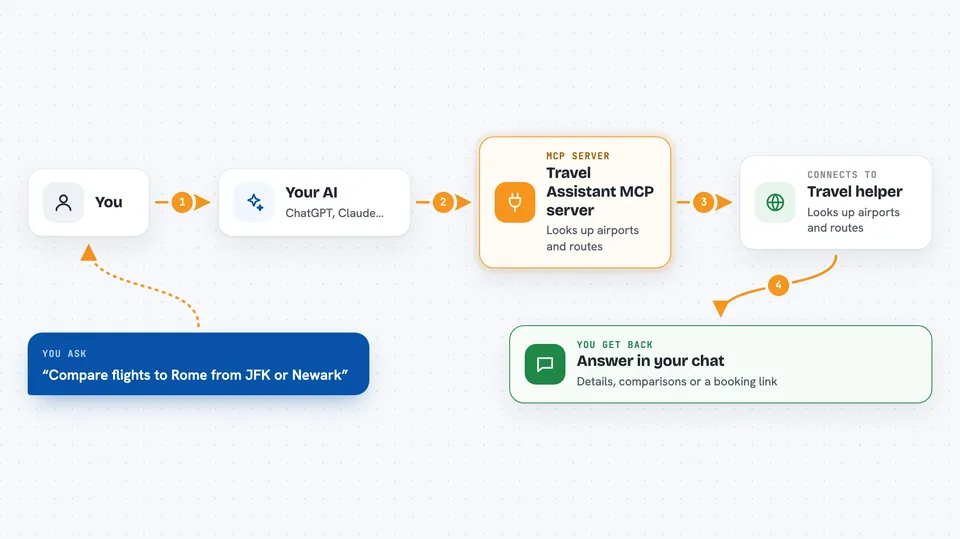
You ask your AI something like which airports are near a city, or whether it is cheaper to fly from a different airport. Your AI passes that question to this helper. The helper looks up airport details, compares routes, explains travel timing, and can build a link to a booking site. Then your AI tells you the answer in the chat, in plain words.
 Click to zoom
What you can do with it
- Look up an airport by its three-letter code
- Compare routes from different nearby airports
- Explain when to book and when to arrive at the airport
- Explain layovers and seasonal travel factors
- Build an external booking link for a route you picked
- Show which links may earn a commission
Try asking your AI
- “What airport code is used for Lisbon?”
- “Compare flying to Rome from JFK versus Newark next month.”
- “How early should I get to the airport for an international flight?”
- “Build me a booking link for a flight from Boston to Dublin.”
What it gives back to you
You get answers in the chat: airport details, a side by side comparison of routes, short explanations about timing, or a link you can click to continue booking. The link goes to an outside booking partner, not to this helper. Some links are marked as commission eligible.
Before you start
What you need
- Node.js installed on your computer
- The Claude desktop app or another AI app that supports MCP servers
Good to know
The README itself says not to use this repo and points to another file, so check the project page first; also, booking links may earn a commission and the actual booking happens on an outside site.
Install it with your AI
Add Travel Assistant MCP server to your AI, no technical skills needed
You don't install anything by hand. You copy one prompt, paste it into an AI that can work on your computer, and it checks, installs and connects the server for you, asking you when it needs something.
Sign in to get the install prompt
Members get a ready-made prompt that lets the Claude desktop app check Travel Assistant MCP server, install it and connect it for them, step by step. You don't need any technical skills: you copy, paste and answer a few questions. Your connected AI can also find and install any of the 4,609 MCP servers here for you.
Who it's for
Anyone who plans trips and wants quick travel answers without juggling multiple websites, especially frequent flyers and travel planners.




