
MCP server · Research
AI Skill Store MCP server
by garasegae
Lets your AI search a marketplace of ready-made skills and install the ones you need.
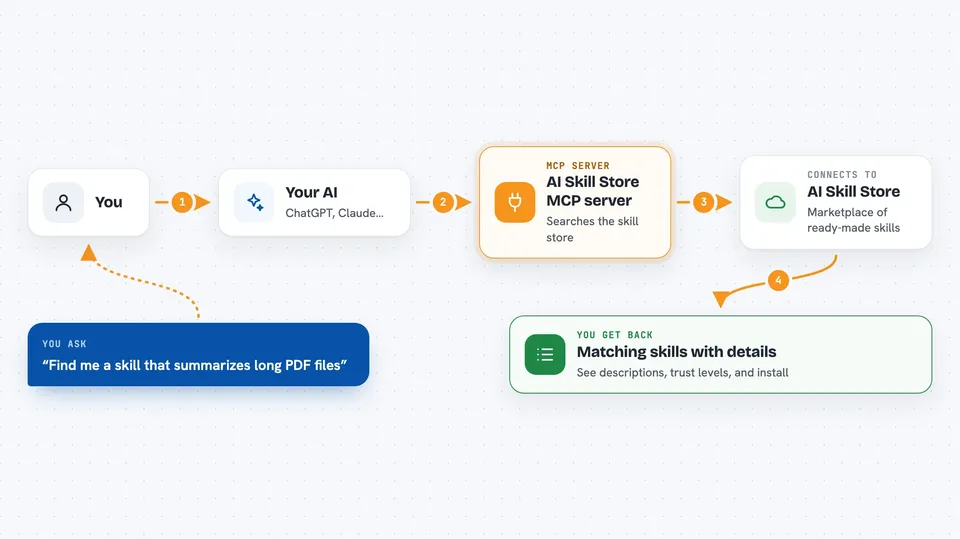
AI Skill Store is an online shop for small add-on skills that AI assistants can use. This MCP server is the doorway that lets your AI walk into that shop, look around, and bring back a skill for you. It is handy if you keep asking your AI to do the same kinds of tasks and want it to pick up new abilities without you hunting for them yourself.
What is an MCP server? The 30-second version
On its own, your AI can only chat with you. An MCP server is a small helper program that gives your AI one extra skill or one extra connection. This one connects your AI to AI Skill Store, a marketplace of ready-made skills. When you ask for something, your AI can reach through this helper into the store, look up a skill, and bring it back to use.
What this MCP server does
You ask your AI for something, like finding a skill that reads spreadsheets. Your AI uses this helper to search the AI Skill Store by keyword or category. The store sends back a list of matching skills, each with a short description and a trust level. Your AI can then look at the full details of one skill, check whether it fits your setup, and download it for you. You end up with the skill installed or a clear summary of what is available.
 Click to zoom
What you can do with it
- Search the skill store by keyword, category, or capability
- Read the full details and schema of a skill before installing it
- Check whether a skill works with your platform
- Download a skill package built for your platform
- Browse the list of categories and supported platforms
- Read community reviews of a skill
- See which skills people keep asking for but nobody has built yet
Try asking your AI
- “Find me a skill that summarizes long PDF files”
- “Show me the full details of that skill before I install it”
- “Does that skill work with Claude Code?”
- “What skills are people asking for that nobody has made yet?”
What it gives back to you
You get back a list of matching skills with short descriptions, trust levels, and links, shown right in your chat. If you ask for one skill, you get its full details, including what it needs to run. When you install something, your AI tells you which package it downloaded and where it went. Reviews and category lists come back as simple text you can read.
Before you start
What you need
- An AI assistant that can connect to MCP servers, like Claude Desktop or Cursor
- An internet connection, since this server talks to aislillstore.io
Good to know
Installing a skill means your AI will run code someone else wrote, so stick to skills marked verified unless you trust the source.
Install it with your AI
Add AI Skill Store MCP server to your AI, no technical skills needed
You don't install anything by hand. You copy one prompt, paste it into an AI that can work on your computer, and it checks, installs and connects the server for you, asking you when it needs something.
Sign in to get the install prompt
Members get a ready-made prompt that lets the Claude desktop app check AI Skill Store MCP server, install it and connect it for them, step by step. You don't need any technical skills: you copy, paste and answer a few questions. Your connected AI can also find and install any of the 4,609 MCP servers here for you.
Who it's for
Anyone who uses an AI assistant daily and wants it to pick up new ready-made skills without searching for them by hand.


