
MCP server · Developer tools
Gavel MCP server
by gavelcode
Lets your AI check its own code changes against your Bazel monorepo's quality rules before you commit.
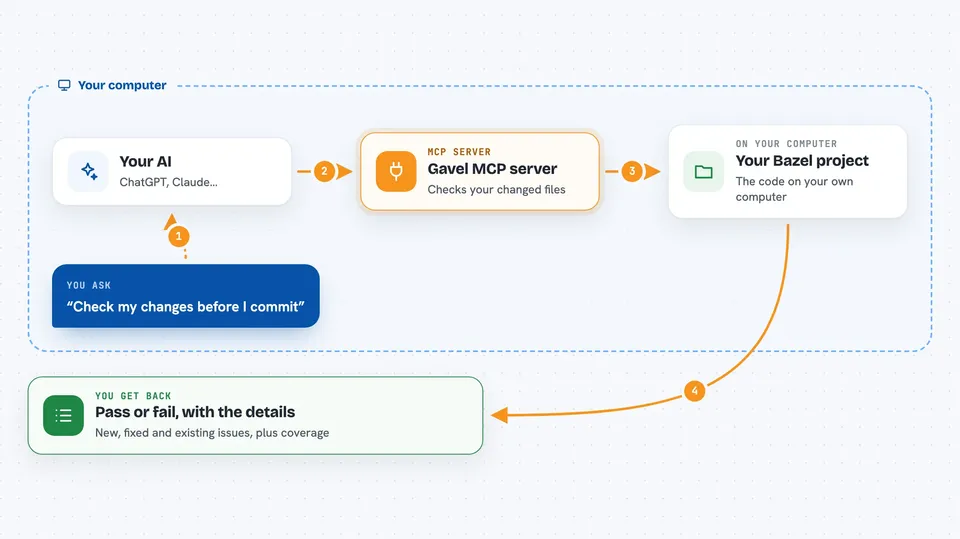
Gavel is a code-quality checker for big Bazel projects. It looks at the code you just changed and tells you if it broke any of your team's rules for lint, test coverage, or code structure. It is handy if you work in a large codebase and want your AI assistant to catch problems while it writes, not later in the build.
What is an MCP server? The 30-second version
On its own, your AI can only chat. An MCP server is a small helper program that gives your AI a new skill or a connection to another tool. This one connects your AI to Gavel, the quality gate for your Bazel project. Once connected, your AI can ask Gavel to check code and get a pass or fail answer back, right inside the conversation.
What this MCP server does
You ask your AI to check some code or a change you just made. The AI calls this helper, which runs Gavel's checks on your Bazel project. Gavel looks only at the files and targets that changed, compares them to a saved baseline, and decides if anything new broke the rules. It sends back a verdict with the details, and your AI shows you the result in the chat.
 Click to zoom
What you can do with it
- Run the full quality gate and get a pass or fail verdict
- Lint a single file and see the findings
- List new, fixed, and existing code issues
- Check test coverage numbers and the trend
- Check for architecture rule violations
- See only the findings caused by your latest change
Try asking your AI
- “Judge my current changes and tell me if the quality gate passes”
- “Lint the file I just edited and show me any new problems”
- “What is the coverage for the payments project right now”
- “Are there any new architecture violations in my change”
What it gives back to you
You get a verdict back: PASS or FAIL, plus a short reason. Along with it come lists of findings marked as new, fixed, or existing, coverage percentages with the change since last time, and any architecture problems. Your AI shows this as a summary in the chat, and you can ask follow-up questions about any item.
Before you start
What you need
- A Bazel monorepo using Bazel 8.0 or newer with bzlmod
- Gavel installed (Homebrew or the install script)
- A gavel.yaml config file in your repo (gavel init creates one)
Good to know
Gavel only reads and analyzes your code; it does not change or delete files, but it does run analysis tools on your project which can take a moment on large repos.
Install it with your AI
Add Gavel MCP server to your AI, no technical skills needed
You don't install anything by hand. You copy one prompt, paste it into an AI that can work on your computer, and it checks, installs and connects the server for you, asking you when it needs something.
Sign in to get the install prompt
Members get a ready-made prompt that lets the Claude desktop app check Gavel MCP server, install it and connect it for them, step by step. You don't need any technical skills: you copy, paste and answer a few questions. Your connected AI can also find and install any of the 4,609 MCP servers here for you.
Who it's for
Developers and teams working in large Bazel monorepos who want their AI coding assistant to respect the project's quality rules.




