
MCP server · Finance and crypto
CashPilot MCP server
by GeiserX
Let your AI check your CashPilot earnings, services, and fleet workers, and start or stop services for you.
This is a small helper that connects your AI assistant to your own CashPilot setup. CashPilot is a tool people use to run bandwidth-sharing services that earn a bit of passive income. If you already run CashPilot and want to ask your AI about your earnings or your services in plain words, this is for you.
What is an MCP server? The 30-second version
On its own, your AI can only chat. An MCP server is a small helper program that gives your AI a new skill or a connection to an app. This helper connects your AI to your own CashPilot instance, so it can look up your earnings and service status, or start and stop services when you ask. You stay in the chat, and the helper does the talking to CashPilot behind the scenes.
What this MCP server does
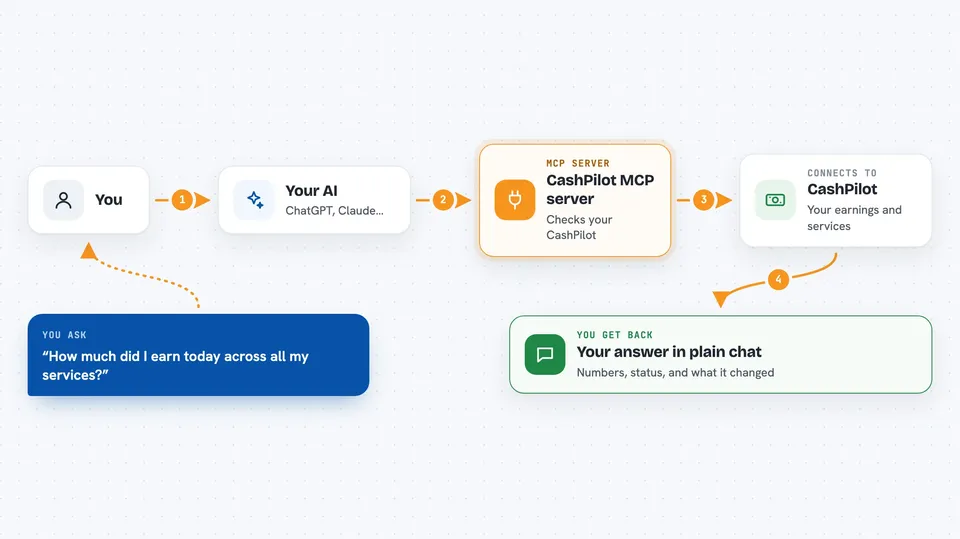
You ask your AI something like how much you earned today or whether a service is running. The AI passes that question to this helper. The helper talks to your CashPilot instance using your admin key. CashPilot sends back the numbers or the status, and the AI explains the answer to you in the chat. If you ask it to, it can also start, stop, restart, deploy, or remove a service.
 Click to zoom
What you can do with it
- Check your earnings summary for today or over time
- See which sharing services are deployed and how they are doing
- Look at the catalog of available services
- Check the status of your fleet and its workers
- Read a service's logs
- Start, stop, or restart a service
- Deploy a new service or remove one
- Trigger an earnings collection across all services now
Try asking your AI
- “How much did I earn today across all my services?”
- “Which of my services are currently running?”
- “Show me the logs for my storage service”
- “Restart the service that looks unhealthy”
- “What is my fleet health score right now?”
What it gives back to you
You get answers in plain language in the chat: earnings numbers, lists of services, status summaries, health scores, and log excerpts. If you ask it to change something, like restarting a service, it tells you what it did. It can also hand back a service's Docker Compose definition if you ask for it.
Before you start
What you need
- Your own CashPilot instance running and reachable
- The CashPilot admin API key (not the fleet key)
- An MCP client like Claude Desktop, Claude Code, or Cursor
- Node.js if you want to run it with npx, or Docker if you prefer the container
Good to know
It can start, stop, deploy, and remove your services, so be careful when asking it to make changes, and keep your admin API key private.
Install it with your AI
Add CashPilot MCP server to your AI, no technical skills needed
You don't install anything by hand. You copy one prompt, paste it into an AI that can work on your computer, and it checks, installs and connects the server for you, asking you when it needs something.
Sign in to get the install prompt
Members get a ready-made prompt that lets the Claude desktop app check CashPilot MCP server, install it and connect it for them, step by step. You don't need any technical skills: you copy, paste and answer a few questions. Your connected AI can also find and install any of the 4,609 MCP servers here for you.
Who it's for
People who already run CashPilot and want to check earnings and manage their sharing services by just chatting with their AI.



