MCP server · Research
Tarot MCP server
by gokimedia
Ask your AI for tarot card meanings, random draws, three-card spreads, and yes or no answers.
This is a small helper that gives your AI assistant a full tarot deck to work with. It knows all 78 cards, both upright and reversed, plus love and career meanings. It is handy if you enjoy tarot for fun, journaling, or thinking through a decision.
What is an MCP server? The 30-second version
On its own, your AI can only chat with you using what it already knows. An MCP server is a small helper program that gives your AI a new skill or a connection to something outside the chat. This one connects your AI to a tarot card database, so it can look up meanings and draw cards for you. You just ask in normal words, and the AI uses this helper behind the scenes.
What this MCP server does
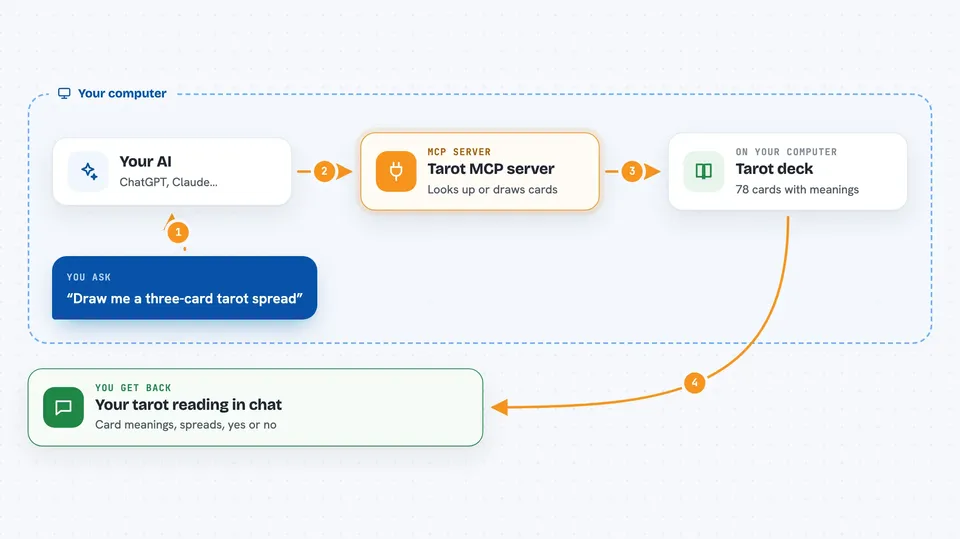
You ask your AI something like what does The Fool mean reversed, or draw me a three-card spread. The AI passes your question to this helper program. The helper looks up the card or draws random cards from the full 78-card deck, and pulls the meaning text that goes with each one. Then your AI writes the answer back to you in the chat, in plain language. Every answer also includes a link to a longer guide on the Deckaura website.
 Click to zoom
What you can do with it
- Look up the meaning of any of the 78 tarot cards
- See upright and reversed interpretations for a card
- Get love or career focused meanings for a card
- Draw a single random card, with or without reversals
- Get a Past, Present, Future three-card spread
- Ask a yes or no question and get a verdict
- List the whole deck of cards
Try asking your AI
- “Draw me a three-card tarot spread about my new project”
- “What does The Fool mean reversed?”
- “Yes or no: should I take the job?”
- “Give me a random card for today and explain it”
What it gives back to you
You get text answers in the chat: card names, their upright and reversed meanings, love and career notes, or a yes or no verdict. A three-card spread comes back as three cards with a short reading for each position. Each answer also includes a link to the full guide on deckaura.com. Nothing is saved anywhere, it is just a reply in your conversation.
Before you start
What you need
- Node.js installed on your computer (the free program that runs this helper)
- An MCP-compatible app such as Claude Desktop, Cursor, Windsurf, Cline, or Zed
Good to know
This is for fun and reflection, not real advice, so do not treat a tarot answer as a fact or a professional opinion.
Install it with your AI
Add Tarot MCP server to your AI, no technical skills needed
You don't install anything by hand. You copy one prompt, paste it into an AI that can work on your computer, and it checks, installs and connects the server for you, asking you when it needs something.
Sign in to get the install prompt
Members get a ready-made prompt that lets the Claude desktop app check Tarot MCP server, install it and connect it for them, step by step. You don't need any technical skills: you copy, paste and answer a few questions. Your connected AI can also find and install any of the 4,361 MCP servers here for you.
Who it's for
Anyone who enjoys tarot for fun, reflection, or journaling and already chats with an AI assistant.