
MCP server · Finance and crypto
SODAX Builders MCP server
by gosodax
Lets your AI look up SODAX cross-chain swap, lending, solver, and intent data plus its SDK docs.
This is a helper for people building on SODAX, a system for moving tokens and money across many blockchain networks. Once connected, your AI assistant can pull live data about swaps, lending rates, solver activity, and intent history, and read the SODAX developer documentation. It is most useful if you write code or follow crypto projects and want answers without jumping between websites.
What is an MCP server? The 30-second version
On its own, your AI can only chat with you using what it already learned. An MCP server is a small helper program that gives your AI a new skill or a connection to an app or service. This one connects your AI to SODAX, so it can look things up there and bring the answers back to you. You just ask in normal words, and the AI uses this helper behind the scenes.
What this MCP server does
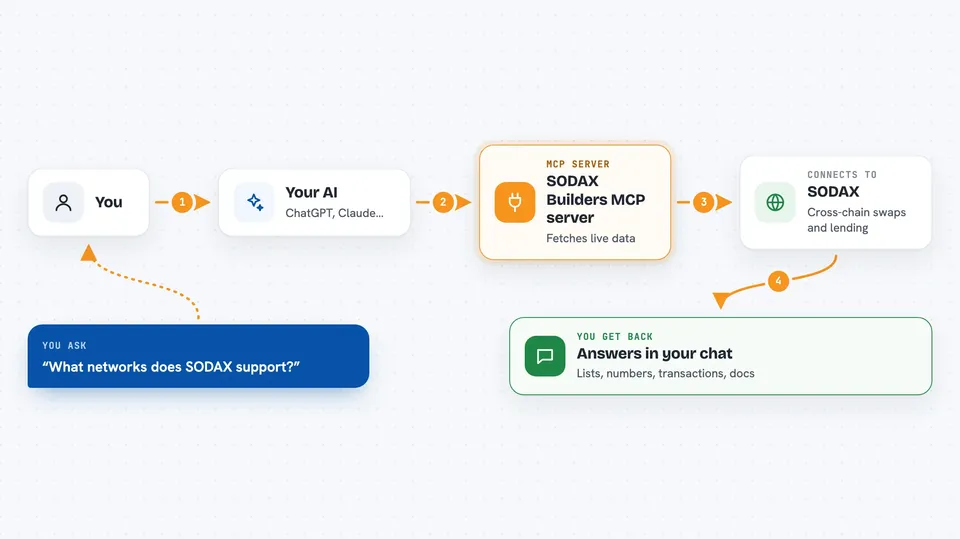
You ask your AI a question, like what networks SODAX supports or what a wallet's intent history looks like. The AI sends that request to this helper, which talks to SODAX's live data services and documentation. SODAX sends back the details, such as token lists, rates, volume numbers, or doc pages. The AI then explains it to you in the chat. Some tools can also submit a transaction to the relay or refresh cached data.
 Click to zoom
What you can do with it
- List the blockchain networks SODAX supports for cross-chain swaps
- Look up available swap tokens, optionally filtered by network
- Check solver volume, orderbook entries, and oracle prices
- Look up an intent or transaction by its hash or a wallet address
- See money market lending and borrowing rates and positions
- Search the SODAX cross-chain SDK documentation and code examples
- Track cross-chain relay packets for a source transaction
Try asking your AI
- “What networks does SODAX support for cross-chain swaps?”
- “Show me cross-network solver volume for today”
- “What are the lending rates on SODAX money market?”
- “How do I integrate cross-chain swaps with the SODAX SDK?”
What it gives back to you
You get answers in the chat: lists of networks or tokens, numbers like volume or rates, details about a specific transaction or intent, or text pulled from the documentation. Some tools return structured data such as orderbook entries or oracle prices for each chain and token pair. If you ask it to submit a transaction or refresh the cache, it will report what it did.
Before you start
What you need
- An AI assistant that supports MCP servers, such as Claude, Cursor, VS Code, Windsurf, or ChatGPT
- The MCP server URL from the README (no account or key needed for the hosted version)
Good to know
Some tools can submit a transaction to the relay or refresh cached data, so double-check anything that changes state before you confirm it.
Install it with your AI
Add SODAX Builders MCP server to your AI, no technical skills needed
You don't install anything by hand. You copy one prompt, paste it into an AI that can work on your computer, and it checks, installs and connects the server for you, asking you when it needs something.
Sign in to get the install prompt
Members get a ready-made prompt that lets the Claude desktop app check SODAX Builders MCP server, install it and connect it for them, step by step. You don't need any technical skills: you copy, paste and answer a few questions. Your connected AI can also find and install any of the 4,609 MCP servers here for you.
Who it's for
Developers and technically curious people building or following cross-chain DeFi projects on SODAX.



